Go to QNAP AppCenter, and stop the PMS, followed by starting it again…
Does that changes things?
/T
Go to QNAP AppCenter, and stop the PMS, followed by starting it again…
Does that changes things?
/T
Not really 
I’m now balancing your great help with having supper (2116 here in the UK)
Guess above pic was not what you wanted to paste 
And do eat, and then return here when done, but know, that I’m one hour ahead of you, and workday tomorrow, so don’t be too late here
Thank you. I assumed you were in the US.
The above was what the system reported after stopping and starting the app again as per your suggestion.
And server still unavailable.
Huh…That was when browsing to 192.168.1.22:32400/web ?
And kinda thought that my forum user name dane22 would give away my nationality here
I was wondering about your name 
Browsing to 192.168.1.22/32400/2web still gives me this:
C’mon Plex Ninja, you can do it!
Okay, and now for the tricky part here, since your workstation is a Mac, and I haven’t got a Mac, so guessing here, but try this:
Open a terminal on a Mac, and type:
ssh admin@IP_OF_QNAP
If on Windows, use putty
Then type:
$(getcfg -f /etc/config/qpkg.conf PlexMediaServer Install_path)/plex.sh stop
Then type:
rm "$(getcfg -f /etc/config/qpkg.conf PlexMediaServer Install_path)/Library/Plex Media Server/plexmediaserver.pid"
Then type:
$(getcfg -f /etc/config/qpkg.conf PlexMediaServer Install_path)/plex.sh start
After above, paste a screenshot of the terminal window, as well as try and access Plex again
And STRONGLY suggest that you copy/paste the commands above into your terminal window to avoid type errors
And if SSH(Putty) Connection is refused, then make sure that SSH is enabled on your QNAP
/T
Thanks: on it.
Bugger me! It’s back!!!
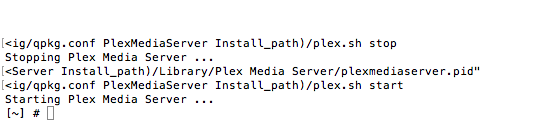
What part of this do I need to repeat when I get a power failure again? All of this terminal stuff?
You are the Plex Ninja! Thank you sooo much - I’m having Danish bacon sandwiches for lunch tomorrow in your name.
LOL, and yes, all the SSH commands
/T
I have no idea if you are a boy or a girl, but I LOVE you!
Old fart, and male
That’s me, what about you?
Again, thank you. I have saved those SSH commands. Sleep well.
And I bet, that a future version will alert users in the QNAP Web Interface if above happens again, so they know what to do 
Dream on! Not sure how QNAP could make things any more complicated for the average moron like me. However, their kit seems solid and good.
@jmaas28 said:
Dream on! Not sure how QNAP could make things any more complicated for the average moron like me. However, their kit seems solid and good.
Actually, I more or less wrote the new startup script 
And as said, when a power failure happens, then normal cleanup procedures doesn’t take place, you you can hardly blame neither Plex nor QNAP for that, only your self for not having an UPS, or?
I agree with that. Never said it was anyone’s fault other than mine. My wife is going to love having a big shiny whirring UPS in the kitchen next to my NAS, 8TB USB back-up drive, expansion enclosure, time capsule, router and modem.
LOL, and sales pitch is: “Without it, we could loose all the home videos/pictures on the QNAP, since the filesystem might break during a power failure”
/T

