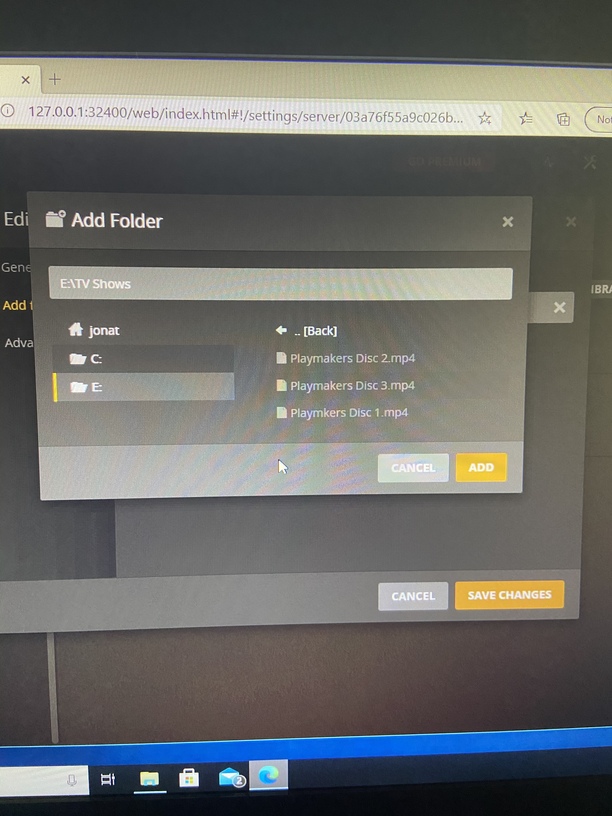
Very new to all this. I am using an older Windows based desktop to run the media server. I bought a seagate external hard drive to store my dvds as I digitize them. The server sees my external drive as E:. However the files on the hard drive do not transfer to the library. I have seen other posts like this but either I didn’t understand them (very likely), or it’s a different issue.
/TV Shows  <-- TV Show library points here.  Directory name does not matter.
  /Playmakers
    /Season 01
      /Playmakers - s01e01 - Game Day.ext  <-- .mp4, .mkv, etc
Ah, yes, I see the TV Shows folder now. You should still use E:\TV Shows\Plsymakers so future videos aren’t in the same folder. You still just add E:\TV Shows
Is it slso a TV Shows library type?
If so it will never work right.
The files appear to be entire DVDs with multiple episodes on each.
You would need to use the Other Videos library type.
Most multi-episode files I’ve run across have chapter markers denoting where the next episode starts.
If you need to re-rip the discs, try MakeMKV. It rips an unaltered copy of the movie/show to your hard drive, saving it as a MKV file.
You can then use MKVToolNix to separate each file into the individual episodes. If chapter markers are not available you can use timestamps instead. See the support article linked below.
Note: MKVToolNix will take a mp4 file as an input. If you do not want to re-rip the discs, use your existing mp4 files and split them at the appropriate points. The output will be a MKV file. There’s probably a tool somewhere to split mp4 files, but I’m not aware of one.
After splitting the file, you can transcode it to another format, container, etc with Handbrake or similar tools if needed.