[FFMPEG] - moov atom not found

Server Version#:1.21.1.3830
Player Version#:4.47.3

I thought ‘Web Optimized’ was the answer but not so lucky. I am using MacX DVD Ripper Pro and I tried both mp4 and mkv with mkv I ran through HandBrake both with ‘Web Optimized’ and not. The odd thing is that some which were working before are not now. For example, the first 7 seasons on Seinfeld worked but not now even though the original mp4 files were used.

I added 3 seasons of Mad About You and it is even worse because even the thumbnail does not appear.

I am running my NAS and Plex servers on Pi4 4 GB using NFS and all connections seem to be working there. My client is Chrome on Mac

My server is

Screen Shot 2020-12-29 at 11.56.18 AM

and some recent logs are

(File removed)
(File removed)
(File removed)
(File removed)

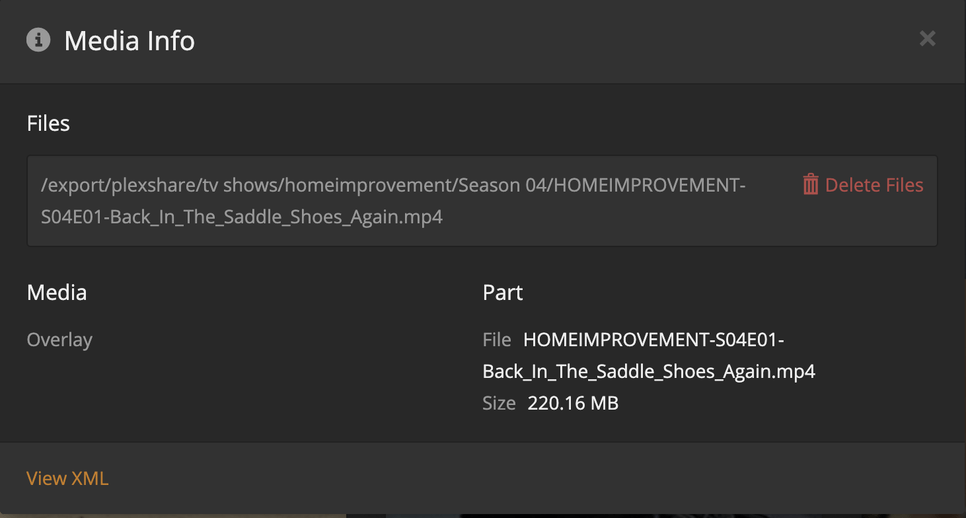
The Info on the shows that do not work is

The metadata is BAD BAD

Those that work

The error when playing is

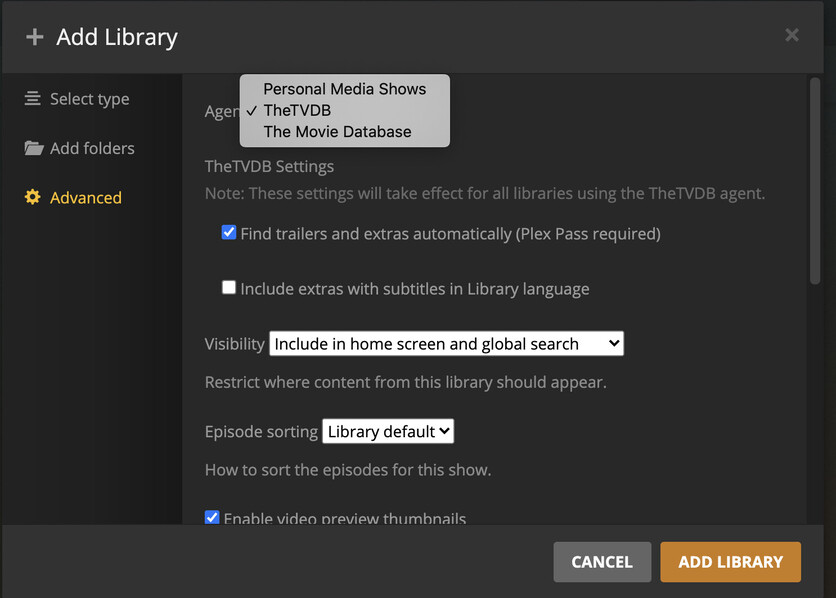
Advanced in Add > folders is

I should have expected

I have gone through this before at

and

https://forums.plex.tv/t/1-21-1-3850-does-not-change-advanced-selection/668177

For some reason I think that the new version of plex server is not coming through otherwise I may expect to have different scanning and a different result.

Help please, there is nothing else I think I can try. I have seen a write up on

but don’t want to go there unless I have more information because I don’t understand it.

I’m at the end of my rope.

Make certain the drive where the metadata lives, which is also where the codecs live, is mounted with the exec option.

Codecs are shared libraries and require “execute” permission to be loaded into memory.

Also, not entirely certain the codec has been downloaded.
The network adapter is constantly changing state (up / down – as if the connector is faulty / loose -OR- DHCP is constantly refreshing the IP address)

The logs are filled with:

ec 28, 2020 23:30:01.904 [0xabcfb430] DEBUG - NetworkInterface: Notified of network changed (force=0)
Dec 28, 2020 23:30:01.905 [0xabcfb430] DEBUG - Network change notification but nothing changed.
Dec 28, 2020 23:30:08.234 [0xb16fe430] DEBUG - Completed: [192.168.0.230:60941] 200 GET /player/proxy/poll?deviceClass=pc&protocolVersion=3&protocolCapabilities=timeline%2Cplayback%2Cnavigation%2Cmirror%2Cplayqueues&timeout=1 (5 live) TLS GZIP 20001ms 5 bytes (pipelined: 17)
Dec 28, 2020 23:30:08.305 [0xb1eff430] DEBUG - Auth: authenticated user 1 as umbach.mark@gmail.com
Dec 28, 2020 23:30:08.305 [0xa44ec430] DEBUG - Request: [192.168.0.230:60941 (Subnet)] GET /player/proxy/poll?deviceClass=pc&protocolVersion=3&protocolCapabilities=timeline%2Cplayback%2Cnavigation%2Cmirror%2Cplayqueues&timeout=1 (5 live) TLS GZIP Signed-in Token (umbach.mark@gmail.com)
Dec 28, 2020 23:30:08.305 [0xa44ec430] DEBUG - Content-Length is -1 (of total: -1).
Dec 28, 2020 23:30:09.750 [0xabcfb430] DEBUG - NetworkInterface: received Netlink message len=56, type=RTM_NEWLINK, flags=0x0
Dec 28, 2020 23:30:09.750 [0xabcfb430] DEBUG - NetworkInterface: Netlink information message family=0, type=1, index=3, flags=0x1003, change=0x0
Dec 28, 2020 23:30:09.750 [0xabcfb430] DEBUG - Network change.
Dec 28, 2020 23:30:09.750 [0xabcfb430] DEBUG - NetworkInterface: Notified of network changed (force=0)
Dec 28, 2020 23:30:09.751 [0xabcfb430] DEBUG - Network change notification but nothing changed.
Dec 28, 2020 23:30:17.591 [0xabcfb430] DEBUG - NetworkInterface: received Netlink message len=56, type=RTM_NEWLINK, flags=0x0
Dec 28, 2020 23:30:17.591 [0xabcfb430] DEBUG - NetworkInterface: Netlink information message family=0, type=1, index=3, flags=0x1003, change=0x0
Dec 28, 2020 23:30:17.591 [0xabcfb430] DEBUG - Network change.
Dec 28, 2020 23:30:17.591 [0xabcfb430] DEBUG - NetworkInterface: Notified of network changed (force=0)
Dec 28, 2020 23:30:17.592 [0xabcfb430] DEBUG - Network change notification but nothing changed.
Dec 28, 2020 23:30:25.436 [0xabcfb430] DEBUG - NetworkInterface: received Netlink message len=56, type=RTM_NEWLINK, flags=0x0
Dec 28, 2020 23:30:25.436 [0xabcfb430] DEBUG - NetworkInterface: Netlink information message family=0, type=1, index=3, flags=0x1003, change=0x0
Dec 28, 2020 23:30:25.436 [0xabcfb430] DEBUG - Network change.
Dec 28, 2020 23:30:25.436 [0xabcfb430] DEBUG - NetworkInterface: Notified of network changed (force=0)
Dec 28, 2020 23:30:25.438 [0xabcfb430] DEBUG - Network change notification but nothing changed.
Dec 28, 2020 23:30:28.306 [0xb16fe430] DEBUG - Completed: [192.168.0.230:60941] 200 GET /player/proxy/poll?deviceClass=pc&protocolVersion=3&protocolCapabilities=timeline%2Cplayback%2Cnavigation%2Cmirror%2Cplayqueues&timeout=1 (4 live) TLS GZIP 20001ms 5 bytes (pipelined: 18)
Dec 28, 2020 23:30:28.383 [0xb1eff430] DEBUG - Auth: authenticated user 1 as umbach.mark@gmail.com
Dec 28, 2020 23:30:28.384 [0xa44ec430] DEBUG - Request: [192.168.0.230:60941 (Subnet)] GET /player/proxy/poll?deviceClass=pc&protocolVersion=3&protocolCapabilities=timeline%2Cplayback%2Cnavigation%2Cmirror%2Cplayqueues&timeout=1 (4 live) TLS GZIP Signed-in Token (umbach.mark@gmail.com)
Dec 28, 2020 23:30:28.384 [0xa44ec430] DEBUG - Content-Length is -1 (of total: -1).```

Thanks for the reply

I checked all connections local (on my desktop) on the servers and the repository and everything appeared fine. I have heard this before but I can’t find anything. Note that since the repository is on a NAS this goes through a switch. All IP addresses are static. Could something be wrong there?

On the NAS server 192.168.0.226

My fstab entry

PARTUUID=bd6ee579-01 /media/plex ext4 rw,suid,dev,exec,noauto,nouser,async 0 0

the exports entry is

/media 192.168.0.0(rw,insecure,no_subtree_check,async,no_root_squash)
/media/plex 192.168.0.228(rw,insecure,no_subtree_check,async,no_root_squash)

then sudo mount /dev/sda1 /media/plex and sudo exportfs -ra

on the plex server 192.168.0.228

pi@plex:/media/plex1/tv shows/madaboutyou/Season 1 $ showmount -e 192.168.0.226
Export list for 192.168.0.226:
/media/plex1 192.168.0.228,192.168.0.212
/media/plex 192.168.0.228,192.168.0.212
/media 192.168.0.0

and then this is mounted on plex

sudo mount -t nfs -o proto=tcp,port=2049 192.168.0.226:/media/plex /media/plex

pi@plex:/media/plex1/tv shows/madaboutyou/Season 1 $ df
Filesystem 1K-blocks Used Available Use% Mounted on
/dev/root 30481844 2133452 27077764 8% /
devtmpfs 1827800 0 1827800 0% /dev
tmpfs 1959896 8 1959888 1% /dev/shm
tmpfs 1959896 57668 1902228 3% /run
tmpfs 5120 4 5116 1% /run/lock
tmpfs 1959896 0 1959896 0% /sys/fs/cgroup
/dev/mmcblk0p1 258095 55985 202110 22% /boot
tmpfs 391976 0 391976 0% /run/user/1000
192.168.0.226:/media/plex1 960353408 32692736 878807680 4% /media/plex1
192.168.0.226:/media/plex 960353408 70081024 841419392 8% /media/plex
/dev/sda2 261937152 39368320 222568832 16% /export/thumb

I am kind of headed the same place on
https://forums.plex.tv/t/error-1094995529-invalid-data-found-when-processing-input/663896/2

Is the IP address of the server assigned as

  1. Static
  2. DHCP MAC reservation
  3. Regular DHCP.

As your logs showed, the primary offense is they are in a constant state of flux.

PMS will not be able to download codecs from Plex.tv until they are.

The MOOV atom is related but not until first confirming PMS has codecs.
The MOOV atom reflects on improperly ripped / processed media as much as it reflects on PMS’s inability to properly read the file and find it.

Repository on the NAS is insignificant in this case.

BTW, I can successfully play the ripped videos on my Mac. That would seem to indicate that the ripping is :ok_hand:

I am using the following entry in /etc/dhcpcd.conf for the static IP

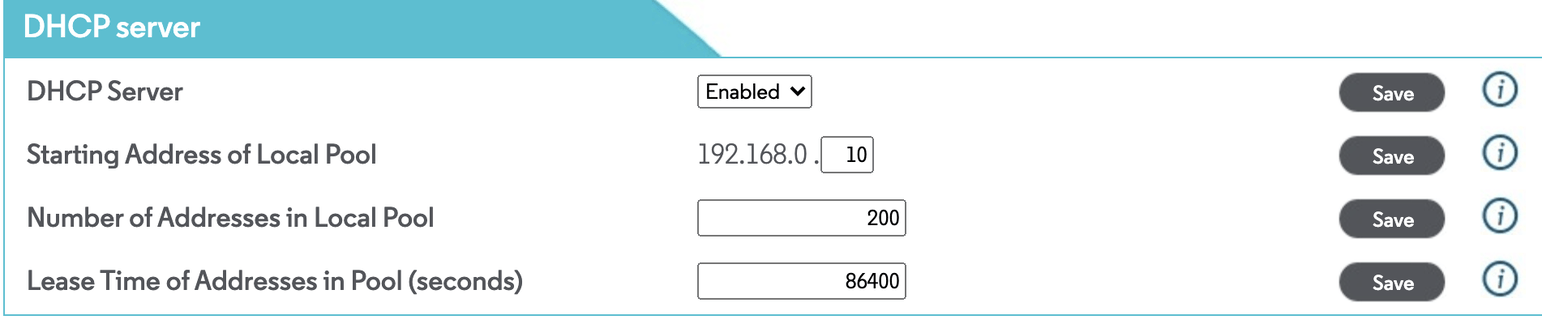
I am blocking some of my addresses from DHCP use as follows

and the static addresses for the NAS and Plex servers are

I can see the static address on the NAS

Screen Shot 2020-12-29 at 2.33.17 PM

These are reproduced on plex server as 192.168.0.228.

Is there something I am doing wrong here with my modem/router?

Do you have any idea why I am not seeing the new scanner/agent selection on my version of the server?

Updated to 1.21.2.3841 and the scanner/agent selection showing up but they still don’t fix anything.

This topic was automatically closed 90 days after the last reply. New replies are no longer allowed.