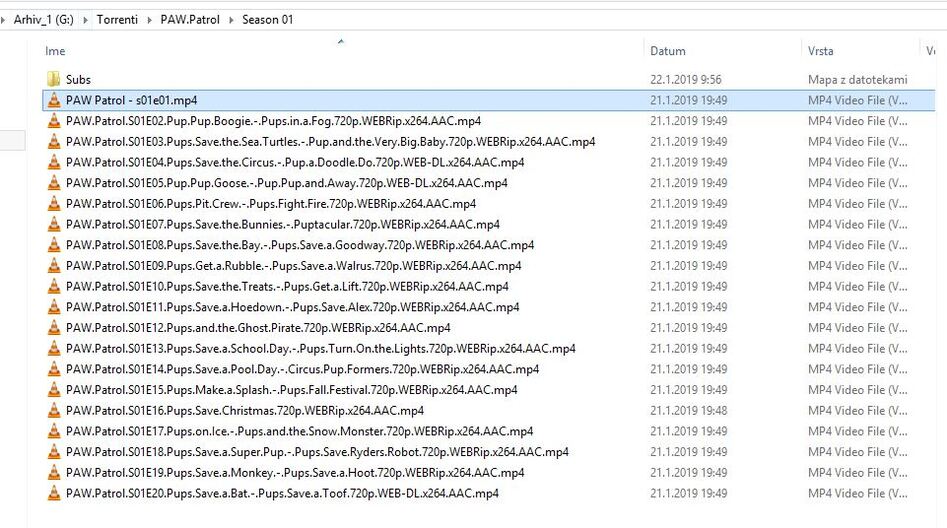
TV Shows .. / Paw Patrol .. .. / Season 01 .. .. .. / Paw Patrol - s01e01.ext ← episode file; ext being the file extension .. .. .. / Paw Patrol - s01e02 - Pups Save A Train.ext ← episode file w/ optional episode title .. .. .. / ...
If you already had the show in Plex, you might need to perform the „Plex dance“ in order to ensure Plex won’t ignore your updated file names as it recognizes the file had already been added.
Plex uses number of properties to identify files… not just the file name. This is supposed to avoid losing e.g. your additions / user ratings / view states when you do minor fixes to a video file. Here this can however „protect“ the wrongly matched show’s from being fixed.
For that to work…
move the show outside of the tv show’s folder
re-scan the library and wait for the process to complete
empty trash for this library
move the files / folders back in place (ideally after completing the naming clean-up)
I was playing with settings in agents, and then they somehow show up…
Now i have another question - why dont they automaticaly sort in collection? I have enabled in settings
You may enabled the Use collection info from The Movie Database metadata agent setting. When enabled (it is disabled by default), that will try to gather collection information from The Movie Database. This may cause many unwanted collections to be automatically created, particularly collections where you only have one item.You can disable Use collection info from The Movie Database in the server metadata agent settings for the “Plex Movie” and “The Movie Database” metadata agents. This will only prevent collections from getting automatically added to items added to your library in the future . It will not remove collections from existing library items.
Most likely due to tags in your MP4 files that Plex read (instead of the naming). Move the local media asset agent to the bottom (don’t turn it off) and you should be good (or just remove the tags from the files).
And don’t use the collection data from the movie db. It is horrendous. Better to create your own collections.
i dont understand them. under moves, there is Personal media, plex movie and the movie database. then, under each of them, there are different agents. why?
sometimes i add some local cartoon, and plex just add some movie that has nothing to do with this cartoon. then i have to repair match…
In there, grab the line ‘Local Media Assets’ with your mouse and drag it downwards, so it ends up being at the bottom of the stack of active agents.
Repeat the same under
Settings - Server - Agents - Shows - TheMovieDatabase
Settings - Server - Agents - Movies - Plex Movie
Settings - Server - Agents - Movies - TheMovieDatabase
Which of the above is used by default in a given library, depends on which agent is set in the properties of the library. Edit your library, go to the ‘Advanced’ tab.
In a library, which shall not match its files to an online metadata agent, you should set
Scanner = ‘Plex Video Files Scanner’
Agent = ‘Personal Media’
After doing that, the library will be sorted under ‘Other Videos’.
This agent assignment can still be overridden on a per-item basis by using the ‘Match/Fix Incorrect Match’ command.