I tried that then after a while video froze then moved then froze and so on with audio continuing to work. WTF? Live TV is obviously not ready. How can they sell this based on live tv feature?
Still having the same issue. Only on Firesticks. Made sure Plex server was up to date as well as Firestick. Working fine on Roku, IOS App.
The versions of my server and app are all up to date and the video has held and not crashed. Maybe this will help someone out there, hope it does. Sorry to those it didn’t help.
As has been reiterated many many times, disabling transcoding is a workaround, not a fix. For many of us, it causes audio sync issues on SD channels. It is not helpful. Plex should be able to transcode.
1 Like
@nakat0mi @daioio
Open your Plex Now Playing Dashboard in a browser before tuning to Live TV on the Fire Stick 4k. If your channel doesn’t show up in the dashboard it will likely time out in about 3 minutes or so. If it does show up, it will probably not crash. I noticed if it does not show up in the dashboard you can switch to a different channel and then back and it will show up and be fine. It seems to be happening mostly on the first channel I tune to. This is not a fix but maybe it will help Plex track down this bug.
When I attempt to switch to another channel, the live feed stops and kicks back to the guide. This is a POS! Also unable to record in the firestick client, but can in Windows 10.
Thanks, I’ll give that a shot
Plex Client FireTV Stick 4K Log.txt (1.0 MB) Mine is doing the same thing.
Windows 10
Plex Server - Version 1.21.1.3830
Plex Client - Installed yesterday on FireTV Stick 4K
(File removed)
1 Like
@rmoran99
It looks like you are having the same exact error logs as I am.
PMS times out the live tv session for no reason:
Dec 21, 2020 08:31:19.719 [29312] DEBUG - Subscription: Timing out idle sub with id 132 for session f494695baba26218-com-plexapp-android
Then the Fire Stick 4k can’t find the session in PMS and bombs out:
12-21 08:31:20.626 i: [FFmpeg] [WARN] [https @ 0x6c092f00] HTTP error 404 Not Found
@daioio
Do you have any updates on this?
Thanks
I have also tested this on FireTV Cube. I am
playing the SAME station on both FireTV 4K and Cube and the 4K times out and does not show up in preview mode on the server Dashboard. The Cube shows up and does not error out. Setting are identical on Cube and 4K stick.
I can change the station on FireTV 4K and it plays for 3 minutes and then stops. Ugh
@daioio any update?
Blockquote
What type of FireStick are you having the issue with? I only have the issue so far in FireTV Stick 4K. My FireCube doesn’t have this issue. Curious if it’s common in certain devices
What FireTV do you use? I can reproduce this problem in FireTV 4K Stick but not in my FireTV Cube.
If the firestick decides to work, eventually sound will be out of sync (even on windows 10 client). Then a freeze or 2 and then just goes haywire.
Hi @daioio,
I used WireShark to do a comparison of the packets received from the latest version of Plex on FireStick 4k and an older version that I know works (8.5.2.20133).
The old version is sending out the following HTTP requests to the server exactly every 10 seconds while playing. The new version is not sending them at all, this must be what is causing the Plex server to time out and kill the transcode.
Can you look into why the Fire Stick is not sending these HTTP requests?
GET /:/timeline?audioStreamID=288174&duration=3600000&guid=plex%3A%2F%2Fepisode%2F5fd092be83c647002e4057c6&key=%2Flivetv%2Fsessions%2Ffe750750-5f63-4aed-8616-ae2c917d5497&playbackTime=5690&playQueueItemID=6.1-1608652800000&ratingKey=121242&state=playing&time=0&X-Plex-Client-Identifier=c2ba770c8a492cb4-com-plexapp-android&X-Plex-Token=xxxxxxxxxxxxxxxx HTTP/1.1
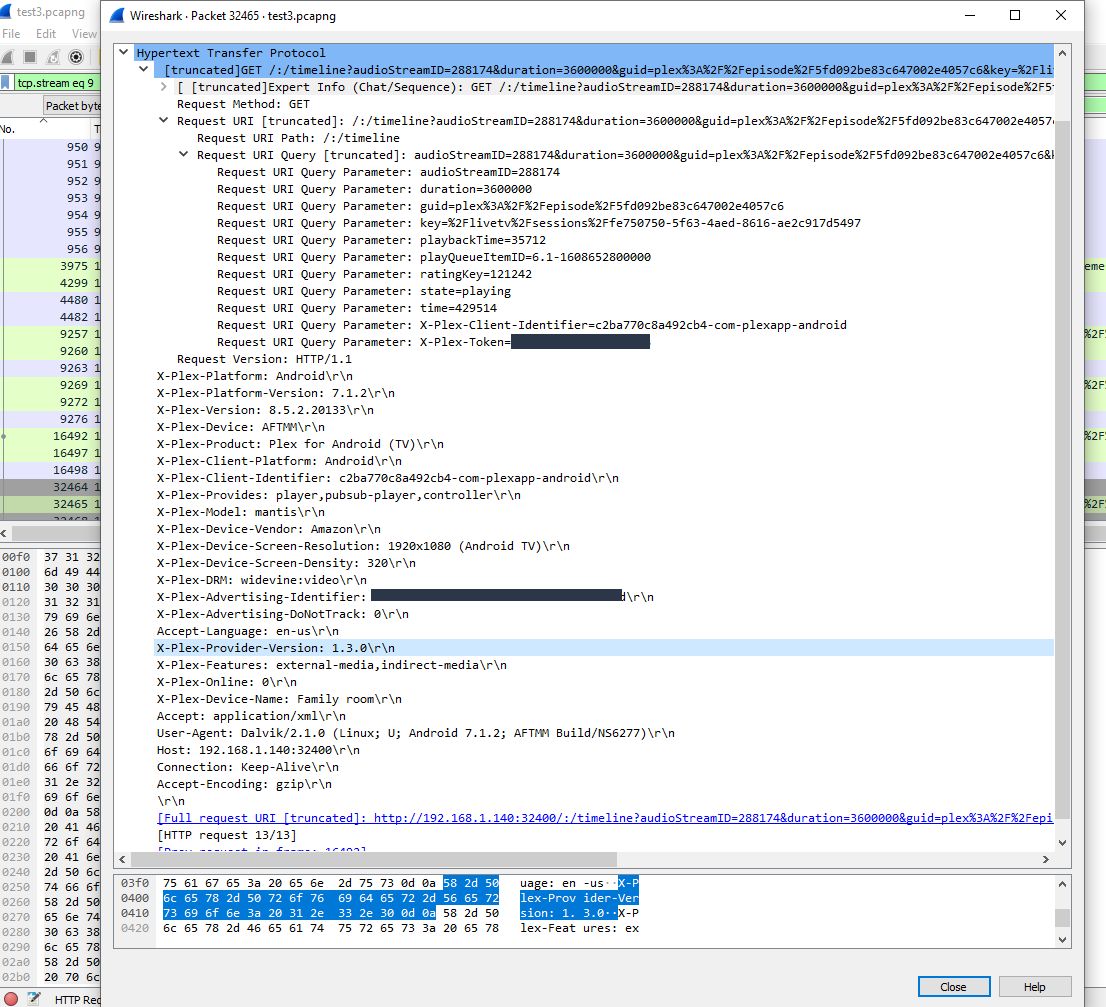
edit:
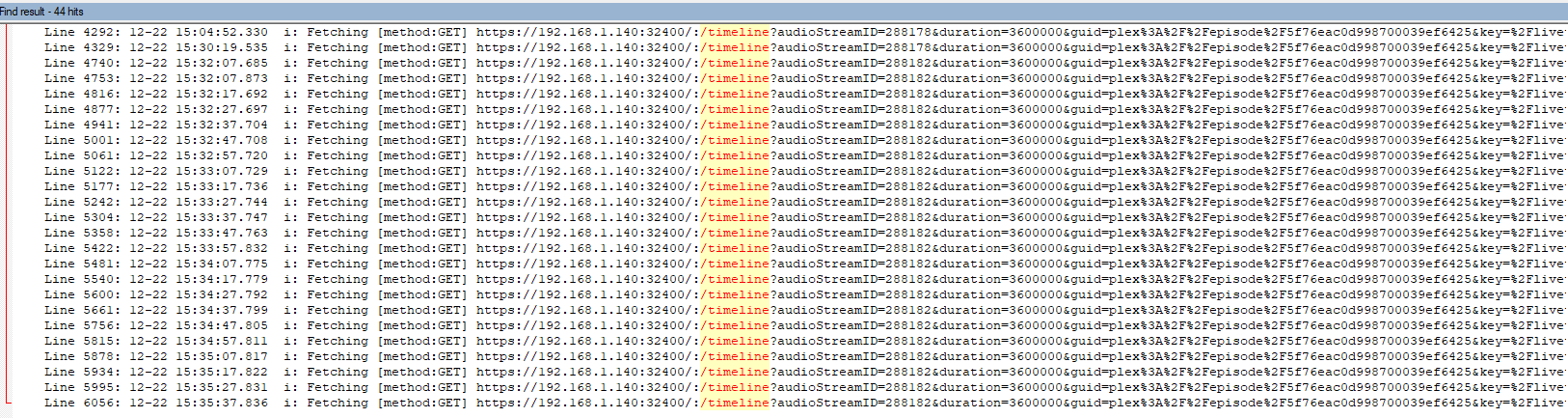
It also shows up in the logs. Here is a search for /timeline in the fire stick 4k logs with the old version of plex. This same search turns up nothing in the logs of the new version.
The timestamp over to the left shows this request sent exactly every 10 seconds.
4 Likes
Awesome, that’s the best lead so far. Thanks for doing that work.
1 Like
I’ve got same issue with exactly the same symptoms, including disabling transcode interlaced and encountering audio sync issues. Tested on two 4k Firesticks and exactly the same on both.
Downgraded to 8.5.2 as @jg121212 mentions and it’s working fine again.
Which variant did you use and will firestick update it automatically?
The Amazon Appstore version from this post -
I’ve disabled automatic updates on my firestick to ensure it’s not updated.
I have automatic updates on and have never had Plex sideloaded apps auto update. I don’t think any sideloaded apps will auto update.
Ah OK, wasn’t sure tbh, thanks.
