You may want to have a look at your file names and directory structure for the two series. Since there’s an ambiguous name, you’ll need to include the year, in parentheses, for both series. For example:
TV\              <--- Library should point here, name unimportant
     The Flash (1990)\
          Season 01\
               The Flash (1990) - S01E01 - Pilot.mkv
               ...
     The Flash (2014)\
          Season 01\
               The Flash (2014) - S01E01 - Pilot.mkv
               ...
          Season 02\
               ...
Getting everything sorted out now though may require the Plex Dance (after the naming is fixed, if necessary), if you’re unlucky:
Then why does the documentation say its at the episode level?
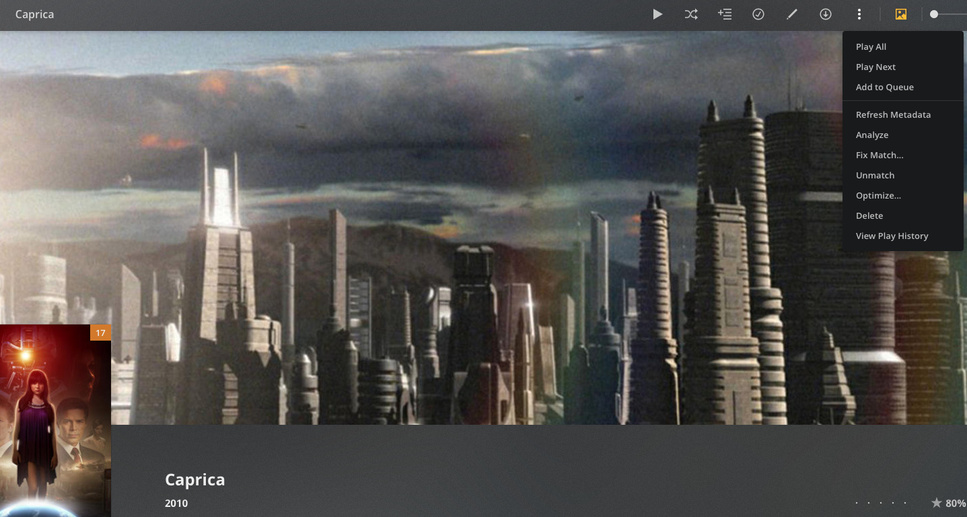
Opening Fix Incorrect Match
To access the feature:
Open the details/preplay screen for the item in Plex Web App
I have the naming stuff correct but for 1 episode of season 5 it keeps putting that episode in the wrong place. Removing this function from here assumes all or nothing and it wasnt previouslt like that.
I’ve never known it to be available at the season/episode level. If you’re confident that you have the file names and directory structure correct (like the example I gave above), it could be embedded metadata in the files (if they’re .mp4/m4v). In that case you’d want to ensure that the agent assigned to the library has its Local Media Assets item at the bottom of the list (or correct/remove the files’ metadata).
Having said that, do you mind sharing a screenshot showing your file names and directory structure, for both series?