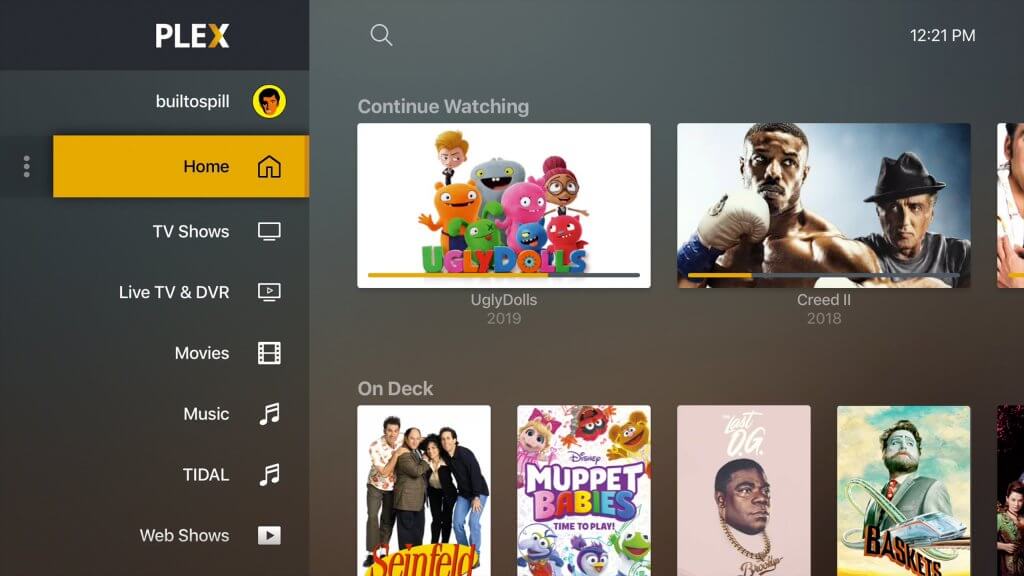
Of all of the things that every user ever requested: removing the option to customize the home screen was never one of them.
I specifically choose not to use the on-demand/rental/free stuff Plex is putting out, and only use my own content. This new update seems to have forced all that nonsense back on to me and then stripped my ability to hide it all.
Did I miss the settings area where this customization option is?
Thank you, but disabling these services isn’t the request though.
The request is: I want to customize my home screen; I want them to undo their change.
I’ll add a gripe or two here as well; there’s no need for this thread to be about just the first flaw I came across in this update.
Show/movie backgrounds, when viewing a title on Android, are painfully cropped to fill the first 1/3 to 1/2 of the screen rather than fit the image nicely.
Why can I not see any of my playlists from the home screen? It used to be that I’d hit the hamburger menu button and I could choose “Playlists” to see them all.
The custom font that some titles have is a really nice feature, but if Plex isn’t going to generate it for every title I have, I’d rather the option to turn it off entirely.
I paid for a lifetime Pass literally over decade ago, so Plex probably hasn’t made any money off of me in a while (especially because I don’t watch any of their content), and I definitely got my money’s worth over that time, so if I have to switch to something else that I can actually control and customize, it’s no real loss now. This outcome is generally unsurprising considering the number of times I’ve griped here about the frequent unrequested changes and errors.
Home screen changes are the biggest mistake ever. I don’t care about “What’s On Now”, “Tune In Now: Popular Shows”, “Plex Picks”, or any of the other absolute ■■■■ I have to look at. I want MY media, I want it on ONE menu, not multiple sub-menus, and I want to not have to see any of the crap that I don’t have any interest in ever using.
I even got a notification earlier tonight about needing a monthly subscription to view my own media when trying to watch something on my own server before switching to my tablet’s web browser to finish a show. (I just checked again, and it seems to be gone, but WHY would I ever need to do that?)
This update is just the absolute worst. It’s making me seriously consider Jellyfin instead of Plex, but that would be a death knell for my family members that have access to my server. Unfortunately for them, it’s more important that I can access my media than they can, but why should they suffer for the absolute garbage that this update has turned into?
Yep. They don’t care about delighting customers anymore. It’s just about burning the place down on their way out. The update obviously broke the app intentionally because there is no way a modern executive team could possibly be this mistakenly incompetent.
I just tried watching another video while on my hotspot, and I got the same message about needing a subscription when remotely viewing content. If Plex thinks I’m going to pay money to watch my own content outside my home network after paying for the app, then I’m going to change from a Plex fan to a Jellyfin user.
Before app update: I could just click the three bars, select Playlists, watch Playlist items.
After app update: Go to Libraries, select TV shows, select Playlists…more steps to find what I want (great call).
Before app update: Could easily swipe left on items in my Playlists to remove them after I watched them.
After app update: Not even an option. Have to remove Playlist items in the web-based location. Instead of a Play"list", it’s now tiles.
Before app update: I could customize what’s on my Home screen, or what Plex features I saw or wanted to see in my app.
After app update: Guess what m-fer…we’re going to cram all of the Live TV, On Demand and other content you don’t want and is a monumental waste of space down your throat whether you like it or not. We tried being nice and offering it to you, but you all were smart enough to take a hard pass and avoid it like the plague, so now we’re done being nice.
None of what you all did with this app can be mistaken for improvements. These changes are just idiotic.
With this update my own server is now ‘outdated’ which sucks since PMS can not be updated on it as the new versions don’t work. So now my own server is no longer accessible.
That’s fine, I have three other servers I can connect to. Every single file gives me “Unable to Determine HEVC profile” so nothing works. Plex has become useless.
Lifetime Plex Pass users should be able to rollback to a previous version, surely.
Terrible rollout. This better not affect ShieldTV or Apple TV.
What would even possess such an update to fix what wasn’t broken and now, it’s all broken.
Anyway - can we rollback the Google Store version somehow and get this working again?
I used to be able to grant library access to friends through the app by selecting the library and tapping Grant Access, I cant seem to find it anymore. Is it missing completely or am I missing something
Agree that this is not a great update, but another thing I noticed is when I updated the app on phone/iPad, most of my playlists were gone. Has that happened to anyone else? They are still on Plex on the computer.
Remember in 2022 when Plex changed Continue Watching and Up Next and gave like only 4 recent entries and was apparently clueless about what their usebase wanted? “Whoa, you have more than 2 people in your house and maybe they all track multiple shows? What? Really?!” Clueless. “You should read release notes first!” OK, great, let me explain this nonsense to kids and grandparents.
Looks like everyone from then is gone, or their memories are; this new update is awful, simply awful. If nothing else, with the old UI, everything matched. Web, Firestick, Android, all looked alike. That’s awesome, and how it should be. There’s some twisted compulsion to utterly break a fine app on a semi-regular basis. No good reason, “easier to use” is highly subjective, and devs don’t seem to think like their userbase or normal consumers.
Now there’s yet another UI dumpster fire where the “user experience” is… I don’t even know what. I managed to downgrade, but I fear the day when Firestick and Web UIs update and everything about the experience goes down the toilet.
Hamburger is King. Take that away? Why? To make a mature app regress and look like it’s the 0.1b from a startup?
• In 2018 they first introduced the bottom bar navigation. It was flawed, but absolutely nowhere near the dumpster fire that they pushed out recently. PLUS we had Podcasts and Photo Upload then, which for the photo upload was announced in March 2021 and sunset by June 2021.
• By late 2019 they managed to finally come around with UNO UI
Now they come back with the bottom bar navigation yet again only this time there are far less features and joy that come out of this re-design.
UNO is the superior interface. It’s polished. It works. It’s simple. It’s intuitive. It maximizes screen space and functionality. There is no reason to change it.
Unfortunately in the world of saas it is far too common to change things for the sake of change so that product and project managers can justify their jobs.
If the UI is too good and there’s nothing to fix then they have to find something to fix. Almost always at the expense of the user.