FreeNAS Plex Library Currently Empty

Server Version#: FreeNAS-11.3-U3.2
Player Version#: 1.19.4.2935

I read dozens of forum posts, but I can’t figure out why Plex can’t see the content.

My media dataset ACL permissions are governed by just two groups: Media_Read_Only (basic-read only) and Media_Read_Write (basic-full control).

The dataset is mounted and visible in the Plex jail. However, it was initially grey’d out, so I ran a “chown -R 972:972 /mnt/datasetpath” based on something I read and that un-grey’d it to where I could select it in Plex.

But evidently I guess that just permissioned only the top level folder, because Plex can’t read the content within. :frowning:

I tried adding user plex with UID 972 to my FreeNAS accounts and added them to the Meida_Read_Only (also tried Media_Read_Write) but it still can’t see the content.

Long story short, I really don’t want to add a permission to the media dataset recursively because of how much media I have and I don’t know what I am doing, so I thought I would check in here.

Is there a way I can give Plex permission to see the media content with the existing ACL groups I created?

chown -R will change the owner of the directory and its sub-directories. The problem is that you used a ID of a user that doesn’t exist in your server. That’s why you think the command didn’t work.
Whats the output of the commands bellow:
ls -l /mnt
ps -fe | grep -i plex

“That’s why you think the command didn’t work.”

Interestingly I thought it did work, because it allowed me to select the folder in Plex. Was grey’d out before.

As for those commands:

From FreeNAS shell:
ls -l /mnt
total 21
drwxr-xr-x 7 root wheel 7 June 18 07:00 MyPool01
-rw-r–r-- 7 root wheel 5 June 14 14:36 md_size

ps -fe | grep -i plex
Didn’t do anything. No message.

From the Plex Shell:
ls -l /mnt
total 0

ps -fe | grep -i plex
Didn’t do anything. No message.

Does this indicate the chown command I ran really didn’t do anything?

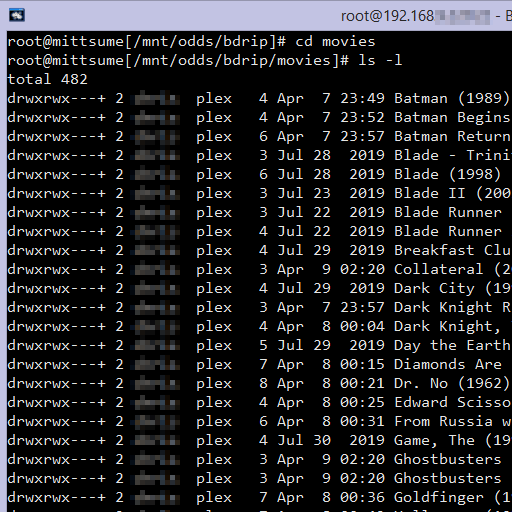
For funnzies, from the FreeNAS shell, I ran the ls -l /mnt/MyPool01 and all the permissions were d---------+ root wheel for each dataset.

All in all, i really just want Plex to use the ACL groups i already assigned. If that is not possible because they need to be unix permissions, I understand. Really just want to be confidant before I apply and recursive permissions because it takes forever.

The ACLs are being used, but maybe not correctly

d---------+ root wheel

The + signal means that there’s ACL applied to it.

What’s the output of getfacl directory where directory is one of your directories inside /mnt/MyPool01

After that, run the command bellow:

cd  /mnt/MyPool01
chmod -R 755 directory

again, where directory is one of your directories inside /mnt/MyPool01.

I figured this out.

Seems the initial troubleshooting I tried might of upset things, so I uninstalled and reinstalled the Plex plugin.

Then using a test dataset I did some experimentation and I found the key roadblock to what I was attempting to do was that the plex (UID 972) cannot be granted permission through a group. In other words, it needed an implicit/individual ACL user permission. Adding the plex (UID 972) to a Group with the correct permission does not work. Maybe its because that Group doesn’t exist in the Jail??? Not sure.

For anyone else having difficulty with this here is what to do:

Create your dataset any way you want and mount it into the Plex jail as countless other videos explain. Then create a user on your FreeNAS called plex with a UID of 972 (leave all other user options default). Next, edit the ACL of your dataset for Plex and give the user plex its own ACL entry along side your other ACL permissions. You can even give Read Only permissions. Then (this is important) check the box to set permissions recursively.

Works for me.

Untitled-3-edit

image

Permissions set on SMB share: User: (myownusername), Group: plex

Hmmm…

Your directory listing shows only read/execute access granted to the user, there are no permissions granted to group – that’s why it doesn’t work. Also, I think you should just go ahead and create the plex group ID.

I actually set mine from the Windows side. FreeNAS didn’t have the ACL editor then.

Edit: If you want Plex to have only read-only access to the media, you can just do that from the mount points for your storage in the jail configuration.

So if only the plex user has rights, how can my user account see the files on my Windows machine? I only granted myself rights using the group.

Yeah, I saw that. Probably what I should of done from the get go. XD

It appears your current setup is for root/wheel to be the actual owner of the share. But keep in mind when you upload files to the share they get uploaded under the username you connect to the share with. Since I set the user/group as me/plex and to inherit permissions this caused the files I upload to be set as me/plex And since the default permissions on the share are read/write/execute for both user and group, I’ve essentially split the permissions on them.

I maintain full control, since they are under my username, but they now have the group of “plex” which is the name of an actual group on the FreeNAS system, and the Plex jail, and deliberately created with the user/group ID numbers that the plex user on the Plex jail has, so Plex Media Server can now read them (and write if I hadn’t set the mountpoint to the jail as read-only).

Just to point out, I really am not a wizard at the whole ACL thing. I had to deal with this after I upgraded to FreeNAS 11.2U7 and added a new pool to my system, because that was where IX Systems changed the default permissions for SMB shares. Here’s how they look on an older pool:

Note that everyone has read access. This is actually what FreeNAS did by default on shares created by older versions. I, too, try to set up a unversal catch-all group for access by media servers on my system, but I can’t recall how successful I was in getting that to work when I need files created by one application, and perhaps managed by another, to be readable by 2-3 more. But things were understandably easier when everyone could at least read them.

Then I got stuck with this issue and Plex with my new pool (which is meant to store only rips of my personal blu-rays for Plex’s usage), and I found this video, which tells you how to add “everyone” with FULL access, and I was like, “wtf if I can just manually add additional users like this, I should just add the one I really need here instead of leaving this wide open”, and then taking it a step further, “I could just change the default wheel group to the plex group instead” (which my username is an auxillary member of, not that I know if that’s necessary). So now when I add files they are readable by Plex but I can still rename/remove/etc them with no issue.

Edit: Here’s how a directory on the old pool, using the old FreeNAS default looks permissions-wise:

My username is assigned owner, since the files are being synced using a utility using my credentials, and the group is set to the catch-all “share_access” group which multiple apps are a part of with their usernames. But even without that they would still be able to read and open sub-folders due to the permission setup.

This topic was automatically closed 90 days after the last reply. New replies are no longer allowed.