It is SO NICE to have this full page results back!
Also like how the same item results get rolled up into the “Choose Source Menus.” It looks so clean. It don’t recall it doing that before on the old full page results.
I’m getting used to the pulldown still being there but with the option to view the full page results, but I do like how once you open that full page your remain there and see it update when you update your search terms.
Sure, server version 1.28.1.6092 (on ubuntu 22.04). Also done an optimise on the db as I know that rebuilds search index but still only getting 30 films back.
I can provide logs if you want (via DM). Just let me know.
@anon5074910 there is still a query limit (30) by type and source but the fix was the additional limit (30) that was effecting the results by section (Media Libraries, TIDAL, Free On Demand, etc.). Which was highlighted here. You have the Actor’s result to drill into the specific library to find the remaining 30+ Samuel L. Jackson titles.
There needs to be some kind of limit. We can look at changing the current limit.
Understand the need to limit due to the non pagination design plex has implemented.
However, limits in the search result from a link I selected to View All Results is just wrong. I am searching for something which now might not be in this page.
Anyhow, this limit (30) is less of a big deal for me as I can just select the actor or refine the search term. The 200 cast member limit for TV shows is far worse making searching for what a cast member is in very hit and miss …
on a related note… i’ve been hoping someone would take a look at this search problem i’ve had for several years now (once my library got large)… where searches with common words in them (the and of etc…) falsely return a “there are no results” …alas no one seems to have an answer…
just tried it with the new search/“view all results” page
and alas the problem still persists : (
i tried searching for “gone with the wind” and get a there were no results/hits in the all results page…
whereas if i search for- gone wind … i get back the proper results/ hits/items found…
i’m sure this is because my library is so large its an outlier/edge case… but was wondering if it’s a time out thing? maybe the time out could be increased? as maybe it’s failing when it has so many results to go thru with the common words in the search?
Hmm, just tried this and got similar results for both. Searching for the full term takes about a second, while “gone wind” shows results immediately. Large libraries here as well.
the issue is… with a MASSIVE library (like mine sadly) ANY search involving common words like of, and and the… results is a no hit/no items found… but remove the common words and you get the proper hits/results…
for instance… i do a search for “once upon a time in the west” and i get zero results/hits found…
i do a search for “once upon time west” and i get the proper hits of the movie and the soundtrack
: ) : (
i think it is totally dependent on your library being massive (like hundreds of terabytes) : ) : (
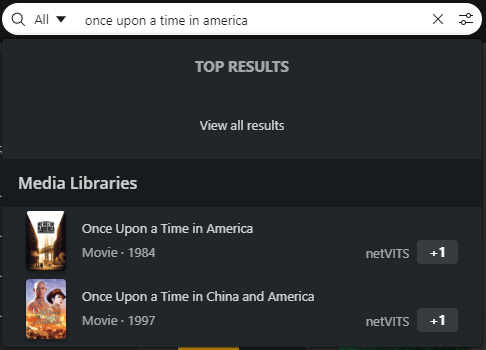
like do you have like gone with the wind or once upon a time in america… and get hits searching for those entire titles? i get zero results/hits unless i leave out the common words.
still broken on my end with the latest beta and the plex hosted version.
(ie- if i search for gone with the wind, plex returns zero results after a minute or so, times out i guess, but if i leave out the common word ‘the’ and instead search for gone with wind, i get the proper 4 or 5 hits from my library instantly)
I was about to open a new thread, then remembered this one.
In my classical library, I have one album where Album Artist is Edward Elgar. Elgar is tagged as Composer on a few tracks in two other Various Artist albums.
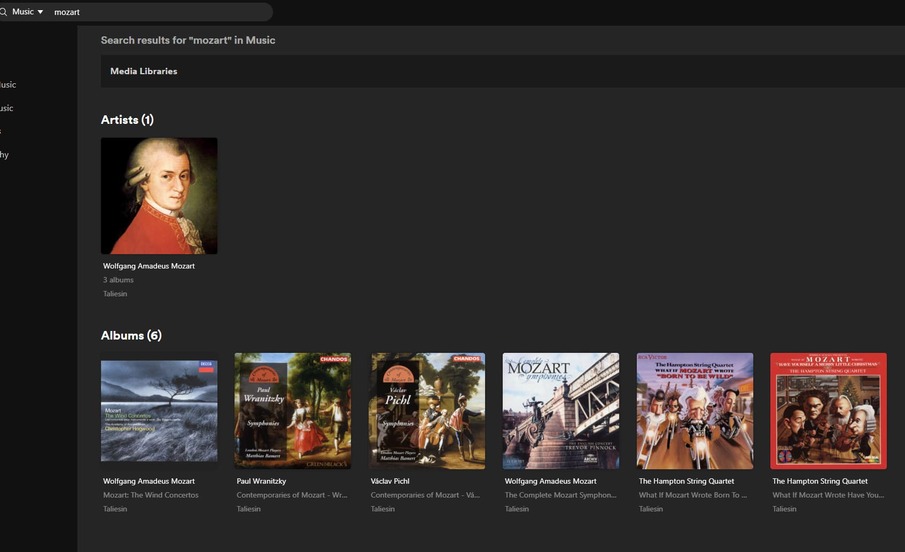
In addition to the inconsistencies mentioned in the previous post, this shows up another surprise. Three of the albums attributed to Mozart aren’t even Mozart music. Four of them are albums where Mozart is mentioned in the album title, but the music is actually by other people.
NO tracks were found.
I suppose an argument can be made for search results finding the search term in the album title, but this is not intuitive, IMO. I think the intuitive expectation is that it will find Album Artist, Track Artist, or Composer.