There are timing issues with how the remote access status is established and often these are corrected by just refreshing the browser with F5/ Clicking retry several times in quick succession could lead to this as well. Logs covering time when it goes red would indicate why that is happening and if it is the timing issue i mentioned or something else
Thanks for the reply. I did notice the timing issue you speak of before but this time around when it goes red it stays red until I click retry for the manual port. I will wait until it happens again and check the logs. Do you have an idea of which logs to look at and what to look for in the log file?
Thanks
Troubleshooting problems is not that simple
One looks at everything to get an understanding of what is happening
So you know I rebooted my plex server and my pfsense firewall last night and so far it hasn’t shown red since. Fingers crossed that it was some sort of graphical bug. Will post again if issue shows up again. Thanks for the replies sir.
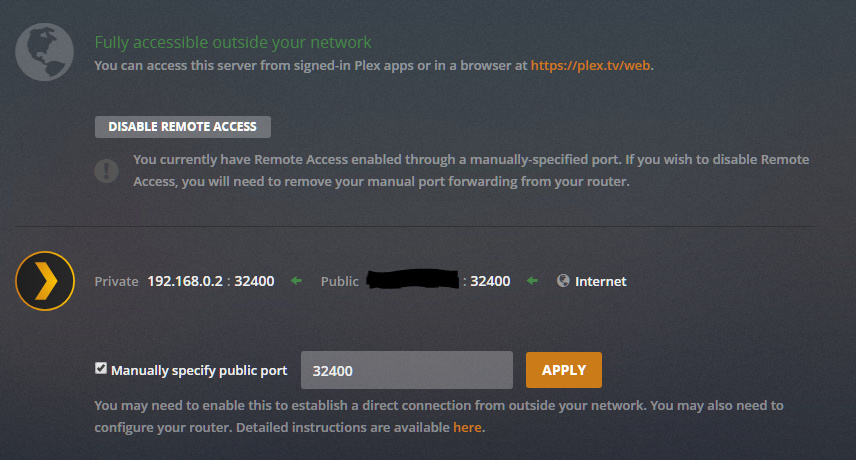
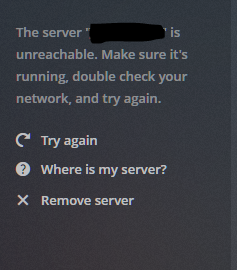
I have been having a nightmare of a time with connecting to Plex remotely. It used to work great for months, then all of a sudden, it had issues being visible outside of the network, even though nothing in my network changed. I fought that the other night and finally got it working again, but now my Plex server says remote connections are available, but when I attempt to connect remotely, it says my server cannot be found.
On my Plex Server:
From remote device:

Logs
Nov 10, 2018 13:01:31.276 [5864] INFO - Notification: Scanning the “Photos” section -
Nov 10, 2018 13:01:31.369 [5864] INFO - Notification: Library scan complete - Extra information may still be downloading from the Internet
Nov 10, 2018 13:01:31.392 [5628] ERROR - PlexClient::downloadContainer: expected MediaContainer element, found html
Nov 10, 2018 13:01:31.393 [5628] WARN - DVR:Subscription: No container available for /tv.plex.providers.epg.onconnect:3/metadata/com%2Egracenote%2Eonconnect%3A%2F%2Fshow%2F14159231
Nov 10, 2018 13:01:31.554 [5812] ERROR - PlexClient::downloadContainer: expected MediaContainer element, found html
Nov 10, 2018 13:01:31.554 [5812] WARN - DVR:Subscription: No container available for /tv.plex.providers.epg.onconnect:3/metadata/com%2Egracenote%2Eonconnect%3A%2F%2Fshow%2F187576
Nov 10, 2018 13:01:31.564 [5812] ERROR - PlexClient::downloadContainer: expected MediaContainer element, found html
Nov 10, 2018 13:01:31.564 [5812] WARN - DVR:Subscription: No container available for /tv.plex.providers.epg.onconnect:3/metadata/com%2Egracenote%2Eonconnect%3A%2F%2Fshow%2F188140
Nov 10, 2018 13:01:31.569 [5812] ERROR - PlexClient::downloadContainer: expected MediaContainer element, found html
Nov 10, 2018 13:01:31.569 [5812] WARN - DVR:Subscription: No container available for /tv.plex.providers.epg.onconnect:3/metadata/com%2Egracenote%2Eonconnect%3A%2F%2Fshow%2F3560344
Nov 10, 2018 13:01:31.630 [5628] WARN - SLOW QUERY: It took 296.875000 ms to retrieve 1 items.
Nov 10, 2018 13:01:31.631 [5616] WARN - SLOW QUERY: It took 296.875000 ms to retrieve 1 items.
Nov 10, 2018 13:01:31.684 [5588] WARN - SLOW QUERY: It took 468.750000 ms to retrieve 51 items.
Nov 10, 2018 13:01:31.771 [5616] WARN - SLOW QUERY: It took 203.125000 ms to retrieve 0 items.
Nov 10, 2018 13:01:31.775 [5612] WARN - SLOW QUERY: It took 828.125000 ms to retrieve 1 items.
Nov 10, 2018 13:01:31.777 [1792] WARN - SLOW QUERY: It took 671.875000 ms to retrieve 50 items.
Nov 10, 2018 13:01:31.839 [5628] ERROR - PlexClient::downloadContainer: expected MediaContainer element, found html
Nov 10, 2018 13:01:31.839 [5628] WARN - DVR:Subscription: No container available for /tv.plex.providers.epg.onconnect:3/metadata/com%2Egracenote%2Eonconnect%3A%2F%2Fshow%2F14504236
Nov 10, 2018 13:01:31.866 [5616] WARN - SLOW QUERY: It took 593.750000 ms to retrieve 0 items.
Nov 10, 2018 13:01:31.912 [5812] WARN - SLOW QUERY: It took 468.750000 ms to retrieve 1 items.
Nov 10, 2018 13:01:31.944 [5612] WARN - SLOW QUERY: It took 453.125000 ms to retrieve 1 items.
Nov 10, 2018 13:01:31.969 [5616] WARN - SLOW QUERY: It took 234.375000 ms to retrieve 0 items.
Nov 10, 2018 13:01:32.104 [5616] WARN - SLOW QUERY: It took 234.375000 ms to retrieve 1 items.
Nov 10, 2018 13:02:15.501 [3860] WARN - NAT: PMP, got an error: NATPMP_ERR_RECVFROM.
It may not be remote access issue. I notice you have Secure Connections set to Required, There have been issues with certificates in past few days. Cannot say if that was your issue
With regards to log from the server, you appear to have disabled debug logging. Please enable it and restart the server so fresh logs get created. See https://support.plex.tv/articles/201643703-reporting-issues-with-plex-media-server/
As the server appeared to be available for remote access and confirmed by canyouseeme.org, we will need diagnostics from the remote end Plex app as well as the server logs zip and screenshot
Was the remote end Plex Web app or Plex Media Player?
To get logs from Plex Web, first it needs to be enabled for the browser session. Select Settings / Web / Show Advanced / Debug and enable verbose logging.
Then try to connect and get screenshot of the error - not cropped - so url and time of day can be captured. and then immediately go to settings / web / show advanced / debug / view log
Select all and copy to text file
and then download the logs on the server
See https://support.plex.tv/articles/200250417-plex-media-server-log-files/
and attach plex web log, plex media server log files zip and sceeenshots
It has started working again, however I will post logs if it becomes inaccessible outside my network. I wonder if it was the certificate issue you mentioned.
This topic was automatically closed 90 days after the last reply. New replies are no longer allowed.
