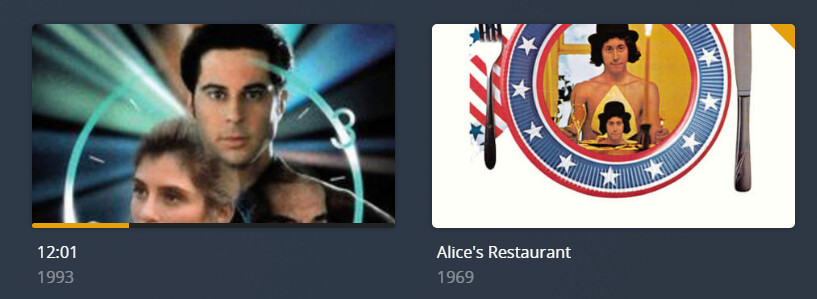
Server Version#:
Player Version#:
Why has Plex changed the Movies grid view so it no longer shows the entire image for the movie? I’m sorry, but this change totally sucks and I would like the old view back.
Server Version#:
Player Version#:
Why has Plex changed the Movies grid view so it no longer shows the entire image for the movie? I’m sorry, but this change totally sucks and I would like the old view back.
Would you mind elaborating? I’m not sure I understand what change you’re referring at. What’s the “entire image for the movie”?
Oh, yeah. And this is happening both on my web browser and on my Roku App.
Is that an “other video” type library?
The thumb/poster format for those has changed some time earlier this year.
Hmm. Weird. It’s all my Movies but when I look at the Library it says Other Videos. I certainly don’t remember doing this. So now I’m creating a new library and choosing Movies as the type. It’s scanning the folders now so we’ll see what happens.
Ok. Set up a new library using the Movies type and it’s still giving me the cropped images.
And what it’s now presenting in that new library is a total mess! Not seeming to recognize movie titles at all but everything is being presented according to individual file names. Sheesh! Total mess!
Ok. Even weirder. Even though I created the library as “Movies” type, it’s showing as “Other” and displaying everything without any sort of rhyme or reason.
Did you set the agent to Personal Media video? IIRC this turns a movie library into an Other video type library.
Ok. Changing the agent mostly fixed the problem. For a couple of title I’m going to have to reset the poster and background. And I still can’t figure out what Plex is doing regarding trailers and featurettes. Several months ago when I first put together my Plex server, I eventually figured out how to get trailers and Featurettes to show up. However, this past week I added several new titles and I cannot get Plex to add the trailers or the Featurettes that I uploaded. Plex also isn’t showing additional info (actors, reviews, etc.) for these new uploads. I looked at my folder structure and it’s the same as the other films I’d uploaded. So I don’t know what I’m doing wrong. Is there some sort of understandable primer on how Plex handles all this stuff?
Thanks,
Plex Documentation
→ Naming & Organizing Your Media
→ Scanners & Agents
The Naming & Organizing section shows how Plex expects media to be named and structured. The section for Movies includes the Local Files for Movie Trailers and Extras support document covering trailers, featurettes, etc. There is a corresponding document in the TV Show section.
See Advanced settings Plex Movie Agent for additional information regarding configuring the Plex Movie agent/scanner. I do not see it mentioned in the document, but note that Plex can read embedded metadata from mp4/m4v files. It does not read embedded metadata from mkv files. This will be applicable if you enable the Prefer local metadata option.
Which Scanner & Agent are you using? The default Plex Movie for both usually provides the best results for commercial, wide-release movies. You will need to refresh metadata for the library if you change the scanner or agent.
Please directory listing, screenshot, etc showing the full path to your files, including any extensions.