Server Version#: 1.20.2.3402
Player Version#: 4.34.4
I am getting the above error when I try to playback anything on plex. I have attached my logs, I hope these are the right ones as I’m unsure so let me know if it is wrong. Please also let me know if there is any further information I can provide you.Plex Media Server Logs_2020-10-06_17-06-26.zip (6.8 MB)
Transcoder issue started for me today as well, following Plex Media Server update. Resolved by disabling subtitles (which are all .srt) – hardly a practical solution however.
Edit: tried the Malwarebytes exclusions. Doesn’t help
Getting the same SRT induced transcoder error. Only happens with SRT’s enabled. And only on newly added media. Old media/SRT’s seem to play fine. My Plex Media Server.log file has the same fingerprint as Rebeis - “Couldn’t find the file to stream…” just before the transcoder kicks out.
FYI, your log files (Plex Media Server.log) lists “error 0x2e4” when the transcoder failed. I searched the forum for that error code. The posts I found mentioned Malwarebytes and running as an Administrator.
Oct 06, 2020 16:40:28.379 [10708] ERROR - [Transcode] JobRunner: exec of C:\Program Files (x86)\Plex\Plex Media Server\Plex Transcoder.exe failed: error 0x2e4.
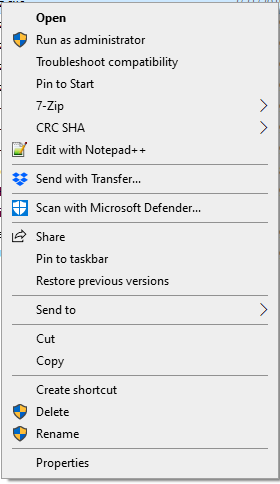
In Windows, you can run a program as an administrator by right clicking on it, then choosing “Run as administrator” from the menu.
You can also set it to run as admin or in compatibility mode from the Properties settings. Right click on the .exe and choose Properties. This opens the Properties window. Choose the Compatibility tab. You’ll see checkboxes for running in compatibility mode and/or as an admin.
For ■■■■■ and giggles i spun up an Elitedesk 705 G4 with Windows 10 build 2004, installed plex as the only application, it too fails instantly with .SRT files not found and failing to play media.
It will play those media with no subtitles.
Sadly i have found no solution to this.
I did some testing, the same media files works as expected under Linux, transcodingvand everything.
On Windows it just fails.
This is on the same physical hardware, differentiere vms.
This appears to be caused by a small issue in the code, which specifies network path to the subtitle file incorrectly and the workaround solution is here.
When you start the file stream Plex attempts to retrieve the file location and subtitle, like:
Request film [file://\\Server\Media\abc.mp4]
Request sub [file:// Server\Media\abc.srt]
The missing “\\” in front of server network path for srt file, causes an issue.
Solution is to re-map the source of library from “\\Server\Media” type of reference to “Z:\Media” and run a full metadata update.
That’s quite a bit cumbersome work arround, so i started looking into other solutions.
While i do love Plex and have been a supporter for years, i’m not fanatic. If stuff breaks and isn’t beeing fixed or even acknowledged, there are other other alternatives.
Same problem here.
I can, of course, switch from unc to driveletter, but what will the effect be on all my manual changes on movie names and the watched status?
I’m also having this problem. Can’t play anything with subtitles. The only place i don’t get the error is on Appletv that plays the files but the subtitles are missing. And i agree that the workaround is cumbersome.