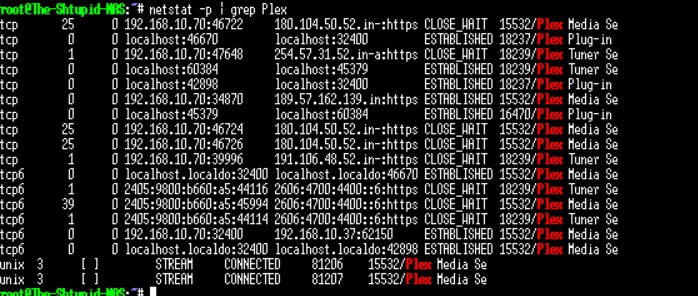
Server Version#: 1.41.3.9314
Player Version#: 8.44
I host Plex on a Synology NAS (Natively, not via docker) and am tired of paying my ISP every month for a public IPv4. All my devices are ipv6 and I would like to use IPv6 connectivity.
|Pv6 is enabled on the NAS and I am able to ping IPv6 IPs on the internet.
What do I do next? Is the Remote Access screen supposed to be like this even with IPv6 connected? Is the only way to truly test it is by getting rid of my Public IPv4 and breaking it?
PS: My Router doesn’t support IPv6 port forwarding, so I have no option other than to use uPnP.
I did some more research and it seems that the “Remote Access” page doesn’t report IPv6 status, so what I am seeing is normal. However, is there any way I can check IPv6 connectivity before I cancel my public IP?
I switched to CG-NAT, and remote streaming stopped working. I couldn’t find a way to troubleshoot why IPv6 doesn’t work.
I figured out why there’s no UPnP entry, because the IPv6 assigned to my LAN devices are already globally routable (starting with 2405:9800), so there’s no need for NAT or port forwarding or UPnP.
You dont use port fowarding with IPv6. All you need is to allow incoming connection via TCP port 32400 to synology IPv6 global address in the routers IPv6 firewall settings.
Keep in mind that Plex IPv6 implementation is far from perfect at this moment and your router might suck with IPv6 (some TP link dont allow you to configure IPv6 firewall and block all incoming connection). Does your IPv6 prefix changes frequently?
Personally I use reverse proxy + cloudflare proxy which provides IPv4 connectivity.
I use my ISP’s router which is pretty barebones. Doesn’t seem to have a section to allow specific ports via the firewall, hust has a toggle for High/Medium/Low. I changed it to low, still no joy.
Considering getting a proper router instead. But then, it is cheaper just to keep paying for the public IP.
I’m also on CGNAT and have remote Plex working on IPv6-only.
Aside from the FW rules, I also added a Custom Server URL to the Plex configuration as per this post.
Weirdly, the remote access page shows that the server is not accessible from the outside, which is NOT true.
Please note that it only works with iOS devices because for some reason Plex Android (or other platforms) doesn’t seem to support IPv6…
Overall, it just seems like the Plex team doesn’t consider IPv6 a priority AT ALL, despite the fact that CGNAT is becoming common around the world.
My kit:
Router is a Fritzbox 7530
Plex is running on a QNAP NAS
Agreed, super annoying and the iOS version is losing this capability with the current “New Experience” version. This is gonna be a dealbreaker for me
Also couldn’t find any comment from a Plex employee on the status of IPv6 and why it’s not being prioritised, especially when native iOS/Android API seems to support it OOTB.
I was thinking if we’re loud enough about it but something tells me we’re still a minority with IPv6 only setups.
I created a thread under the New Experience section:
How can one try the new experience? I don’t rely exclusively on IPv6, but I would like to ensure that the new experience doesn’t break anything before I commit to a lifetime subscription.