Server Version#: 1.41.3.9314
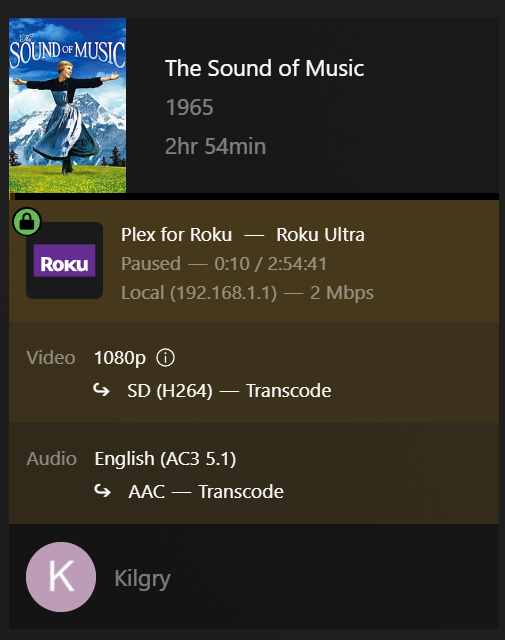
Roku Ultra Player Version#: 7.31.7.9854-92c538e56-Plex
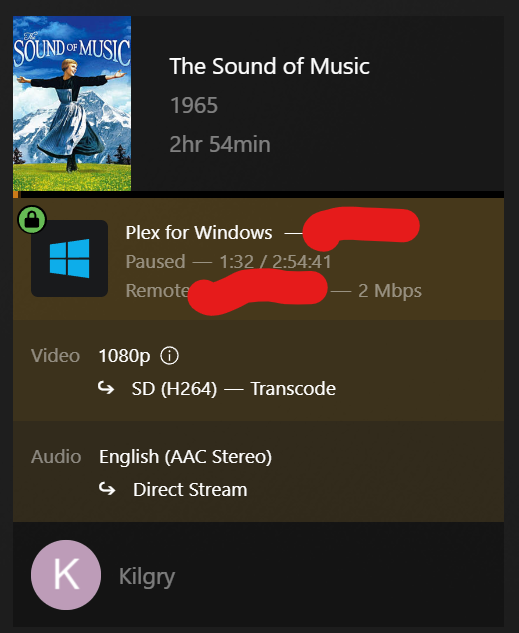
Plex Desktop for Windows Player Version#: 1.107.2.300-7093f413
Server is set up correctly? You can see it is still transcoding to 264.
EDIT: When I use Plex Desktop for Windows I can’t get it to convert. I select the 2Mpbs/720p option but the player then thinks for a bit and resets back to “Original”. I’ll try forcing the entire player…
Do I need to restart Plex server after Saving Changes?
It’s not using hardware transcoding at all. Which suggests an issue with your Quicksync unit in the integrated GPU.
There were other reports about difficulty with this old GPU model and the latest server update.
They are tracked by a developer here: Transcoding no longer working with Windows - #28 by chris_decker08
Thanks OttoKerner, I’ll give the beta a try later when server is available (lots of family with the flu, and Plex is helping them get through their days. )
I wanted to bring your attention to my situation because I don’t know any other way to communicate issues with PMS beta releases and it appears you are the man who has their hands deep in the release.
Right now, it appears that the fix, " * (Transcoding) HW transcodes would fail on older intel igpus (PM-2756)" is not working as intended.
It appears to be working for about 80% of users and all our test machines. I am still trying to figure out why its broken for the rest of you. Unfortunatly that build is going public tomorrow but i will try to get it fixed in 1.41.5. The frustrating thing is it works for some people and not others who are using the same chip!
Very happy to hear you are seeing the same problem on your test machines (though wish it worked for everyone). Glad you are releasing the beta tomorrow. I realize this is a big release and don’t wish to see others missing out, who can benefit.
Again, I’ll do my best to be an available tester, if needed for the future betas on this topic.
Same chip? CRAZY!!! Going to be interesting to see how this turns out.
Had a feeling you would ask for such. However, when trying to find a driver just now, I can’t find one for my OS: Windows Server 2016. I see newer Intel drivers for Windows 10/11 but they refuse to install on my Windows Server. Others are reporting the same on the internet with no good solutions.
Okay, this is pushing my skills a bit for some reason. Never, used the Catalog before and haven’t worked directly with CAB files in years.
So far, I can’t get the .cab file to install. Feel like I’m doing something wrong here.
I used this web page to help me get started with using CAB files:
I had to use the registry edit to allow the context menu to display the option to install a CAB file.
However, once that is done and I try to install I get this:
(I renamed CAB file to intel.cab)
Deployment Image Servicing and Management tool
Version: 10.0.14393.4169

Image Version: 10.0.14393.7426

An error occurred trying to open - C:\Users\[username]\Downloads\intel.cab Error: 0x80070002

Error: 2

The system cannot find the file specified.

The DISM log file can be found at C:\Windows\Logs\DISM\dism.log

C:\Windows\system32>
The log file shows these errors:
2025-02-14 15:28:46, Error                 DISM   DISM Package Manager: PID=9420 TID=7572 Failed opening package. - CDISMPackageManager::Internal_CreatePackageByPath(hr:0x80070002)
2025-02-14 15:28:46, Error                 DISM   DISM Package Manager: PID=9420 TID=7572 Failed to get the underlying CBS package. - CDISMPackageManager::OpenPackageByPath(hr:0x80070002)
2025-02-14 15:28:46, Error                 DISM   DISM Package Manager: PID=9420 TID=7572 Failed to open the package at location: "C:\Users\[username]\Downloads\intel.cab" - CPackageManagerCLIHandler::ProcessPackagePath(hr:0x80070002)
2025-02-14 15:28:46, Error                 DISM   DISM Package Manager: PID=9420 TID=7572 Failed while processing command add-package. - CPackageManagerCLIHandler::ExecuteCmdLine(hr:0x80070002)
2025-02-14 15:28:46, Info                  DISM   DISM Package Manager: PID=9420 TID=7572 Further logs for online package and feature related operations can be found at %WINDIR%\logs\CBS\cbs.log - CPackageManagerCLIHandler::ExecuteCmdLine
2025-02-14 15:28:46, Error                 DISM   DISM.EXE: DISM Package Manager processed the command line but failed. HRESULT=80070002
Still trying to get the CBS.log file to open but it is huge!
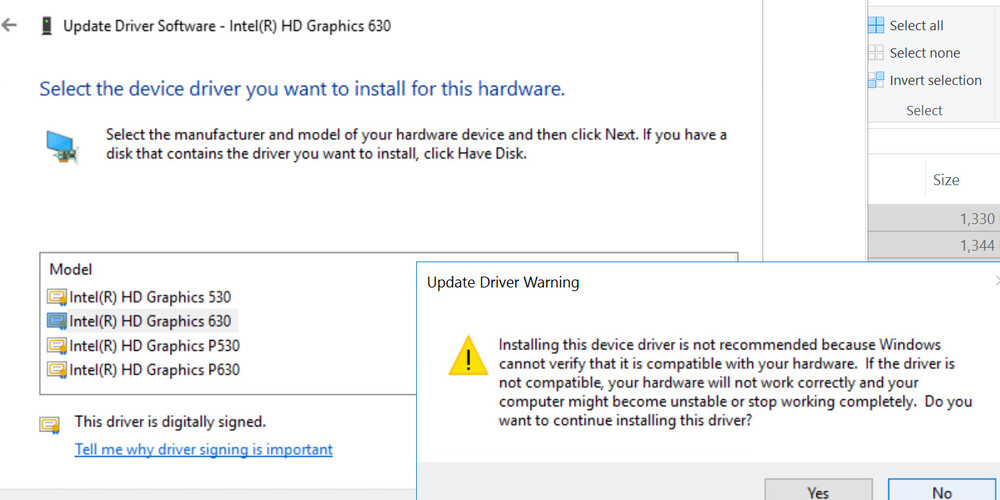
Essentially they are but the driver installer from Intel’s website must be checking the OS. I could try compatibility mode, if available, but not sure how I feel about forcing this on my production environment.
They are basically just zip files, open it with 7zip or similar, extract all the files to a directory and manually update the driver from the device manager.





 )
)