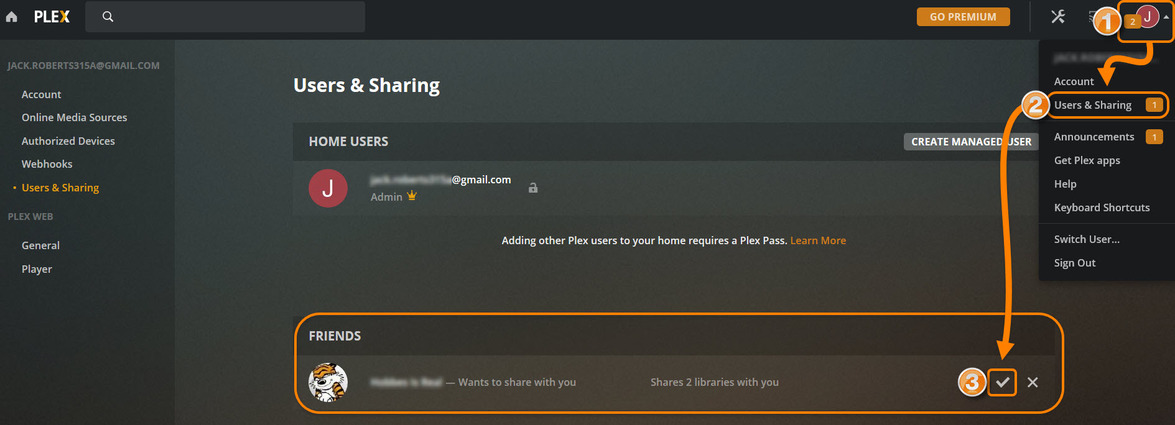
I have the same error. I clicked the invite link from a friend and made an account accordingly (using the same email address the invite was sent to) and still get the error message.
What do I do?
I have the same error. I clicked the invite link from a friend and made an account accordingly (using the same email address the invite was sent to) and still get the error message.
What do I do?
@Rand93 - I don’t see any invitations on your account. Can you PM me the email of your friend?
Hi, thanks for your reply! Turns out it was sent to the wrong email address anyway, sorry for the bother!
hi movieFan., seems I am having this problem often too now. sorry, I’ve done everything to try to avoid the Hmm something went wrong error when I send the link to another user to share my library. My username is bkloester and his name I sent the Invite to is Justin Stewart with a space in between… the green tick appears so I believe it finds him., I click on the libraries I want to share and try to send the invite. Often its the Hmm error. Something it goes through but he never gets the email. I have even copied the url link it creates and SMS that, but when we click on that it doesn’t work either… so frustrating… any tips would be great thank you
I can’t even figure out how to PM you his email address to check it?
Hey there could you possibly check an account for me as I’m getting the issue with one of my accounts it says hmmm error
Can you help me? I’m new to plex. I got an invite to share media from houseofpayne03@gmail.com. Whenever I click on the link to accept the invite it goes to an error page. Will appreciate your assistance gratefully.
@missjoyjuly_gmail_com Are you writing here in the forum from the Plex account you are using? There are no invites to this Plex account. Please double check with your friend the email address the invite was sent to. It must match your email address exactly.
@CrimsonXx Yes, please PM me the email address of the Plex account you are trying to share with.
I am having the same issue. I have 7 users that are sharing my plex library, but the 8th user I’m inviting gets the “Hmm, an invite error… Sorry an error happened when accepting the invitation.” error message. I would send you a private message with the user’s email address, however I need some help with how to send one, because I don’t seem to be able to send one (to the discobot or MovieFan.Plex).
Click on my username then select “message”.
Does anyone have any info on this bug and a potential fix for it?
Sorry, an error happened when accepting the invitation.
I have roughly 8 people who were sharing my library but now when they go to open the library on thier devices the library is no longer shared. Some get the Access denied message others get an error message.
Any help is appreciated.
See if my work around list above helps you out…
This thread is getting on a year old and I have similar issues with 100% of all my invites. I am not sure if even one of them have worked as intended.
So I finally figured out a work around for the link in the invite email error. This is what has to happen…
Only then was the invite successful and they were able to access my Plex library.
Until Plex fixes the email invitation link glitch…I hope this helps!
This is on topic, bear with me…
My wife’s tablet stopped listing our server’s content this week. No clue why, but all she gets now is online content which I disabled on both our profiles. My profile still works, as our main profile.
Reinstalling her plex app did not work.
Removing her as my friend, and sending a new invite led to this topic. An invite error.
Having a look if we can recreate her account wont work - we have to wait a month.
So now we’re stuck. Only my profile can work. Please add to this topic and get it fixed. We’re already going back to our old ways of filling sd cards with content on sneakernet. Wife already tells me to stop strugling with it its just not worth the effort to get plex working.
PM me the email address of your wife’s Plex account.
Thank you - Plex staff helped out. I appreciate.
Hi MovieFan.Plex - I am having issues inviting someone, as described in the Thread. I have tried everything listed, an I sent you a PM with details of the account that I sent the invite to.
For me the same happened, turns out my friend signed up with an Apple account. The email address it generated turned out to be NOT his email, but something like 123456789@privaterelay.appleid.com
When I sent the invite there it worked fine. I can imagine something like this happening for every non native Plex account.
That means they have privacy mode enabled on their Apple account. With that enabled, it hides the real email address.
I’m having the same issue - Invite error. The email address of the invitee is chenchen.ji09@gmail.com. Many thanks