There is no Plex account with that name. Your friend must have used a different email address to create their Plex account. Have them verify by looking under the email tab in Plex Web under their account tab. If they have a username you can also send the invite to the username.

Hi, I’ve been able to share with people before successfully, however I’m trying to invite shares to a new user who uses Google SSO - wmurphy880@gmail.com - he initially got the same invite error, I tried a new invite, same error, but what I noticed on his plex it shows under shared that my library is indeed shared with him. However, he sees no “more” button to access my shares. Tried again from a different browser, same error. Please, I could use some help.
I can confirm that the sharing is set properly. Can you ask your friend to provide a screenshot where they can’t see “more”? Ask for the entire browser page.
Thanks, he just tried again today and it’s working, he can see the more button and the libraries - didn’t do anything different, not sure what happened.
I am having the same issue. I’ve tried inviting a friend with two different email addresses and he always gets an error. Is there a fix for this yet??
Hi,
I recently purchased the lifetime plex.
When I send an invitation to a friend, they keep getting an error “an error happened when accepting your invitation”
Account was created before sending the invite.
I have tried multiple times in re-sending the invite.
Thanks,
Tony
Please PM me the email address of the person you are trying to invite.
Edit - I see you did send the PM. Replied.
This is why I haven’t purchased a Plex Pass. Everyone I try to share my library with gets an invite error…
Having a Plex Pass has nothing to do with this error. Except for a few exceptions, all the errors have been due to a mismatch between the email the invite is sent to and the email used by that user to create their Plex account.
This is why I ask you to PM me the email address of the person(s) you are inviting so I can check if they created a Plex account with the same email.
I don’t understand how to use the forums lol. Trying to resolve this same issue for one of my invites and I don’t see a way to PM you so that I can resolve the issue for them.
Click on my avatar or username and then select Message.
I’m having the same issue as above. I received an invitation to join a friend’s server at my Gmail address, and I encountered the “Hmm, an invite error” message when I tried to sign in using Google through the relevant email address. Thinking that was the issue, I signed out and did the direct login method instead with the relevant email address as my username, and I’m still getting the error.
Friend has tried resending the invite, but it did not fix the issue. I can PM my email if needed. What is the fix?
Also getting the invite error while trying to invite a friend. Any way to fix this? Tried to invite 3 times. Invitee never gets invite email never gets notified in their account. This is my 12th friend. Never had an issue till now.
So anybody who I invite now has to make an a plex account before I invite them?
No, but they must make an account using the same email address that you invite them with. i.e. you invite bob@gmail.com. They create a Plex account using tom@gmail.com, then click on the email that was sent to bob. This won’t work.
Am I right then in thinking that it is no use just using “Copy link” and emailing that link to a new remote user?
For other file sharing services like Dropbox and OneDrive that’s enough to allow them to log in.
But not to my Plex media server?
So a new user has to have a Plex account, is that right?
I’ve just sent myself an invitation (to a secondary email address). I receive the email, click on the ACCEPT button in the link, and am redirected to a page asking me to Confirm Invitation.
I click there on Sounds great, let’s go, then get this message:
“There was a problem accepting this invite.”
So what’s going wrong? Am I required to first set up a new Plex account under this secondary email address? There’s no indication anywhere in the messages received to suggest that.
That just seems WRONG if that’s really required. A design fault, not a bug.
PS. Or is there a requirement to port forward some inbound port in my router, to point towards the Plex Server on my local network?
PPS. No, I’d already done that.
It seems I already had a Plex account for that email and username, and have reset the password so I now know what it is.
Now when I use the l ACCEPT link in the old invitation, and log in with my secondary email, I become just like a new user with a new account, and my Plex page opens to a blank page with only Plex media.
None of the media on the server I’m supposed to be sharing appear in the Plex web page.
I’m not even linked to the server I want to share.
GRRR!
Too complicated.
Trying again. When I now SHARE, I see my secondary email listed as a potential person to share with. Select it, click Send, and wait for an email to arrive with a new link…
And wait…
And wait…
And wait…
And wonder if there’s another design failure? I’ve selected my name and got a green tick beside it. Do I have to type that email address in the blank white box above, as well?
Maybe. After another few minutes, an email DOES arrive from Plex.
But it’s only a notification of my reply to myself in the Plex Forum.
So after almost ten minutes, I’m still waiting for an invitation to view a folder of photos.
What next to try?
I’m strongly tempted to give up, and just share the photos via a OneDrive or Dropbox link. It OUGHT to be easy in Plex, but just isn’t working for me, for no obvious reason.
Correct. Plex doesn’t allow sharing with just a link. It’s specific between 2 Plex users. You have to confirm/accept the invitation using the exact Plex account that the invite is intended for.
Once a user accepts the invitation, anything you share is automatically accepted, so there will not be another email.
Did you look under the “more” tab? I see that you shared a single photo album. When you share single items, and not an entire library, these will show up under a “Shared” library, like this.
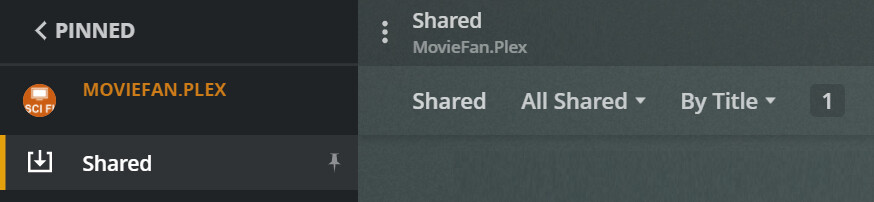
Thanks. All of that clarifies what happened, and it makes sense of it - not the way I hoped it had been designed, but at least the way it works.
So I need to ask my cousin, with whom I’m trying to share, to set up a free Plex account before I can share anything with her?
When I want to share another album, do I have to type her email or account name in the sharing screen again, or is it sufficient to check her name in the list of users with whom I can share and get a green tick beside it?
Might I make a feature request: could the initial email invitation include a sentence telling the recipient they need to create a (free) Plex account before they can view my shared items?
I’ll give it another go now.
