Server Version#: 1.41.5.9522
Player Version#: Versie 4.145.1
For security reasons and the transition to CGNAT (where port forwarding is not possible), I am trying to unlock my PMS on Qnap via Tailscale for PlexAmp and the Plex App on Android and Windows to listen to music inside and outside the home.
I installed the latest version of Tailscale (manually) via App Center on Qnap and - after excellent help from Tailscale Support - this works fine as an Exit Node (so that I can turn off QVPN Server with Open VPN).
Despite various advice on the Internet (and from Chat GPT), I cannot access Plex. I have added a Tailscale subnet [100.64. 0. 0/10] in PMS in “List of IP addresses and networks that are allowed withaut auth” (and to be sure also my LAN, 192.168. 1. 0); of course separated by a comma. However, when I try http://100.x.x.x:32400/web via a browser on my (Android) phone for example (or http://100.x.x.x:32400/web/index.html I get web page not found as a response with net::ERR_EMPTY_RESPONSE. Via PuTTY I checked with the command netstat - tunlp | grep 32400 whether PMS is ‘listening’ on 32400 and PMS is. I haven’t gotten around to manually entering networks in the Plex App on Android for example.
I really have no idea how to solve this and where to go (in QTS or in PMS). If anyone has a handy step-by-step plan (for a relative layman), that would be very useful.
This may be a silly question, but do you have Tailscale on your devices that need access, ie your android phone? Each device that need access to your Tailscale network needs to have Tailscale running.
I have it installed and running on my laptops/desktops and mobile devices with no issues.
Hi skc176, thanks for your quick response. Yes, I have the Tailscale software running on my Android phone. Both peer-peer and with an Exit Node (on my NAS) it works fine. I can ping etc. and also see that the device has a connection with Tailscale in the Admin Console of Tailscale.
Strange it’s not working. I only use the exit node if I need to access a UK website from overseas (I’m UK based).
I haven’t done anything special. Just installed and connected my devices to TailScale and it just works. I haven’t even touched the ‘List of IP address’ etc, just left that as 192.168.0.1/255.255.255.0
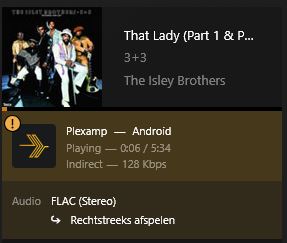
Hi SKC176, I have now made a step further (partly thanks to your video). It works perfectly via a browser with http://:32400. See the attached image, the local IP address and the number of bits of the stream. However, with an app, such as PlexAmp, I get an indirect connection. I have also attached this image where the exclamation mark indicates that the music is played indirectly (and also at 128 Kbps).
I do not want to disable relay on PMS because a device outside my LAN cannot use Netscale (a Samsung TV with Tizen OS). I have entered 192.168. 1. 0/24, 100. 64. 0. 0/10 on my PMS under “List of IP addresses and networks that are allowed without permission”. This does not seem to help. Do I have to enter this series (also) under “LAN Networks”? Or is there another solution conceivable?
I have disabled relay on PMS but left remote access on and port forwarding (which I know is not possible in your case). I have tried with port forwarding disabled but with remote access still on, and it all works as it should.
The list of IP address I have left as 192.180 etc and not entering the Tailscale addresses (even though I really should) I will however give that a try. as soon as I figure what Tailscale IP address I’m supposed to use.
I hope somebody else can chime in on this. I can suggest Googling the issue - that’s how I found that video. There are many more on YouTube that may help.
Thanks again for your help. Unfortunately, I keep getting the message about indirect playback (via proxy relay) when I’m not on my LAN (for example by turning off WiFi and choosing 5G on my phone). Yesterday I was trying to remove the addresses from the option “List of IP addresses and networks allowed without permission” under PMS Network. Then I could no longer “see” my server in PMS! With the help of this excellent article I was able to solve the problem. By the way, the addresses have disappeared and PMS is working fine again. I had already encountered this problem before (for which there is no solution yet).
Anyway, I think I have to find the solution to the problem with Tailscale in the option “LAN Networks” (by specifying the IP range of my Tailscalenet here) and/or “URLs for custom server access” (by entering :32400) on my PMS. Because if I play via PlexAmp without Exit Node on in Tailscale(!), then I see the (local) IP address of my phone. If I turn on Exit Node, then it plays again indirectly (and the Dashboard in PMS reacts very slowly).
If you - or someone else on this forum - can confirm that, I will get started on it. You will understand that I have become a bit more careful with trial & error on my PMS ;-).
I have just tried Plexamp on 5G and I get direct play, but with my Exit Node IP address, not the IP address of my phone (which is what we are both trying to do). With the Exit Node on, I get my Phone IP Address.
There must something very obviously different in our configurations that causing this. We’ll figure it out evenutally!
Dear SKC176, thank you for your inquiry and support! The special thing is that when I access my PMS via a browser on my phone (via https:// :32400) I see direct play in the PMS dashboard for different ways of connecting (Wifi without Exit Node, 5G and Wifi with Exit Node). With Wifi (without Exit Node) I see the local LAN IP (of my phone). With 5G and Wifi incl. Exit Node, I see the IP address of Tailscale. In other situations, apps on my phone that access my QNAP (such as Qfile) work great in combination with Tailscale. Both with and without Exit Node and with or without WiFi. So my router, LAN, Talescale and QNAP work fine together.
With PlexAmp and previously with the Plex App (because as you know I can’t get Plex App to work on my phone anymore) I see in the PMS dashboard in case of PlexAmp or Wifi (without Exit Node) the local LAN IP (of my phone). With 5G or Wifi with Exit Node on, I don’t see an IP address (because I’m playing indirectly).
Plex apps use - as I read on the Internet - their own protocol (GDM: Good Day Mate) to find other Plex servers in the LAN. GDM also works with Tailscale (if the client is connected via Tailnet of course). This works for you too. I have no idea where to find the solution (other than on this forum).
I’m at a loss as well. The only thing I can think of that it could be a QNAP thing as it’s the only thing different between my config and yours. My Exit Node is my AppleTV and Plex is running on my MacMini.
Still hoping someone else can shed some light on this.
Hi skc176, I don’t think it has anything to do with QNAP since accessing files with an app on my phone via Tailnet with the QNAP NAS (as an Exit Node) works great. Accessing via PMS with a browser and https:// MagicDNS:32400 also works fine. Both with my phone and with a desktop at a different location. Only unlocking the apps from Plex does not work well (outside my LAN or with the Exit Node on). This includes Plex Dash, the Plex App and PlexAmp. Since this works fine for you, I suspect that my PMS is configured differently (where we know that Relay is enabled for me and not for you) or that something works differently at the protocol level (such as Bonjour that is something specific to Apple).
It will indeed be nice if - preferably a Plex employee - can shed light on this. To date it is very dark for me how to solve this problem. @ChuckPa can you help me out?
If your primary reason for using Tailscale is to access Plex Media Server remotely let’s start simple.
On your Plex server’s network settings, you need to modify two fields:
Add 100.64.0.0/10 to LAN Networks. Make sure there are no spaces anywhere in the entire field or it will bork the parsing.
Find the Tailscale IP address for your Plex server (it will be on the Machines tab of the admin page).
Using the IP address from the prior step, add a custom server access URL. So, if your Tailscale IP for the server is 100.101.25.76, it would be (substitute your own server’s Tailscale IP): http://100.101.25.76:32400 (Yes, HTTP; a secure connection will still be used.)
After configuring the above, connect your client device (phone?) to Tailscale without the exit node.
In this configuration, when you are off-network, if you connect to PMS from the client and play media, you should see playback as local with the Tailscale IP address of the client in the server’s dashboard.
Dear pshanew, thanks for the contact and the solution! Partly because of my previous experience where I could no longer approach my PMS, I still have a few questions before I proceed to implementation:
Can I still access PMS via a browser on my LAN with https://192.168.x.x:32400/web/index.html#!/ if I make the changes you have indicated in Network settings? Or do I also have to add something for this in LAN Networks (separated by a comma of 100.64.0.0/10?
Can I leave Relay enabled (because of a Samsung TV with Tizen OS outside my LAN)?
By the way, does the 100.64.0.0/10 indicate that a maximum of 10 devices (IP numbers) can connect to my PMS? Or does that mean something else?
Do you also have this solution working (at home) yourself? Do I do the following well in terms of implementation?
Do you think I am doing the following well in terms of implementation?
You can still access it by the local IP address when you are on your home network. However, you’ll need to add your local subnet to the LAN Networks setting. If you’re local network is 192.168.1.x, then your final LAN networks string should be: 192.168.1.0/24,100.64.0.0/10
Yep, no problem there.
No, the /10 is the network prefix. It means that the first 10 bits of the address specify the specific network (100.64-127.x.x in this case). The remaining 22 bits of the address represent the specific host. There are actually more than 4 million addresses in this range .
Yep, but I’ve got a little more going on with mine. I’m using subnet routes as well so that I can access other devices on my network which don’t have Tailscale clients (or do but I don’t want to install it).
That looks good to me (once you add your private network to LAN Netwerken.
Also I should note that this is just one way of accomplishing this. The subnet routes I mentioned above are another way.


 how to solve this problem.
 .
.