Hi. I have several NAS’s on my network. I have loaded Plex onto my main computer. I have selected a folder from one of my NAS’s for my initial library. Apart from the fact that I’m seeing screen shots as well as the main cover art for each movie, which is messy, all appears to be working as it should. My question is this…
I would like to know how to check which folder, on which NAS, my library is pointed at. All I appear to be able to do at the moment is ADD or DELETE a library. There must be a way to see an existing library’s path? - In my case, I just need to see my one existing library’s path. How do I do this please?
Edit your existing library and select the “Add Folders” tab. Your current library paths will be shown; you can add new ones or remove existing ones here.
Wow! - That was a rapid reply - Thankyou !!
Could you please tell me how to stop the additional screenshots appearing when selecting the “ALL” view. For instance for the movie “Always” I see two screenshot images prior to the proper cover art image (for Apollo 13 I actually see 3 screenshots before the proper screenart)
I’m not sure what you’re asking. Can you post a screenshot of what you’re seeing?
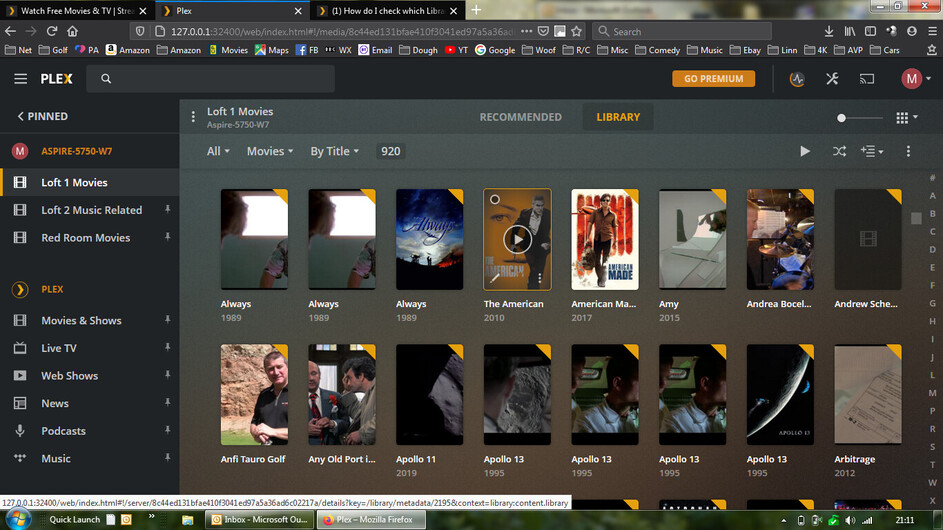
That looks like you got something pretty wrong when associating a folder / folders to your library.
Those duplicates imply you might have added redundant folders or individual movie folders to your library. That’s certainly not normal.
You just need to point the library to a top-level folder (e.g. C:\Users\xxxx\My Videos\Movies\)… not at individual movie folders (e.g. C:\Users\xxxx\My Videos\Movies\ and C:\Users\xxxx\My Videos\Movies\Apollo 13\…). Is that what you did?
1 Like
What @tom80H said.
Also, ensure you’re sticking to Plex’s naming and organization guidelines:
The folder I’m using certainly contains sub folders - and so this could be the cause of the issue? - i.e. The Movies folder contains other folders which may well contain the same movie
could well be.
however I was more aiming at your library configuration pointing at multiple folders in the first place.
No Tom - I certainly have not aimed at multiple folders - just the one - “Movies”
Defintely read the info @pshanew posted about naming snd orgsnising your movies.
It appears thst you have the same movie loading multiple times.
You can hover over each of the duplicate/redundant items and click on the pencil/edit icon (bottom left corner of the poster). On the „info“ tab you should see the path of each underlying file.
Thanks Guys - I’m sure I’ll get to the bottom of it with your help ;- )
Use ExportTools to export the contents of your library, incl. filepath
This topic was automatically closed 90 days after the last reply. New replies are no longer allowed.
