Server Version#: Version 4.22.3
Player Version#: Not Sure
I am very new to this, now that’s cleared.
I’ve got a Wireless router connected to a modem. I can access the router page (192.168.38.1) i have made relevant port forward configuration on the Router (Wireless). However, i can’t seem to access my modem GUI (192.168.1.1) to forward port. The page reads “The page cant be reached”.
In addition, the router’s got DHCP enabled and the connection type is PPPoE. I’m not sure if that`s helpful.
I have gone through Google results and Plex forums, with no luck.
Any help/guidance would be appreciated.
I’ve contacted the ISP but they are of no help.
Have a Good One.
Option A:
Put your wireless router into AP mode
Restart all devices
Create forwarding rule on ISP modem
Option B:
Plug a computer directly in the ISP modem and turn on bridge mode if it has one
Remove computer and reconnect wireless router
Option C:
Plug a computer directly in the ISP modem and forward port 32400 to the ip that the wireless router had (reserving it in DHCP as well)
Remove computer and reconnect wireless router and forward the same port to the Plex server
Option C is the least viable.
If the modem is a real modem and not actually a router, then the first NAT could be at your ISP. https://en.wikipedia.org/wiki/Carrier-grade_NAT
You then have no influence over it and cannot solve the double-NAT situation.
A little clarity on the above please.
Thank you.
Dynamic Host Configuration Protocol is the mechanism whereby IP addresses are assigned to devices. To make the assignments consistent across reboots most router’s DHCP panels have the ability to reserve the address to the device.
Since you mentioned PPPoE, as OttoKerner pointed out you need to check with your ISP to see if you have CGNAT first.
Alrighty. In a nutshell, leave the DHCP active on the modem. About that (PPPoE), i have spoken to them numerous times - My ISP provider isn’t helpful.
I live in the boonies, there aren’t any other ISP’s that provide service here. So, i’m stuck with 'em.
If i’m behind C-NAT, is there another option?
Tunneling?
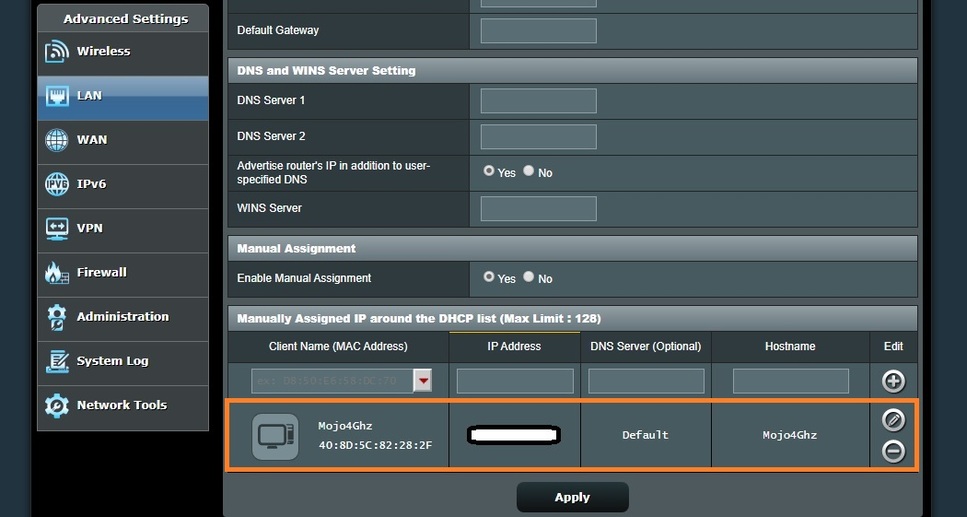
There should be a way to ‘reserve’ your server’s IP/Mac address.
Here it is in an ASUS:
I simply selected it from the dropdown list.
I have done this for my Plex Server. So, it’s got a static IP.
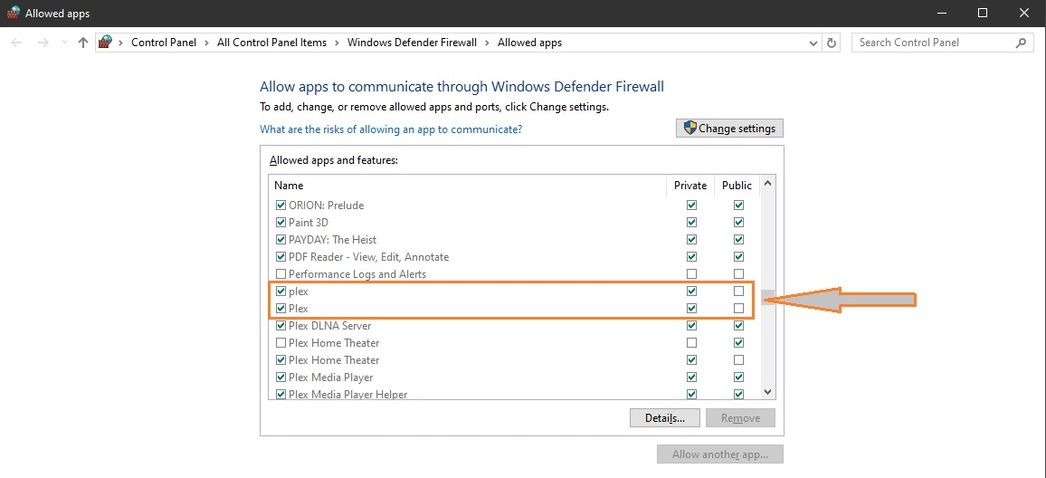
One last thing to check:
A recent Windows update may have borked this for us…
not Windows?
Disregard.
ISPs are generally helpful in a double nat situation.
Shame about yours.