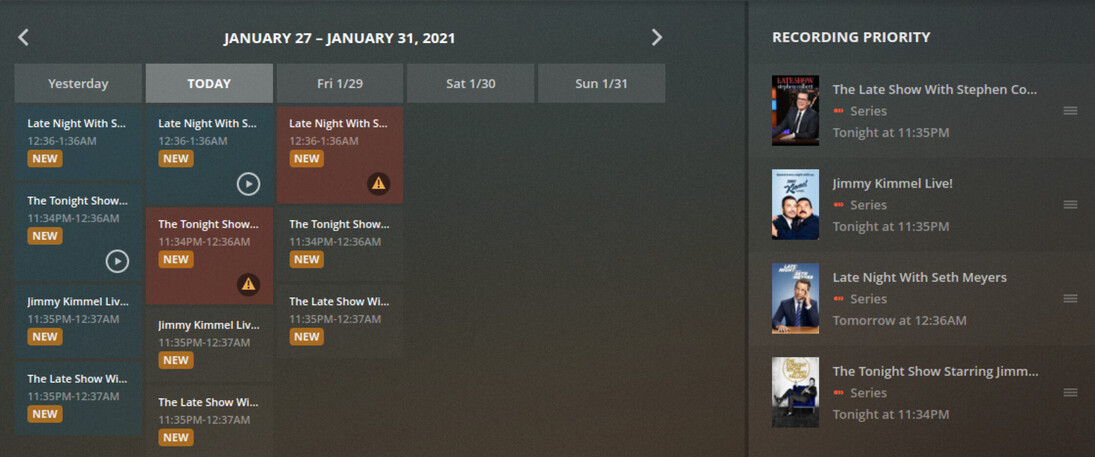
I received the notice that we needed to delete our DVR and reset our programs to record. I don’t remember how I resolved this issue before, but talk shows tend to bleed over a few minutes apparently in order to inhibit automatic recordings.
I have a 1 minute overlap between two shows. I want it to just truncate the end of the first show, however the controls only offer you to extend at the beginning/end. I cannot believe that TiVo solved this 15 years ago and we are struggling with this in Plex. Will the DVR just refuse to record the “non-preferred” show? It doesn’t say what it’s going to do.
This is something that should have an easy resolution yet searching the forums has provided no clear answers.
I have a similar problem.
Have all tuners being used every hour, One show is scheduled for 61 minutes (damn you “This is Us”). That extra minute eats into the next show and throws a conflict for the next show. I can’t figure out how to resolve. The only workaround I can think of is wait until the show starts and manually start the recording. As you stated, I shouldn’t have to solve a problem that has long been solved. Plex please offer a fix.
I don’t have it installed right now (using another DVR) but, as I recall, the setting “Allow Partial Recordings” (or words like that) had a lot to do with resolving those sorts of issues, Can’t remember if this setting was at the DVR level or show level. In any event, it wasn’t obvious and required trial and error to understand it. In the end, I decided to use another DVR program that did not require a PhD to fully understand.
I currently have the shows organized the way I think they should be to get the desired behavior, but it’s not honoring the priority schedule on the right side. I assume those ON TOP are the highest priority?
It’s recording shows LOWER on the list and refusing to record the shows closer to the top.
In response to your original question…not sure if this is what you are trying to do but it works for me to solve conflicts for 31 & 61 minute shows by truncating the last minute.
I believe if you enable partial recordings, any over lapping recordings should start late or end early according to the priority order.
Thank you all for your suggestions. I will try this right now. I remember before posting I tried to put a negative number in the “Minutes after End” and made sure the box was checked for “Partial Recordings” but none seemed to work. I’ll try again now and post a picture of my attempt and report if it works.
I can report that adding the “-1” worked. However. my original attempt was a valid failure. The field does not appear to allow typing the negative. I had to paste in the -1 for it to work. I think this is a bug. when trying to type it in, I intuitively assumed that it didn’t allow negatives.
Hope this helps others. Here is a screenshot of it working.
FYI, I tried to enter a negative number into either field and it would not allow me to do this.
So, I’ve tried to mess with the schedule, and it refuses to prioritize shows properly. If you “prefer this” it just shoves it to the top.
This schedule makes no sense. Jimmy Fallon is at the BOTTOM on the priority and yet the scheduler wants to reject Seth Meyers on 1/29.
Also, partial recordings doesn’t do what you expect. You would think it would just chop off the end or beginning of a show to meet the conflict, but I end up with 30-second clips of the beginning of the wrong show all the time.
The DVR scheduler/priority functionality is garbage.