Hi,
My main server is my laptop. A few days ago, I couldn’t access this server using app.plex.tv. I don’t remember the error message. As I didn’t find a solution, I suppressed the server (bad idea, I know). Now I don’t how to get access again to my own laptop on Plex.
More information:
-I still have access to my NAS-server. No problem with that.
-I never used the Windows app. So there is no “Plex” folder under HKEY_CURRENT_USER\Software\ in the registry on Windows.
-I can’t access to http://localhost:32400/web or http://127.0.0.1:32400/web
If you think log files are interesting, please tell me how to post them.
Have a look at this support article and make sure to follow all 3 steps for your operating system (access the special server settings, remove the related entries, restore access to your PMS):
I indeed checked that article first.
For " Access Special Server Settings" & " Remove Certain Entries", I searched in the Windows registry and there is no folder including “Plex” within. So nothing to delete.
For " Restore Access to Your Plex Media Server", I can’t access to localhost:32400/web (browser message: “This website is not accessible”). But I know I could access it before having these troubles.
I am not sure to understand your question.
Do you mean on the sidebar in the Plex interface? No, it is not since I removed the server from Plex.
Also, there is no Plex entries in the registry, whether Plex is running or not.
In that case, please help me to reframe your issue…
You wrote in your first post that your main server is your notebook/laptop:
Is the server you disabled actually yours or did you disable a server shared by a friend with you? You have me confused
Accessing Plex Web via localhost:32400/web or 127.0.0.1:32400/web depends on you having a Plex Media Server installed on that machine from which you’re working at that moment.
I mean that the server I removed is the one linked to the files I have on my laptop. So now I cannot add files from my laptop to Plex.
So yes, the server is mine.
I realized my words are not well chosen, sorry for that.
My Plex library was simply a folder on my laptop. This is that “server-laptop” that I removed from Plex. The simpliest configuration, I would say.
Now the problem is that I can’t reach anymore the files on my laptop from Plex.
one of the libraries of your server is linking to the movie files stored on your laptop
when you experienced issues earlier, you removed that library (or the folder linked within the library)?
the NAS cannot access the folder shared from your laptop(?)
Follow-up question – if the above interpretation is correct:
have you shared that folder on your laptop as a network share and mounted it to the local file system of the NAS? – can you confirm this “share” is still alive and available to the NAS / machine running the PMS?
can you still access the server if you use the IP address of the NAS / PMS machine instead of localhost or 127.0.0.1? (localhost and 127.0.0.1 refer to the local machine… so if you try to access them from your laptop and there’s no Plex Media Server installed on that laptop, the browser will only give you an error message).
I had 2 “plex” servers: my laptop (PC-server) and my NAS (NAS-server). No link between one another. My NAS is working well. The issue here is only related to my laptop.
First I got a message error on app.plex.tv (I never used anything else) saying that it is not possible to connect to PC-server.
Then I removed PC-server from Plex, and now I cannot access/create/retrieve my PC-server anymore, i.e. a way to put movies on PC to any Plex library.
Kind of.
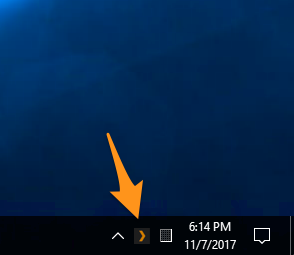
In that case… can you please go back to the top of the thread and check/confirm that the server on your laptop is actually running? (see e.g. the post with the 2 screenshots)
If the server isn’t running you won’t be able to access anything
I don’t have such kind of icon. I thought it is due to the fact that I don’t have installed the PMS desktop app. Should this icon be there if I only use the web app?
Should I install the desktop app?
This icon is the only think visually showing that your Plex Media Server (installed on the laptop) is running. It’s independent of Plex Web or a desktop client for Plex.
If the icon doesn’t show in the first place, this implies your server isn’t running.
Can you manually start the Plex Media Server executable on your laptop?
Can you do me a favor and re-explain what you meant when you wrote you had 2 “plex” servers: your laptop (PC-server) and your NAS (NAS-server)?
I interpreted that to mean you had at some point in time downloaded the Plex Media Server app (e.g. from the link you posted above) and installed it on your laptop. If you did, there’s no need to download it again… just launch it
If I misinterpreted this – not sure what we’re actually dealing with