Hello
I’m looking for a way to keep my Audio settings permanent. Every time my AVR is turned off, the settings reverts to “Auto select device” and stays this way, even when my AVR is turned back on.
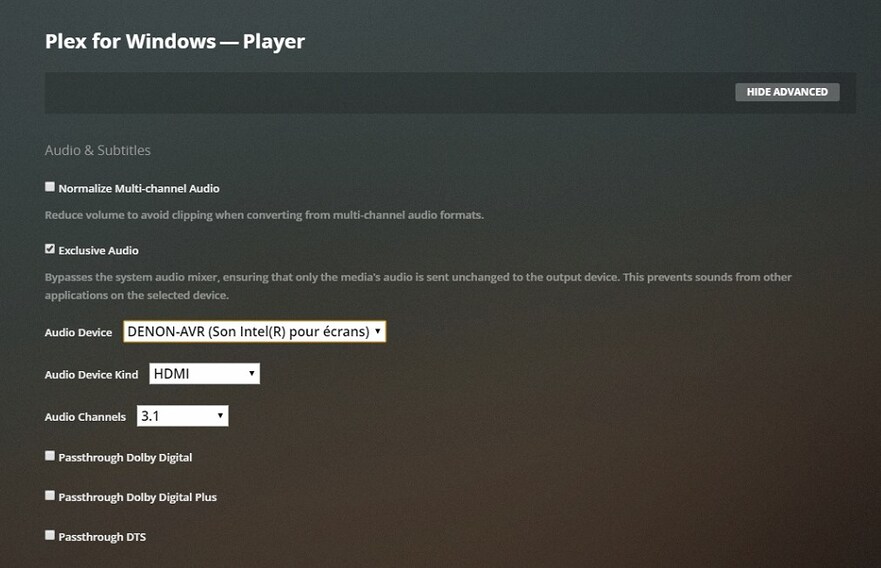
It makes a huge difference on the sound quality, and I don’t want to set this every time I turn my AVR on.
I’m not afraid of advanced configurations, but if there’s a way, I don’t know it.
Actually I found the part of the logs where the switch is done when the AVR is stopped. Maybe there’s a setting to disable this auto-detection?
Mar 24, 2021 14:22:43.298 [2084] DEBUG - [MPVEngine/mpv] ao/wasapi: OnDeviceStateChanged triggered: sending hotplug event
Mar 24, 2021 14:22:43.320 [2084] DEBUG - [MPVEngine/mpv] ao/wasapi: OnDefaultDeviceChanged triggered: sending hotplug event
Mar 24, 2021 14:22:43.498 [2084] INFO - [DisplayComponent] Monitor change detected.
Mar 24, 2021 14:22:43.513 [2084] INFO - [Web] [Audio] Devices: [{"description":"Autoselect device","name":"auto"}]
Mar 24, 2021 14:22:43.514 [2084] ERROR - [Web] [Audio] "wasapi/{184dbba3-efc4-40c2-9da3-8078488c955d}" is an unrecognized or absent device
Mar 24, 2021 14:22:43.517 [2084] INFO - [Web] [Audio] Selecting auto (Autoselect device)
Mar 24, 2021 14:22:43.551 [2084] DEBUG - [MPVEngine] Property 'audio-channels' set to 'auto-safe'
Mar 24, 2021 14:22:43.552 [2084] DEBUG - [MPVEngine] Property 'audio-device' set to 'auto'
Mar 24, 2021 14:22:43.552 [2084] DEBUG - [MPVEngine] Property 'audio-spdif' set to ''
Mar 24, 2021 14:22:43.552 [2084] DEBUG - [MPVEngine/mpv] cplayer: Set property: audio-channels="auto-safe" -> 1
Mar 24, 2021 14:22:43.552 [2084] DEBUG - [MPVEngine/mpv] cplayer: Set property: audio-device="auto" -> 1
Mar 24, 2021 14:22:43.552 [2084] DEBUG - [MPVEngine/mpv] cplayer: Set property: audio-spdif="" -> 1
And when I re-enable it :
Mar 24, 2021 14:28:09.919 [2084] INFO - [Web] [Settings] Audio device changes DENON-AVR (Son Intel(R) pour écrans) (wasapi/{184dbba3-efc4-40c2-9da3-8078488c955d}): {"player.audioDevice":"wasapi/{184dbba3-efc4-40c2-9da3-8078488c955d}","player.audioChannelLayout":"3.1","player.audioPassthroughCodecs":[],"player.transcodeToAC3Enabled":false}
Mar 24, 2021 14:28:10.010 [2084] DEBUG - [MPVEngine] Property 'audio-channels' set to '2.0,2.1,3.1'
Mar 24, 2021 14:28:10.010 [2084] DEBUG - [MPVEngine] Property 'audio-device' set to 'wasapi/{184dbba3-efc4-40c2-9da3-8078488c955d}'
Mar 24, 2021 14:28:10.010 [2084] DEBUG - [MPVEngine] Property 'audio-spdif' set to ''
Mar 24, 2021 14:28:10.011 [2084] DEBUG - [MPVEngine/mpv] cplayer: Set property: audio-channels="2.0,2.1,3.1" -> 1
Mar 24, 2021 14:28:10.011 [2084] DEBUG - [MPVEngine/mpv] cplayer: Set property: audio-device="wasapi/{184dbba3-efc4-40c2-9da3-8078488c955d}" -> 1
Mar 24, 2021 14:28:10.011 [2084] DEBUG - [MPVEngine/mpv] cplayer: Set property: audio-spdif="" -> 1
So maybe theres a way to fix this property audio-device="wasapi/{184dbba3-efc4-40c2-9da3-8078488c955d}" -> 1? Making plex.ini as read-only don’t works.
Thanks!
Server Version : 1.22.0.4163
Player Version : Plex for Windows - 1.29.1.1974-a65b3ef3
