The person that set up my plex created two libraries. How do I remove a library from plex?
Oh I see how it is supposed to work, but here is what I see:
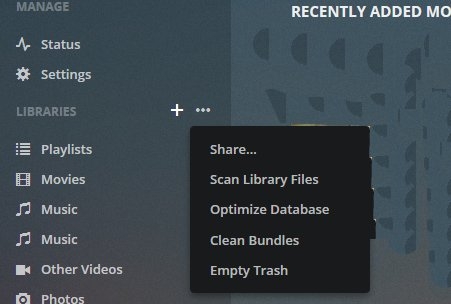
As you can see it does NOT show two libraries and there is NO option to delete anything.
I have also clicked on “Scan Libraries” about 100 times but I see no videos being added to Plex. Everything just seems to suck.
You should have three dots to the right of each library, below the one you are currently looking at. Point your cursor to one of them and it should show “Delete”.
Don’t you see the tree dots there in the above image? That is what I clicked on and in the image it shows the options and there is NO delete. For what ever reason Plex only shows one library, but I know there two libraries because videos show in plex from the second library.
Under that - to the right of each Library - more dots will appear when you hover the mouse over those libraries. Click those dots to the right of a library and there is where you’ll find the Delete:
Regarding Invisible Media Syndrome:
If you have TV Shows in a TV Show Library that don’t adhere to the naming and structuring guide, it’s very likely they are invisible.
https://support.plex.tv/hc/en-us/categories/200028098-Media-Preparation
https://support.plex.tv/hc/en-us/articles/200220687-Naming-Series-Season-Based-TV-Shows <— these are not ‘suggestions’.
Example:
F:\MCEB-TV
…Death in Paradise
…Season 06
…Death in Paradise - S06E01 - Erupting in Murder.mp4

FileBot (link in my signature) can handle that for you automatically or manually in seconds.
What FileBot can’t do is remove possible embedded metadata in the Title Field of MP4/M4V files. Plex will read this info and prefer it over a perfect file name/structure (we don’t know what you’re using), but you can combat that situation by moving Local Media Assets to the bottom of every agent list you can find. All tabs in TV Show and Movies here:
https://support.plex.tv/hc/en-us/articles/200241558-Agents
Just drag LMA to the bottom of the list and drop it. If you do have embedded metadata this will cure the issue, if you don’t it won’t matter. LMA will do what it has to from the bottom.
Renaming/restructuring is best performed OUTSIDE the library and you’ll need to write a new bundle for the show so The Plex Dance® was invented:
The Plex Dance®:
- remove show/movie from library
- update library
- empty trash
- clean bundles
https://support.plex.tv/hc/en-us/articles/200392106-Library-Actions <— update library, empty trash, clean bundles - bring names and structures into compliance/ or the ultimate bundle reboot operation
- replace corrected show/movie into library
- update library
All Steps. In Order. No Shortcuts.
There are many areas where failure may sneak into the plan of attack…
Log Files are always a good idea:
https://support.plex.tv/hc/en-us/articles/200250417-Plex-Media-Server-Log-Files
Drag zip file to a message window and drop it.
That was very good Juice. I can still only see one of my libraries in the Plex site on my computer. But to fix some of the problems this is what I did. First I moved all the videos from my second library. The videos remaining in my main library I converted mp4. I then updated my libraries several times.
This took away all the confusion I was having about where things were stored and there is no reason to delete one of my libraries. On my computer I still cannot see all the videos, but when I load my Amazon TV device on my TV, I see all the videos and they play almost flawlessly.
Right now I am satisfied with the way Plex is working. I wish I could get Plex to show on my Roku device, but I will leave that for another time…
Thank you very much.
This is an answer to a year old question. But I had the same problem trying to delete an unused Library.
I found an excellent article on this subject. So I just wanted to share this for other people with the same problem.
With Credit to the Author, Aaron Phillips.
“Plex Media Server: A Beginner’s Guide | Comparitech”
If you scroll down towards the bottom of the article. There is a section titled.
“Removing a Plex server”
This I followed and it worked fine. Thanks Aaron.
