Server Version#: 1.18.4.2171
Player Version#: 4.12.3
hey out there - 1st post so bear with me!
-what i’m trying to achieve
i’d like to be able to cast to my non smart tv with a 3rd generation chromecast plugged into an hdmi port
-what i have so far
plex media server running on a windows 10 desktop pc. i can access the server by entering http://192.168.1.xx:32400/web/index.html in a web browser on other devices on my local network and the plex app running on android devices. media playback is working perfectly. i don’t want to enable remote access at the moment as i have no need to access the server outside of my local network
-whats not working
i can connect to the chromecast via the android app. the tv screen/chromecast tells me that it’s ready to receive content. however when i press play in the plex app on my android device a warning comes up stating:
unable to connect: 'chromecast name' is unable to connect to unknown securely, and insecure connections are not permitted.
-what i’ve tried
changing ‘settings > network > secure connections’ to required. i now get a ssl warning in browsers and the app still reports the connection is not secure
is there a way around this?! my thinking is that maybe i need to install a local ssl certificate which would then mean i can access the server using https://192.168.1.xx:32400/web/index.html in browsers and the android app will also then use secure connections.
i’ve spent a fair few hours searching for a solution but no joy as yet…
If you install a certificate, you will have to call the server by the name, and not by the IP.
This certificate would have to valid, and not self signed, that’s because you can’t import a certificate to chromecast.
I suggest you read about Let’s encrypt certificates, that are free, or just keep the settings to “preferred”.
ok, so a lets encrypt certificate seems to be the way to go. i can access the server using the ip address or its name and the android app only shows the name so that should be fine.
ok, so i’ve done some more digging - from the sounds of things, this should be possible however the big problem is going to be when the chromecast attempts to verify the certificate…
it looks like some fairly complex dns stuff may have to be done to get this working?
maybe what i need to do is set up the ssl cert a no-ip.com address (i don’t have a fixed ip address at home) and then wire up that domain to my pms using my router? i’m guessing i’d need to do some internal dns set up though for the devices inside my network to map the domain name to the server.
seems like a lot of hard work to just cast local media!
i’ve done some more experimenting: i can cast from chrome running on either my windows laptop or android tablet or android phone without any issues. i’ve also managed to get my samsung smart tv updated and the native app running on that can stream happily.
so the hang up is still with the android app not being able cast due to the connection being insecure.
but…
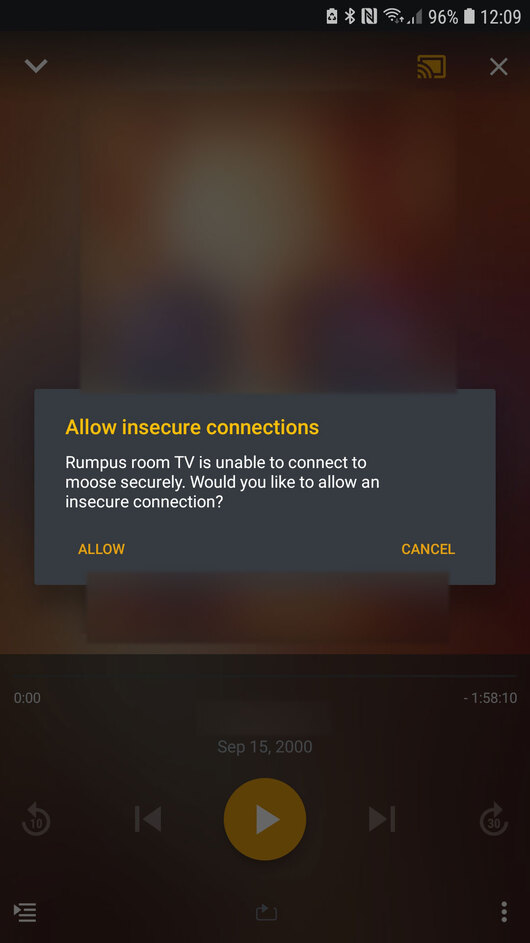
check this out: when i first installed everything a couple of days ago, this is what the plex app on my android phone reported when i pressed play after connecting:
but it looks like the updated app has addressed the problem and provided a solution. i did have a look at the release notes but i couldn’t find anything relating to google chromecast (although i did find an entry for google tv).
so i think this thread is solved - by updating the plex android app 2 days after i did the install and set up
but i did just check my phone and it appears that the plex app was updated 3 hours ago…
If you followed @Coxeroni 's advice above, you did indeed change something. Because this is the related preference which would change the error message and allow the fallback to an unencrypted communication.