Hello,
I have a strange problem…
I have usual categories as Movies and TV Show.
They are related to my PC directories : To see for the movies and a specific directory for each TV show.
But when I look in my library TV Show, I have all the TV Shows but also a item To see that must not be there.
When I click on it, it indicates by example S04 - E02 and when I start it, it is in fact a movie, not a TV Show.
I checked on my PC and I’ve found that it happens ONLY FOR FRENCH MOVIES !!!
And also, I have those movies in both libraries : Movies that is correct but also in To see under TV Show.
Do you have an explanation and could you help me ?
Thanks in advance.
Marc
sounds like you might have linked both directories to the tv-show library.
can you verify what you see if editing the library (⋮ > Manage Library > Edit... → Add folder)?
what information is listed when you open the episode details page for s04e02 and click  >
> Info (this should list the full path(s) of files associated with that episode item.
Thanks for your answer…
In fact on my PC, the structure is J:\Shared\To see and J:\Shared\xxx (where xxx are my TV shows directories).
When I check Info, I see the complete path as hereabove…this is the movie but labelled as a TV Show.
What I don’t understand is that happens ONLY with 6 french movies, all the others are OK ans I have all my TV Show also OK.
A last thing…in To see on TV Show, I have 3 images, one with 1 movie, one with 2 movies and one with 3 movies…but under a label Episodes…
[quote=“marcguislain, post:3, topic:866616”] J:\Shared\To see
[/quote]
What directories are your two libraries pointing at?
The tv show library should point at a library-level folder, not each individual tv show folder.
Example:
J:\
  Shared
    To see  <- folder linked to your movie library
      Movie Folder (year)
      Movie Folder (year)
      …

    TV Shows   <- folder linked to your tv show library
      Show Folder (year)
        Season 01
          …
      Show Folder (year)
        Season 01
          …
OK I see what you explain but my problem is not the TV Show or the To see libraires but the fact that 6 files that are in my directory To see are in Plex in the TV Show library and considered as TV Show in place of Movies…and only french movies, I insist !
Which brings us back to the original question…
To which exact folder(s) are your two libraries linked?
I’m asking this because this is where Plex scans the libraries. If you’re e.g. pointing the library to a joint top-level folder, Plex can pick up files that are supposed to be in different libraries.
With that in mind it’ll still be helpful if you can share the full path(s) showing for the episode (s04e02)… the file must be named in a weird way for Plex to pick a movie up as an episode.
Another consideration: given Plex will usually not mix tv/movie content… can you check if the „French movies“ have any conflicting embedded metadata that could throw Plex off?
We’ll only be able to dig deeper into this if we can have specific information. Otherwise we’ll end up running in circles guessing…
I worry that some shows are in the “To See” category alongside movies. Since the folder containing both is indexed by a “To See” library, it might be targeting mixed media.
I might be wrong.
It is maybe easier whith printscreens…
Here is my structure on my PC : drive J: - directory Shared - folder To see (A voir) and folders for each TV Show

Here is the content of To see (A voir) : only movies in French or English

Here is the link for e.g. the french movie Fanfan

Here is the content of library TV Show where you can see A voir (To see)…why ???

Here is the content of A voir (To see) but it is indicated TV Shows…why ??? (I’ve modified the title of the first on the left)

You can see 3 episodes for Saison 19 and 2 episodes for Saison 20
And finally when I click on Saison 19, here is what I see (I’ve modified the titles)…those are french movies, not TV Shows…
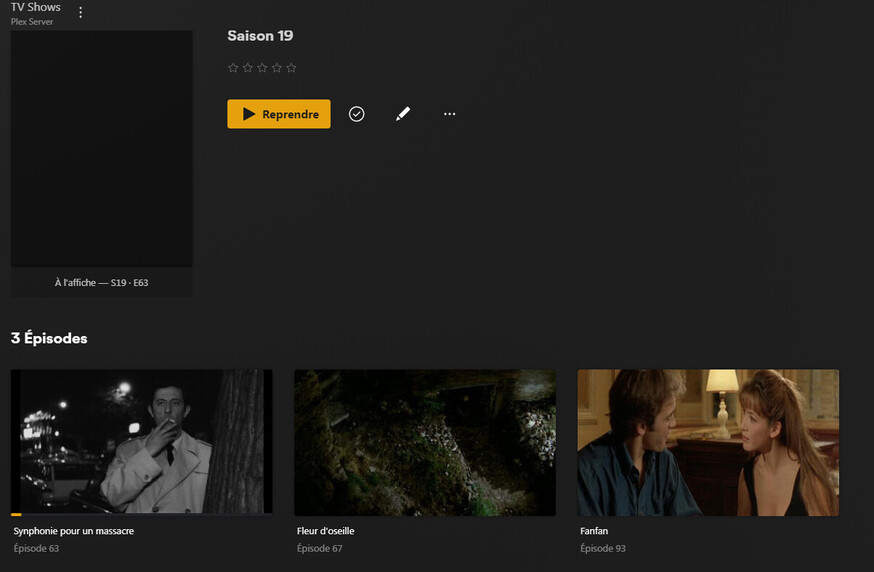
And here is the Info about the movie Fanfan hereabove…

I hope that helps…
Marc Guislain
The first screenshot already shows what’s going on.
A voir is in the same level as your series.
So, if you create a series library, you would have to point it to J:\shared. However doing so is not advisable either, with your current folder structure.
You do not point your series library to each of the series folders individually!
Do it like this:
J:\shared
   \Movies <-- add this to your movies library
   ...
   \A voir <-- add this to the movies library
   ...
   \Series <-- add this to the series library
      \True Detective
      ...
i.e. as explained above and in the linked file naming documentation: separate your videos by type “movie” and “series” completely. Don’t include either in the folder of the other.
Then create separate libraries for each type and point them only to the folder on disk which contains video of their respective type.
Don’t try to do it any other way, it will fail and is not supported.
1 Like
OK thanks for your help…
So I just have to create 2 folders : Movies and Series and after put all the Series in their own folder, am I right ?
I’ll try this and I come back if I still have problems… 
Regards…
I come back just to say it works perfectly… 
Thanks again for your help…
Regards.
Marc
This topic was automatically closed 90 days after the last reply. New replies are no longer allowed.
