This is a mess…
I stupidly ‘upgraded’ my server on a DS218j to DSM 7. Having struggled through the vast amount of info generated by you guys at Plex I eventually managed to get Plex through the NAS and via a web browser to work.
However, I have an Nvidia Shield which I use as my main streaming device. I have no idea how I should go about setting the permissions for this device! I understand that it’s all about permissions but when you only have a vague knowledge of Linux and Android it doesn’t take much to get completely stuck.
All I want is a media player that just works, and I shouldn’t need to take an advanced programming course to get there. It’s one of the reasons I left Kodi but I am now seriously considering going back (if it works with DSM7 that is).
So what do I have to do to get Plex working through the Shield??
If you can access your Plex server from other clients then you should be able to access it from the Shield.
After completing trumpy81’s steps…
Make sure the Plex client app on the Shield is up to date. Launch the Google Play store app and check for updates.
Launch the Plex app and authenticate to your Plex account. You may be prompted to pick a default server and pin some libraries to the home page. After that you should see your libraries, just like with any other Plex client.
That’s pretty much it. You may need to tweak some settings if you’re trying to pass audio to a receiver/soundbar/etc., but those settings should not prevent you from playing movies/shows/etc.
Write back if you’re still having issues. Give a basic problem description - spinning wheel, error message (include text), etc. Also, include some basic info about your setup. Is the Shield using wired Ethernet or WiFi, is it connected to a TV (make/model), soundbar, etc.
Also, what version of Plex Media Server are you running? You can check in Authorized Devices, Settings → Server_Name → General, or in Synology Package Center.
Thanks for the help guys
It is very flaky…I power down the Shield and reboot - it’s working. I go to the Plex web app and…it isn’t working. I get a variety of messages, usually ‘this server is not powerful enough’, but it is, and it’s worked before!
Setup is:
Synology NAS DS218j running DSM7 and hardwired
HP Omen i7-9700K and RTX2800 Super (wifi)
Nvidia Shield (hardwired)
iPad Mini (5th Gen) (wifi)
“This server is not powerful enough” is usually generated when the Plex server needs to transcode the video, but cannot.
The DS218J has an ARM7 processor. It is not strong enough to transcode video.
Web browsers have very limited audio/video capabilities. It is very common for Plex to need to transcode the audio, video, or both when playing media via Plex Web.
When watching on a PC, use Plex for Windows instead. It direct plays almost all media, rarely needing to transcode things.
The Shield should direct play most media. ASS subtitles will cause problems, so don’t use them for now.
To what is the Shield connected? TV, soundbar, etc.
You miss my point. A few days ago, when I was on DSM6, all the videos on my drive played no problem through the browser, the Shield and the iPad. So transcoding is not the issue…
OK, even worse today…now Plex won’t play from the Plex app in DSM7. I’m getting ‘please check that the file exists and necessary drive is mounted.’ Needless to say that both exist. I can play files in DSM7 by accessing file station and then playing the files direct using the Synology media player.
Plex was working in the Shield last night but I haven’t checked to day. I attach files as requested.
One thing which will fool PMS into thinking a file does not exist is when access to it, for user PlexMediaServer, it blocked by permissions at a higher level.
Linux is VERY strict about permissions. Linux, because it follows its Unix parent, is designed to keep one user’s files protected from being accessed by another user.
I have worked on Unix supercomputers with over 1000 users all signed in at the same time. Unix (and Linux) security is such that, without that other user giving me permission to see and read his files, I will never even know they exist.
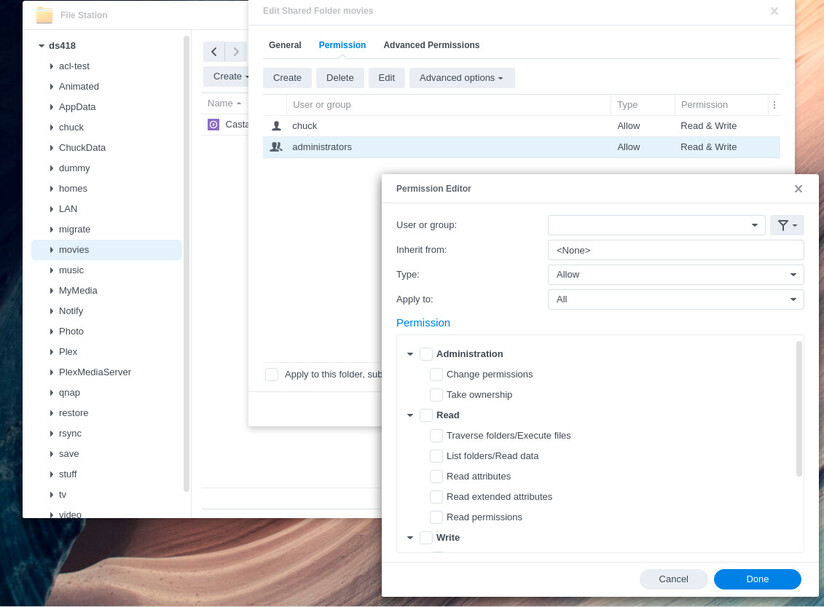
This is what is seen on DSM.
You own the files. User “PlexMediaServer” , by default, will not be able to access them unless you expressly grant that permission.
When you create a shared folder, I’m sure you’ve seen the ‘Everyone’ permission rule.
That grants everyone permission which is what you’d think applies to PlexMediaServer as well.
Here’s the “Gotcha”
Depending on how the files are uploaded to DSM (most are copied over SMB from windows or MacOS, permissions are Not Always inherited from the shared folder’s rules. This is because Windows (the most common cause) doesn’t care about other users (which is a very logical design for a personal computer). What Windows does is, without knowing, grants only permission for you to see your files. Plex can’t.
So, how do you go and fix this?
File Station
Right-click the shared folder containing the media Plex can’t see → Properties
Permissions tab
If you don’t see PlexMediaServer listed, click Create
I’m really grateful for the responses, but I need to emphasise the following:
The whole system (NAS/PC/Shield/iPad) was working fine BEFORE I upgraded to DSM7.
Connections sometimes work, and then for no reason stop working. At the moment all are working EXCEPT for the plex.tv browser.
I get numerous different errors, NONE of which make any sense, such as:
CPU not powerful enough (well, it was a few days ago!)
Cannot find files (well they’re where they have always been)
Cannot connect directly to media (as above)
Server not powerful enough to convert video (well it worked a few days ago)
The PlexMediaServer is already present in the Permissions page.
I also take exception to the poster who said that I need to sort out my libraries. They ARE carefully sorted, they DO exist where they should be, and I have been involved in PCs for more than 20 years!!
Respectfully, a LOT has changed with DSM 7. The argument that it all worked on DSM 6 is moot.
If you have not already, please attempt the suggestions posted by @trumpy81 and @ChuckPa (They are the standard in Plex linux/nas/synology support. If they can’t fix it for you, no one can)
If you look around the forums a bit, you will find it a known fact that files do not behave well in Plex if stored in either the Synology home or media folders.
It is advisable to create a separate share (mine is called Plex Media) and move your media there. You can keep your file/folder structure exactly the same, you are just changing the root folder they live in.
If you have a need to access the media files from Synology Drive, you can add your new share as a Team Folder in Synology Drive.