Synology DSM 7 - cant play any content

Server Version#: 1.23.4.4712-1f0ed4aea
Player Version#: latest available on nvidia shield

Plex Media Server Logs_2021-07-03_10-18-30.zip (6.5 MB)

After install dsm 7 I uninstall and install again new version of Plex server as @ChuckPa mentioned here: Synology - DSM 7.0 Release - Plex Installation (Not Operational) Issues - #420

But I can’t play anything from my players (nvidia shields on my home) Im getting always the message

Error. An error occurred while attempting to play this video. please check your connection and try again

Im almost sure it’s an issue on my server on my NAS because y install a second server on a Linux host and try to play the same content and works without any problem.

I appreciate any help on this issue @ChuckPa @trumpy

@hollman

You missed a few when giving System Internal User PlexMediaServer permission to access the media

Jul 03, 2021 03:15:42.105 [0x7f5be9ccb700] DEBUG - Jobs: Starting child process with pid 22163
Jul 03, 2021 03:15:42.105 [0x7f5be910f700] ERROR - Couldn't check for the existence of file "/volume1/Videos/Drones/DroneVideos/.grab": boost::filesystem::status: Permission denied: "/volume1/Videos/Drones/DroneVideos/.grab"
Jul 03, 2021 03:15:42.106 [0x7f5be910f700] ERROR - Couldn't check for the existence of file "/volume1/Music Shows/.grab": boost::filesystem::status: Permission denied: "/volume1/Music Shows/.grab"
Jul 03, 2021 03:15:42.106 [0x7f5be910f700] ERROR - Couldn't check for the existence of file "/volume1/Photos/.grab": boost::filesystem::status: Permission denied: "/volume1/Photos/.grab"
Jul 03, 2021 03:15:42.499 [0x7f5be9ccb700] ERROR - Failed to create iterator to "/volume1/Photos": Permission denied

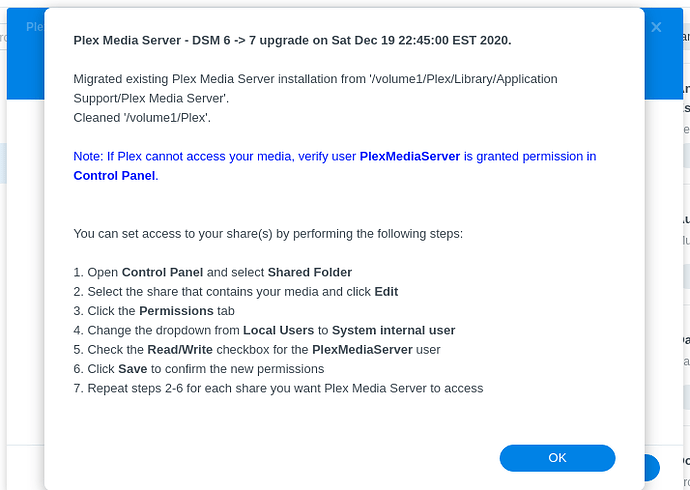
This is the final popup message which is displayed after installing Plex for DSM 7

That content doesn’t matter. The important one is the Movies folder where it’s all the movie content I’m playing with the issue.

I already grant the permissions to that folders but the content I’m trying to play with issues are located in /volume1/Movies

find next new logs after grant access to the folders mentioned.
Plex Media Server Logs_2021-07-03_13-56-13.zip (6.4 MB)

@hollman

  1. “Allowed networks” is a mess.
Jul 03, 2021 13:54:44.392 [0x7fb0ca1ae700] ERROR - Error parsing allowedNetworks 'localhost': Invalid argument
Jul 03, 2021 13:54:44.392 [0x7fb0ca1ae700] ERROR - Error parsing allowedNetworks ' 192.168.50.10': Invalid argument
Jul 03, 2021 13:54:44.392 [0x7fb0ca1ae700] ERROR - Error parsing allowedNetworks ' pera': Invalid argument
Jul 03, 2021 13:54:44.392 [0x7fb0ca1ae700] ERROR - Error parsing allowedNetworks ' raspberrypi': Invalid argument
Jul 03, 2021 13:54:44.392 [0x7fb0ca1ae700] ERROR - Error parsing allowedNetworks ' beast': Invalid argument
Jul 03, 2021 13:54:44.392 [0x7fb0ca1ae700] ERROR - Error parsing allowedNetworks ' 192.168.50.0\0024': Invalid argument

IP addresses or Network addresses/subnetmask separated by comma.

Authentication for certificate (plex.tv credentials) – invalid/not allowed

MFMwUTBPME0wSzAJBgUrDgMCGgUABBRI2smg%2ByvTLU%2Fw3mjS9We3NfmzxAQUebRZ5nu25eQBc4AIiMgaWPbpm24CEgSxDfTl2gCAc3vvt1Ss1igF3Q%3D%3D
Jul 03, 2021 13:54:51.189 [0x7fb0abfff700] ERROR - [CERT/OCSP] response error: unauthorized.
Jul 03, 2021 13:54:51.189 [0x7fb0abfff700] INFO - [CERT/OCSP] couldn't fetch a valid response; retrying in 10800 seconds
Jul 03, 2021 13:54:51.271 [0x7fb0c8cd5700] DEBUG - PubSubManager: Time to connect to 173.230.131.250 was 157 ms.

Might be due to double NAT detected

Jul 03, 2021 13:54:53.190 [0x7fb0ca1ae700] ERROR - MyPlex: mapping failed due to potential double NAT configuration
Jul 03, 2021 13:54:53.190 [0x7fb0ca1ae700] DEBUG - MyPlex: mapping state set to 'Mapped - Not Published (Double NAT)'.

DSM 7 shared folder permissions appear to be valid for your Movies Videos, TV, and Music… “Notify” would not work without them.

Sample"
Jul 03, 2021 13:55:03.316 [0x7fb0ca49d700] DEBUG - [Notify] Now watching "/volume1/Movies/The.Wild.Pear.Tree.2018.TUR.1080p.Blu-ray.HEVC.DTS-HD.MA.5.1-DTOne"
Jul 03, 2021 13:55:03.316 [0x7fb0ca49d700] DEBUG - [Notify] Now watching "/volume1/Movies/Greater.2016.HDRip.XviD.AC3-EVO"
Jul 03, 2021 13:55:03.317 [0x7fb0ca49d700] DEBUG - [Notify] Now watching "/volume1/Movies/Crisis.2021.1080p.AMZN.WEBRip.DDP5.1.x264-CM"
Jul 03, 2021 13:55:03.317 [0x7fb0ca49d700] DEBUG - [Notify] Now watching "/volume1/Movies/1917.2019.2160p.BluRay.x265.10bit.SDR.DTS-HD.MA.TrueHD.7.1.Atmos-SWTYBLZ"
Jul 03, 2021 13:55:03.317 [0x7fb0ca49d700] DEBUG - [Notify] Now watching "/volume1/Movies/1917.2019.2160p.BluRay.x265.10bit.SDR.DTS-HD.MA.TrueHD.7.1.Atmos-SWTYBLZ/Sample"
Jul 03, 2021 13:55:03.317 [0x7fb0ca49d700] DEBUG - [Notify] Now watching "/volume1/Movies/Arkansas.2020.1080p.BluRay.x264-YOL0W[rarbg]"
Jul 03, 2021 13:55:03.317 [0x7fb0ca49d700] DEBUG - [Notify] Now watching "/volume1/Movies/Pete's Dragon (2016) [1080p] [YTS.AG]"
Jul 03, 2021 13:55:03.317 [0x7fb0ca49d700] DEBUG - [Notify] Now watching "/volume1/Movies/Going In Style (2017) [1080p] [YT

I think if you

  1. Fix “Authorized Networks”
  2. Restart PMS
  3. Get a fresh set of Log files ZIP
  4. We can see what is left to make this run right.

Done.

find next logs after performing the steps
Plex Media Server Logs_2021-07-04_09-55-08.zip (6.2 MB)

thank you so much both for all your help

its working fine now

Im actually having this exact same issue with my nvidia shield, however when i try to install Plex following these instructions i am never promted for an “Installation type”. Am i installing the wrong way? Im doing it by clicking the “Join Beta” button on the Plex Media Server Package.

For me the only way i can get my shield to play conencted to my Synology is to downgrade the Plex media player app on the shield to the system default by clicking “:uninstall updates”. However this only works on my OLD original shield. My new shidl doesnt have that option so its effectively dead in the water. @trumpy81

I’m facing the exactly same issue. I tried to re-install from scratch and following the guide here. I was never able to re-claim the server. I’ve attached the log and looking forward for some help! Thank you :slight_smile: @trumpy81

Nevermind, its working again. For some reason the Synology Repository has an outdated version “1.21.0-3744”. I’ve downloaded the package from the website in version “1.23.3.4707-7000”. After installing the newer version manually everything works fine again.

First of all, you are doing it the wrong way. The Package Center option is NOT the way to go because it is incompatible with DSM 7.0-41890. Synology have not yet updated that package, they probably have other priorities at the moment. You need to download the latest package from Plex Downloads and install it manually.

Ok so this makes sense. I literally JUST bought this Synology, and while im VERY familiar with running plex inside a docker stack, i know nothing about the Plex native client on the NAS. I just assumed the one in the store was the way to go. I will try the other one you suggested.

You should NOT be using the Nvidia Shield as a server. Remove the server (if you have it installed) and use the Shield as a client/player and your Synology NAS as the server.

The nvidia shield is the CLIENT. Both of use were having the same error where the shield refused to play Plex content from the Synology Plex server. Regardless, i went back to a straight docker based client as a temporary solution which works. I will try this other download you suggested this evening, thank you.

This topic was automatically closed 90 days after the last reply. New replies are no longer allowed.