Server Version#: 4.134.2
I’m running Plex media server on a Windows 10 PC. It has some made some very wonky meta-data conclusions including the following:
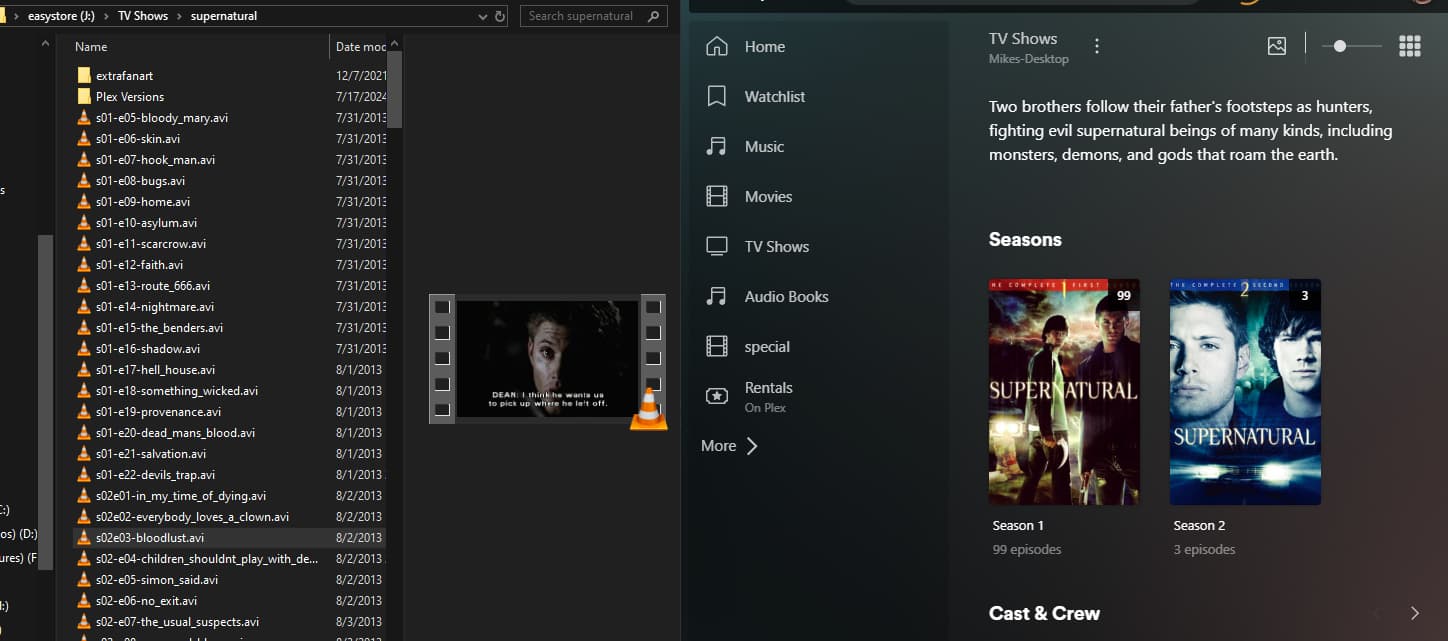
Listing Supernatural season 1 as having 99 episodes
- I have seasons 1 - 5 in the folder all labeled in a s##-e##-title_name format.
Only listing episodes 1-5 of Dinoriders
- I have all 13 episodes in the same folder
Doesn’t list Star Trek: The Animated Series at all
- I have the folder with the series in the same directory as my other TV shows
Not listing Transformers Prime Wars - Combiner Wars at all.
- Like Star Trek The Animated Series, I have the files in a folder in the same directory as the rest of my TV Shows.
I’m sure there are others I’m forgetting right now but I think that covers the individual cases. Any advice or recommendations on how I can rectify these issues? I’ve tried refreshing the meta data, correcting the series matches, and specifically adding the individual folders. And this is where I am presently.
Make sure you are following the recommended naming conventions which can be found here:
TV Series: https://support.plex.tv/articles/naming-and-organizing-your-tv-show-files/
Movies: https://support.plex.tv/articles/naming-and-organizing-your-movie-media-files/ (just for good measure even though you didn’t mention movies).
I do not know how big of a deal would be, but one thing I see that you are doing incorrectly is using s##-e## instead of the recommended s##e##.
Without actually seeing examples of your directory structure it is hard to say if that might be your issue, but starting with the link above for TV series is a good place to start.
Depending on the issue, you might need to Plex Dance the files (either just the episodes, the whole season or the whole series, really depends on what is not showing).
I can tell you I have Supernatural and Star Trek: The Animated Series and they both are showing in my library properly.
-Shark2k
I changed the file names of the first 3 episodes of season 2 of supernatural to the s##e## pattern and now it’s seeing them as episodes of season 2.
though it’s still saying season 1 has 99 episodes. So… progress I guess?
And you asked about my directory structure, it’s pretty simple.
Tv Shows>[name of series]>[files]
Two more points/questions.
- What folder are you pointing your library too? It should be the TV Shows folder (but just want to confirm)
- Please read the first link in my initial response as your structure under the the series folder is not following the recommended directory structure. Your file names are also not correct according the recommended naming convention.
There are programs out there like FileBot and Tiny Media Manager that will help you to quickly rename files with the recommended naming for Plex so you don’t have to do it manually.
-Shark2k
It’s pointing to the Tv Shows folder.
I’ll check out FileBot and Tiny Media Manager.
One thing I am curious about, how come Plex can identify the season 1 episodes when the files are s##-e## format but nothing beyond that? I can see why would fail to ID episodes like that, or how it would ID all them. But I’m not understanding how it sees the season 1 eps and then fails to recognize season 2 and beyond.
As I am not a Plex employee (and more specifically one that works/has worked on the scanner algorithm) I cannot answer that with any authoritative response.
That said, since you do not have the files separated into season folders per the recommended directory structure and your naming is not following the recommended naming, my guess is the scanner is “getting confused” when it goes to do the matching after the season 1 episodes.
The one thing I do know (and this does not directly apply to you since your naming in this case is only working like 95%) is that there have been many posts in the forums over the years regarding matching issues. A good majority of those posts almost always ended up being related to naming conventions not following the recommendation even though it did work at some point.
Basically if you do not follow the recommended naming convention it may work today but there is no guarantee it will not break in a future update to the scanner by Plex.
I do not know if someone that might be able to give you something close to an actual reason might see this thread and be able to respond.
One thing you could do is download your logs and see what the is shown in the “Plex Media Scanner” logs. You might have to initialize a library scan to get the information (depending on how long ago you last scanned) or your might need to do the Plex Dance for it to try and match the files again. But the logs might possible give you clues to why it is not matching.
-Shark2k
It’s not a critical point. Just one of curiosity. But you are correct. I didn’t convert my file structures to align with Plex’s preferences. I just moved my library from Kodi and didn’t really look any further.
Keep in mind that for countless series, there is more than one method of ordering their episodes.
There are ones which use an “absolute” episode numbering scheme, where all episodes are given a number from 1 to end. (and really no different seasons)
Then there are those which have a different ordering of the episodes, so that the episodes are playing in a different order.
There are sometimes different ways of assigning episodes to a certain season.
That list can go on even further.
The point is:
Plex is using the episode ordering of TheMovieDB.org by default.
You can select the orderings of TheTVDB.com on a by-series basis.
Plex does not use the orderings listed on any other website, be it IMDb, or Wikipedia, or anidb.net
When converting from a different media player/server, you should determine which episode ordering you were using so far.
If it was one of those which are supported by Plex, you can select it as default in the properties of your series library.
If it was not one of the supported orderings, you will unfortunately have to look up each show at the supported websites and determine which of them is closest to the actual ordering of your own files. Then rename/renumber all those files which don’t fit at all.