Server Version#: 1.31.2.6810
Player Version#: Any
I have one PMS recording OTA TV into a media library on a shared NAS directory. Metadata for the shows on this server are complete and OK. I have a second PMS which accesses the same shared NAS directory via its own library. Some of the metadata is incomplete on this second server. Sometimes thumbnails are missing, or episode descriptions, or other data. Both servers use the same default agents. Any ideas on why this may be happening and how to create more consistency between the two servers?
That doesn’t mean much.
If you are using Plex’s own DVR feature to record the videos, the recording server is using metadata from the DVR EPG. That’s not relying on metadata websites like TheMovieDB.org or TheTVDB.com but is getting the tv programming directly from the tv stations (via Gracenote).
Whereas the other server has to fetch the metadata from the regular metadata sources, which might have other or missing data for some episodes.
Thanks for the info, it helps. But it also leaves me with a bit of a problem. Once in a while I switch recording from one server (antenna) to the other due to signal quality issues on certain channels. It just happened last week in fact. So then on the same server I will have some episode metadata from the EPG, and others from the websites. Do you have any suggestions on how I might “repair” the metadata for certain shows to be consistent with the EPG data? Thanks!
Only “by hand”.
Look up the show on either TheMovieDB.org or TheTVDB.com
Compare the episode ordering of your files with what’s on these databases. Pick one of them.
Rename and reorder your files if necessary.
Then “Fix Match” of the show and select the appropriate website for the “Episode Ordering” in its properties in Plex.
Thanks. However at the last step, I do not see Episode Ordering or the ability to choose one of the websites in the dialog box. See attached screenshot. I am logged into Plex as admin user.
You are not using the “Fix Match” command.
You simply go to the highest level of a show and “edit” it.
For TV shows you can either chose the TVDB or TMDB show order.
The default show order for the new agent/scanner is TMDB
If some DVR metadata is being matched to a TVDB order there will be conflicts
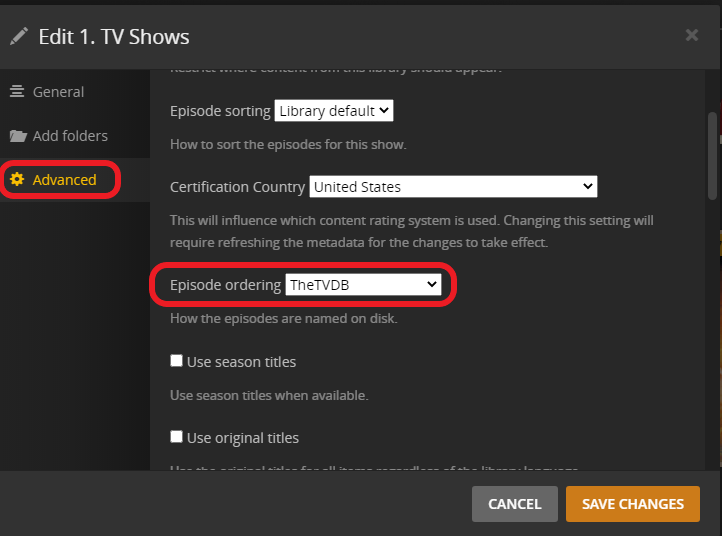
For just one show you can change the order by clicking the pencil on the show poster and going to the advanced tab
If you would rather have the TVDB order for your entire library you can change that also
Go to 3 dots next to the library → Manage Library → Edit → Advanced