Server Version#: 1.32.8.7639
Player Version#: Web 4.121.1
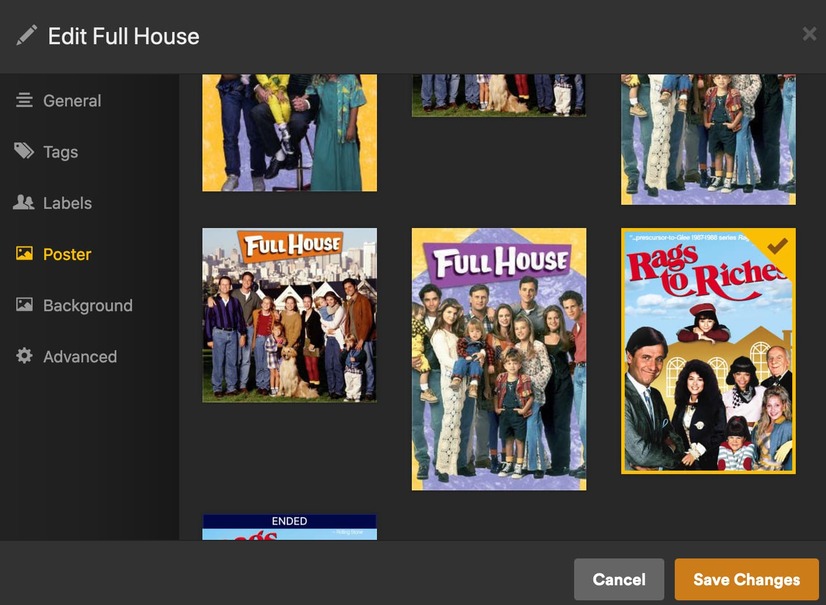
For the show Full House Plex seems to choose a poster for a different show. I change the poster but then a week or so later, the choice is reverted to the incorrect one.
I don’t know where this poster is coming from - I’ve checked Tmdb, Fanart, Tvdb and it doesn’t exist on any of those. The URL in inspect element (if it helps) is blob:https://app.plex.tv/5c8c3367-3dfb-4f97-be72-d7694608b116.
I’ve seen this on other shows as well. In my case " Great Canadian Railway Journeys" gives me the poster for “Azul Tequila” along with the wrong show description. The episode listings are fine just the poster and show description is incorrect. I’ve check TheTVDB and TMDB to see if the incorrect artwork came from there but they’re correct. I’ve done the Plex Dance a couple times and it still comes up with this mismatch.
By default, Plex is using the poster at the first position. Your screenshot shows however the second-to-last poster being selected.
This can have 2 reasons:
the library is quite old and a poster had been selected by hand some time ago, while the library was set to use a different metadata agent (such things can happen if you converted a library from one of the “legacy” to the modern metadata agent)
You have set your library to prefer embedded or “side car” cover art. Verify in the properties of the library that “Prefer local metadata” is NOT activated.
Yes, but you may have selected a different poster manually while the library was still using the old agent. And after the conversion it has retained the number of the poster, even though now this poster number has a totally different subject. Because all manual changes result in a “lock” of the changed meta datum.
If you inspect the plex media info XML of the show, you may see this lock as <Field locked="1" name="thumb"/>
You manipulate the URL and replace the item number that’s already there (which is for the episode) with the number that appears in the XML as the parent or grandparent ID.
(parent being the season
and grandparent being the overall show)