Server Version#: 1.32.8.7639-6000
Player Version#: ?
<If providing server logs please do NOT turn on verbose logging, only debug logging should be enabled>
I installed the new version of PMS on my Synology DS218j and now I cannot get to my movie files. When I click on Your Media, it takes me to Add your media to Plex and prompts me to get PMS again.
Did you perhaps use a different username?
I look at Plex.tv and find nothing at all recent for this Scotty1234 username.
There are older servers which haven’t been seen in a few years
same as it has always been.

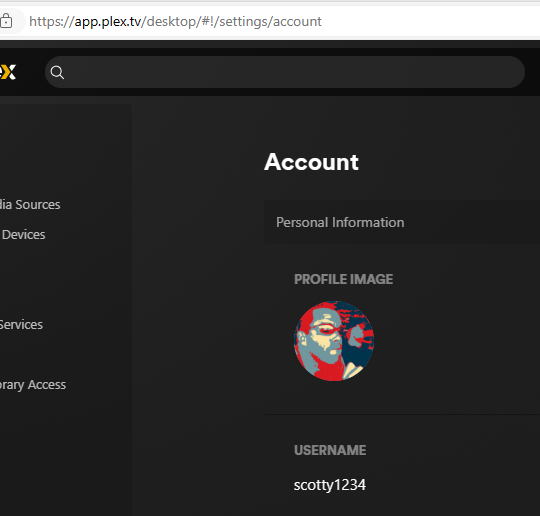
I believe ChuckPa‘s point was that there’s currently no server associated with that account (and apparently hasn’t for some time).
Based on the 2nd screenshot I assume there’s no server listed below the account and web app settings? (at least it looks like there’s some empty space at the bottom left corner where you should otherwise see the settings sidebar for those)
That would be in line with ChuckPa‘s finding.
ok so i am not sure what that means or what I need to do. I’ve always been able to access this from my network on my TV and now for some reason I cannot. I have an active PlexPass subscription.
Can you connect to the server using the Syno’s local IP address (http://[Syno IP address]:32400/web) and does that show more content?


No, it just appears like the server might be linked to a different account.
Edit: Syno will usually block you from installing a version that’s not made for that particular platform (e.g. installing an ARM package on an Intel NAS).
Can you run the following URL with the same IP → http://[Syno IP]:32400/identity
This should show you an unformatted piece of XML – does it show claimed="1" or "claimed="0"?
You could give this guide a try…
claimed=“0”
I tried the uninstall and it did not give any option to Keep and just uninstalled it. 
I reinstalled and not back in same position where it is asking me to Get Plex Media Server. So odd.
Are you accessing the server/syno locally, from within the same subnet?
forgive the ignorance here but not exactly sure what you mean. Currently the Syn drive is plugged directly into my desktop computer because it was having issues where it was plugged in before on my network. I am hoping to get this resolved and return to the network and not be plugged in directly to my computer.
Would you please clarify this?
I interpret this as being:
- You’ve removed a HDD from your Synology.
- You have that HDD connected to your computer.
When you open the DSM Desktop in your browser,
Go to Control Panel - Info Center
In the General tab is information the machine (your DS218j) and the DSM version.
Which DSM version does it show? DSM 6 or 7 ?

I have a DS418j for development.
no the drives are in the system and the synology is connected to my computer directly.
DSM 6.2.4-25556 Update 7
directly as in using a cross-patched / crossover LAN cable between the NAS and your PC, no other components involved?
NAS connected to PC via Lan cable.
The NAS must be connected to the network.
the desktop is on the network. why would that prevent Plex from working from within the NAS?
And I suppose that’s where things are getting somewhere in the range of tricky to ugly.
First off… your desktop might be connected to your network… but in this setup, the NAS isn’t.
To achieve a connection on a crossover cable, you’ll either need to use the NAS‘ „default IP address“ (assigned to the device by the manufacturer for cases where it cannot get an IP assigned by a DHCP server/router) OR you had a static IP configured on the Syno itself (no automatic IP assignment or IP reservation from a DHCP server/router; in which case the IP address could be anything within or outside the subnet managed by your router… although IIRC modern OS / security tools might even distinguish if they address a devise via network or on a direct assignment and still treat it as a different subnet).
Given the server isn’t claimed you need to be on the same network to access it (either to finish the setup or access your established libraries).
In anyway… running a NAS as a tethered device might work for some use cases. It’s definitely not how it’s designed to work and there’s no guarantee any apps/servers/… will work as expected.
Why not simply connect the Syno to your router, let the router assign a local IP address / have an ip reservation and access your server regularly…?
Thank you. I was having problems on the network connection which is why I brought it to my desktop. I guess I’ll put it back there and then report back.
I think this all happened when I changed my internet provider a couple of months back.
