@rozzly I have been catching up on this thread to try and understand the issue. Before I go off and try to reproduce here on my I7-13700 (UHD 770 GPU), do you mind summarising how you are playing on the Samsung and Web player? I am assuming it is transcoding the video, but I am not sure which quality you have selected in the clients? Is is 8Mbps 1080p for example or something lower?
Hi chrisallen, all of my content is 1080p hevc/x265 and is hardware transcoded. Playback in web/Samsung is set to original quality. I’d say 8mpbs is a fair benchmark if you were to limit higher bitrate content, however animated media can play as low as 1 or 1.2 mbps at 1080p with great quality aside from the bits impacts by the issue at hand.
Thanks @rozzly for that info. For context, I am running a 13700 on Unraid 6.12.3, with Plex Media Server running in Docker.
root@NAS:~# dmesg | grep i915
[   11.377130] i915 0000:00:02.0: enabling device (0006 -> 0007)
[   11.377912] i915 0000:00:02.0: [drm] VT-d active for gfx access
[   11.378093] i915 0000:00:02.0: [drm] Using Transparent Hugepages
[   11.379073] mei_hdcp 0000:00:16.0-b638ab7e-94e2-4ea2-■■■2-d1c54b627f04: bound 0000:00:02.0 (ops i915_hdcp_component_ops [i915])
[   11.381043] i915 0000:00:02.0: [drm] Finished loading DMC firmware i915/adls_dmc_ver2_01.bin (v2.1)
[   11.494855] i915 0000:00:02.0: [drm] GuC firmware i915/tgl_guc_70.bin version 70.5.1
[   11.494886] i915 0000:00:02.0: [drm] HuC firmware i915/tgl_huc.bin version 7.9.3
[   11.497946] i915 0000:00:02.0: [drm] HuC authenticated
[   11.498321] i915 0000:00:02.0: [drm] GuC submission enabled
[   11.498344] i915 0000:00:02.0: [drm] GuC SLPC enabled
[   11.498838] i915 0000:00:02.0: [drm] GuC RC: enabled
[   11.499598] mei_pxp 0000:00:16.0-fbf6fcf1-96cf-4e2e-a6a6-1bab8cbe36b1: bound 0000:00:02.0 (ops i915_pxp_tee_component_ops [i915])
[   11.499741] i915 0000:00:02.0: [drm] Protected Xe Path (PXP) protected content support initialized
[   11.510847] [drm] Initialized i915 1.6.0 20201103 for 0000:00:02.0 on minor 1
[   11.511637] i915 0000:00:02.0: [drm] Cannot find any crtc or sizes
[   11.511745] i915 0000:00:02.0: [drm] Cannot find any crtc or sizes
root@NAS:~# cat /proc/cpuinfo | grep 'model name' | uniq
model name	: 13th Gen Intel(R) Core(TM) i7-13700
root@NAS:~# uname -a
Linux NAS 6.1.38-Unraid #2 SMP PREEMPT_DYNAMIC Mon Jul 10 09:50:25 PDT 2023 x86_64 13th Gen Intel(R) Core(TM) i7-13700 GenuineIntel GNU/Linux
I have tried Chuck’s sample (segment-1917.mkv - Google Drive) and playing back in Plex Web (Google Chrome) @ 1080p 8Mbps appears fine with no visible artefacts. Just to rule out something on my end, Can you please DM me server logs that cover your playback attempt on Plex Web that results in artefacts? This will show me what the transcoder is doing so I can ensure I am setting up a similar transcode.
I’ve DM’d you my server logs as requested.
Few things to mention:
- When testing Chuck’s sample specifically, I was playing back at original (maximum) quality (70.3 mbps). The blockyness appears at the 40 second mark – HDR tone mapping enabled.
- I took a screen recording of the problem and linked it 6 posts up from your last. [ Screen Recording ] (download and play to see the issue, don’t stream through gdrive due to limited playback quality)
- I provided a sample previously which you can retrieve here Rozzly Sample File that produces the issues more frequently.
I know you reproduced the issue on a few other boxes, namely the nucs you mentioned with Xe graphics, but I see that was on windows and a VM on proxmox. Did you ever try it on a metal linux install by any chance?
I see Chris is running unraid, I wonder if there is something different about the way proxmox’s VFIO passthrough works compared to unraid?
I’m running my main PMS instance on an intel nuc 12th gen within a Proxmox container, but I have an 11th gen NUC here as well running Ubuntu bare with the same issues. Unraid and docker are two configurations I haven’t messed with.
Gotcha. Your proxmox containers are UEFI or seabios?
I’m actually not too sure. I’m using LXC containers instead of traditional VMs. I took the easy-mode and used the PMS helper script to deploy it. Proxmox VE Helper Scripts | Scripts for Streamlining Your Homelab with Proxmox VE (tteck.github.io)
Oh, duh. Containers not VMs. It’ll be whatever boot mode your proxmox host is using, I would assume UEFI in this day and age.
Thanks @rozzly So far It seems the issue doesn’t manifest on my Unraid setup with my i7 13700. I do have an Intel NUC here (SBNUC11TNHi50L0 - NUC11TNH) that seems to match what you have. I’ll get that loaded with Ubuntu and try and repro in the next few days.
For what it’s worth, I originally discovered this issue on an i5-13600k on windows, and I believe Ubuntu bare, which prompted me to move to the 12th gen NUC, only to have the same problem. One thing to note is the i5 model has the Iris XE GPU, but with 80 execution units. The i7 models have the Iris Xe 96 EU, though I’m not sure this will make a difference.
@chrisallen just checking in to see if you made any progress or were able to test Ubuntu bare to reproduce the issue(s).
Sorry, I had some other efforts to attend to. I hope to continue investigating this today/tomorrow
I have tested under the following conditions:
Server 1:
- Intel 13th Gen i7-13700 CPU
- Unraid 6.12.3 (Kernel 6.1.38)
- Plex Docker container (PMS 1.32.6.7371-b6a09ad81)
- Enable HDR tone mapping
- Use hardware acceleration when available
- Use hardware-accelerated video encoding
- Hardware transcoding device
Hardware transcoding device Raptor Lake-S GT1 [UHD Graphics 770]
Server 2:
- Intel 11th Gen i5-1135G7 CPU
- Ubuntu 22.04.3 LTS (Kernel 5.15.0-79-generic)
- Plex Debian/Ubuntu bare-metal install (PMS 1.32.6.7371-b6a09ad81)
- Enable HDR tone mapping
- Use hardware acceleration when available
- Use hardware-accelerated video encoding
- Hardware transcoding device
TigerLake-LP GT2 [Iris Xe Graphics]
Client:
- Google Chrome Version 116.0.5845.110
- Plex Web Version 4.113.2.33861-6b00ec4 (https://app.plex.tv/desktop/)
- Plex Web Settings
- Quality
- Use recommended settings
- Debug
- Direct Play
- Direct Stream
- Quality
Test 1:
- Server 1 + Client (Direct Play/Direct Stream enabled)
Outcome: segment-1917.mkvdirect streams and plays fine (it is being remixed so no GPU transcoding)
Test 2:
- Server 2 + Client (Direct Play/Direct Stream enabled)
Outcome: segment-1917.mkvdirect streams and plays fine (it is being remixed so no GPU transcoding)
Test 3:
- Server 1 + Client (Direct Play/Direct Stream disabled)
Outcome: segment-1917.mkvtranscodes and plays fine without artefacts
Test 4:
- Server 2 + Client (Direct Play/Direct Stream disabled)
Outcome: segment-1917.mkvtranscodes and plays fine without artefacts
What I would like to do is share the test NUC with you and allow you to test the sample from your side to see if you can reproduce (perhaps I missed something)
I tested https://drive.google.com/file/d/14iHjEoWcsw1Nivhtn7pcVjeILFoIkiy1/view?usp=share_link with the 11th gen NUC and do see what looks like a shimmering glitch almost every 6-7 seconds.
This appears to only happen when I force it to transcode.
(Here are screenshots for anyone else following along)



I am not sure when we plan to update the intel drivers we ship with PMS (They were last updated at the end of April) but will raise this as an issue internally for our server team to triage.
That looks to be the issue! You can confirm by viewing and comparing against the screen capture linked here: 2023-08-07 19-51-44.mkv - Google Drive (Download for best quality - direct stream from gdrive is low res)
Test 4:
- Server 2 + Client (Direct Play/Direct Stream disabled)
Outcome:segment-1917.mkvtranscodes and plays fine without artefacts
Re test 4 with the higher bitrate sample, you should be able to reproduce this issue “minimally”. During my testing with that file, the issue only happened once and was much more quick to go away than on the lower bitrate content.
Would you happen to have a samsung TV to test the streaming app with?
Hi @chrisallen,
I’ve made a little bit of progress on this issue -
I am running the latest server version: 1.32.7.7571 and I ran into an issue where a single remote stream was saturating my upload bandwidth in 5 minute segments once every 15-20 minutes or so. I have gigabit upload and the media file averages 6,250 mbps bitrate, so this still doesn’t make much sense.
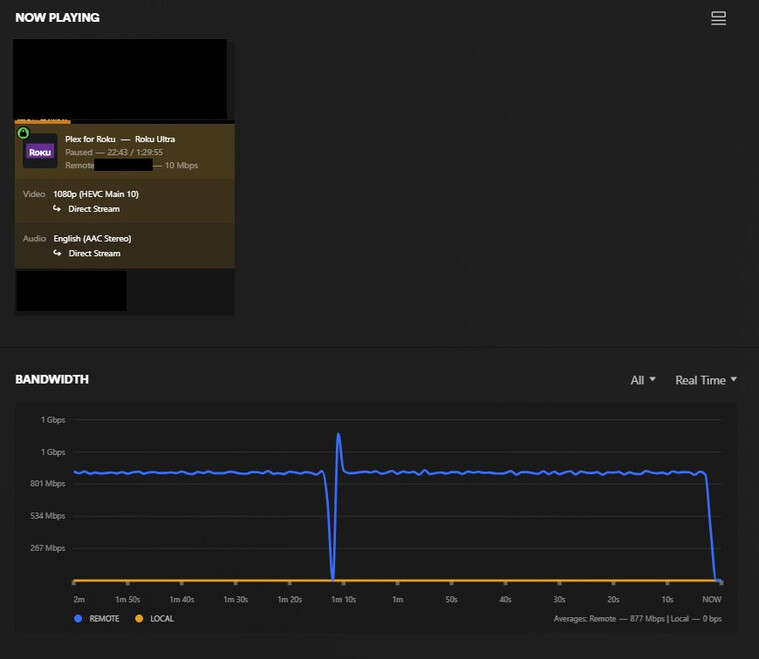
Nonetheless, under the Remote Access settings, I decided to set my internet upload speed to 600 Mbps and Limited remote stream bitrate to 15 Mbps (1080p) - Both were formerly set to unlimited / original respectively.

For testing purposes, under network in settings, I removed the two entries added to the LAN Networks section (192.168.0.0/16, 10.0.0.0/8) so that my local streams would fall under the remote restrictions.

After limiting the playback to 15 Mbps, the artifacts appear much-much less. In a 5 minute segment where an unlimited playback piece would get 8-10 artifacts, limiting the bitrate only produces artifacting maybe 1-2 times.
Once adding my local network subnets back to the Lan Networks in the settings, I can confirm the artifacts get much worse during unrestricted playback.
Edit I just tested on my secondary NUC running server version 1.32.5.7349 , used the sample file provided previously, limited remote playback to 15 Mbps, and removed local subnet entries. I did not have a single artifact / stutter during the entire clip.
adding @Eschmacher in case you want to test this.
You’re on to something here. As soon as I drop the quality from original on either file, it looks better.
@chrisallen Been a couple months, any progress in finding a cause for this behavior?
I’m following this. Just made the switch from Nvidia to a 14900 and I can’t get QSV to work at all. My system is “headless” running Windows 10. It is a Supermicro motherboard with an ASpeed 2600 IPMI BMC. I have both enabled in BIOS and both GPU’s show up in Device Manager. PMS lists the UHD 770 in the dropdown menu of available video engines but does not utilize it.
Any suggestions would be appreciated.
