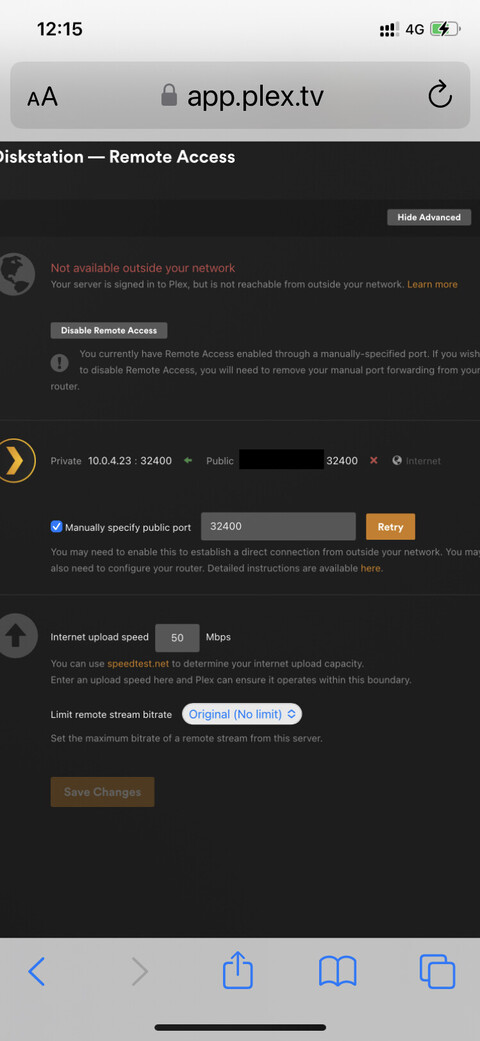
Server Version#:1.30.0.6486-7000
Player Version#: All Players
I have had remote access working for quite long time now but it suddenly stopped working and after a lot of digging around I found out from the ISP that they had decided to block port 32400 (plus a load of others) and would not reopen it for me.
Any suggestions how I can get around this problem?
Thanks folks, will try that.
By coincidence the ISP replied to me again as below so now can’t understand why I have a problem.
“Singtel does not block any of its ONR ports. The configuration adopted by Singtel is TCP port 32400 which is generally used to access Plex Media Server to access music, pictures and videos stored on one computer, with any other computer or compatible mobile device.
Singtel ONR does not support Universal Plug and Play (UPnP) and NAT Port Mapping Protocol (NAT-PMP) auto-configuration that allows Plex Media Server to automatically configure a forwarded port on the router. However, customers can setup manual port forward to allow remote access to Plex Media Server.”
for it to pass the port needs to be open on the router, and there also has to be a device or service listening on that port and be able to respond back.
you have to take the ISPs word that they are not blocking ports, and it would be unlikely they are.
the issue is almost certainly at your end, either the port isn’t open correctly on your router, or you have LAN issues blocking the incoming connection to your plex server.
If you have something like a network camera, you could always try running it on port 32400 temporarily, and test your port forwarding setup. If it works, you know that there is probably some kind of Synology issue.
You could also temporarily install PMS on any other computer you have, and try forwarding there.
If it does not work, then maybe there’s something hidden in your router settings.
I would agree that if the ISP says 32400 is OK for Plex, them being the problem is the least likely issue.
Thanks for all the help folks. I’ve been playing around all day with no results.
I’m in Qatar working and my server is in Singapore at my home so I’m limited as to what I can do.
I’m not a network engineer so my knowledge of what is going on under the hood is not very good. The router is a Synology RT2600ac.
The RT2600ac must hook to the ONR/ONU with an ethernet cable. If the ONR/ONU is in bridge mode then your RT2600ac router will have a public IP and you would configure port forwarding in that device. If the ONR/ONU is not in bridge mode then your RT2600ac will have a private IP so then you would have to configure your port forwarding inside the ONR/ONU instead.
Thanks the advice. Seems the router has a private IP and I can’t access the ONR remotely to setup port forwarding so seems I’ve reached an impasse for a while.
yes but does the synology router also get presented with the WAN IP.
the router will also have a private IP otherwise you wouldn’t be able to access it on the LAN.
if your ISP supplied kit is not in bridge mode then you are essentially running 2 routers on your LAN, which is not the best idea. and in this instance any port forwarding would need to be done, initially, on the ISP supplied kit.
I managed to log in remotely to the ONR and set up a Plex forwarding rule but a port scan still shows it closed. The strange thing is that the VPN port 443 directly above it is shown as open as I’m accessing the server via VON server on the router.
the plex server LAN IP won’t be 192.168.1.1, as that’s the IP of the synology router not the plex server?
also, have you checked if the synology is running in bridge or router mode?
if the ONR is in router mode you should have the synology router in bridge mode.