Server Version#: 4.132.2
Player Version#: 10.18.0.968
Hi, guys.
I hope this message finds you well. I am writing to report an issue I am experiencing with playback of Dolby Vision Profile 7.6 content on my Android TV using the Plex app.
Description of the Issue:
TV Model: TCL 98C745 Android TV
Plex App Version: 10.18.0.968
Issue: Dolby Vision Profile 7.6 content does not play correctly on Plex. However, the same content plays without any issues using the Emby app on the same TV. Additionally, the content plays fine on my Samsung TV and MacBook through Plex.
Steps to Reproduce:
Open the Plex app on TCL Android TV.
Navigate to and select a movie encoded with Dolby Vision Profile 7.6.
Attempt to play the movie.
Observations:
The movie does not play correctly or fails to initiate playback.
This issue is specific to Dolby Vision Profile 7.6 content. Other profiles, such as Profile 8, play without issues.
The content plays correctly on the same TV using the Emby app, indicating that the TV hardware supports Dolby Vision Profile 7.6.
In the Plex app on my TV, I have enabled the feature toggle “Force DoVi Profile 7 support,” but the issue persists.
Additional Information:
I have tried updating the Plex app to the latest version and resetting the app settings, but the issue persists.
The problem seems to be related to how Plex handles Dolby Vision Profile 7.6 on Android TV, as there are no issues on other devices and platforms.
Could you please assist me in resolving this issue? I am keen to continue using Plex for all my media playback needs and would appreciate any guidance or updates on potential fixes for this compatibility problem.
Is there a link to a tutorial on how to do this? I tried doing it through developer mode, but I can’t access the DATA folder. I enabled USB debugging and tried using adb, but it didn’t work.
As for the content, it’s any UHD.Blu-Ray.Remux.2160p.mkv with DoVi Profile 7.6
From MediaInfo:
Format: HEVC
HDR format: Dolby Vision, Version 1.0, dvhe.07.06, BL+EL+RPU, Blu-ray compatible / SMPTE ST 2086, HDR10 compatible
The links are provided in my first message as to how to get your logs. Another question there is a setting on the app under Advanced called Force DoVi Profile 7 Support is this setting enabled? Its default is disabled because we cant keep track of all the models that actually support Profile 7 and even when they do support it they often have playback issues (such as the google chromecast with google tv) so we have allowed users to enable/disable support instead but cant guarantee successful playback as profile 7 is meant for bluray and not streaming.
I came back with the logs.
As I already wrote in the topic, I tried forced activation and it doesn’t work.
I hope the logs will help you figure it out.
So here is the line, ExoPlayer is having issues playing the file, in Emby what player are you using as we know Emby do use different players than Plex.
Can you explain in a bit more detail about the issues with playback that you see?
Is it in specific scenarios like resuming playback, or seeking or is it just in general playing from the beginning?
Are you playing over WiFi or ethernet?
I have tested on a TCL C845 and I have no issues playing a DoVi profile 7.6 file.
I have tried both WiFi and Ethernet. The problem is that buffering occurs constantly, pausing every 5 seconds and starting to load again. It doesn’t matter whether it’s at the beginning of watching or after attempting to rewind.
My friend has a TCL C935 and is experiencing the exact same issue, even if forced support for Profile 7.6 is enabled.
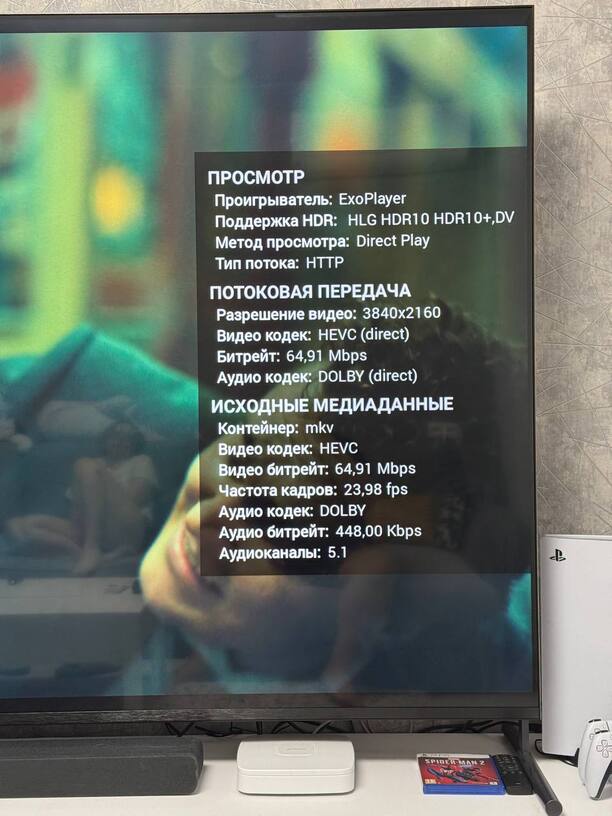
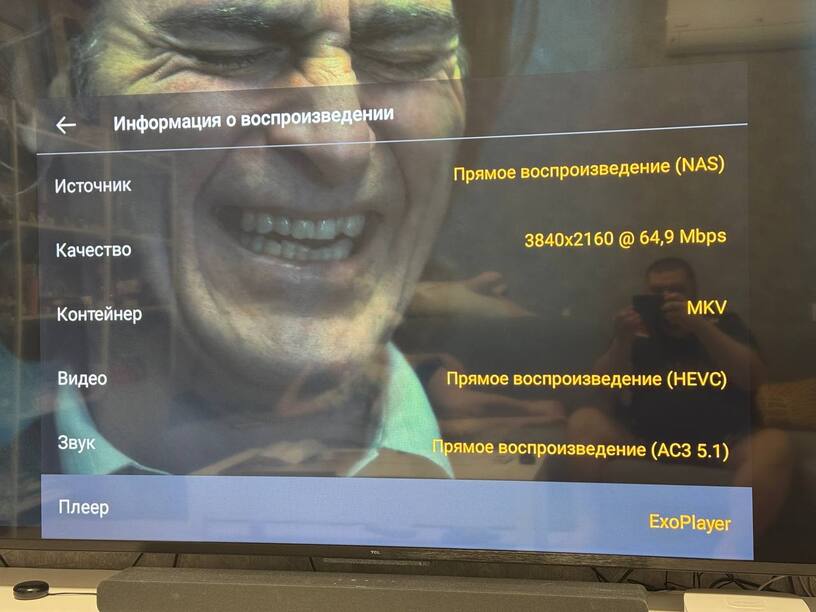
Here are the photos showing what I see in the information in Plex and Emby.
If you disable support for Profile 7 is playback fine?
The ethernet port on those TVs are only 100mb its going to struggle to play files with those bitrates hence any buffering, I have a USB ethernet adapter connected to my C845 to provide a gig connection.