Issue with remote access bandwidth after a server hardware change

Server Version#: 1.29.2.6364
Player Version#: All

Hi…

I had Plex running on a win 7 old PC for years, no major issues.

Box had the motherboard die on me, so had to rebuild onto another PC, similar spec’s etc (Intel Core 4, 8G ram, etc etc).

Once I had done a fresh Win 7 install and all the updates (that was fun!), I installed plex server the same version that the old one was running (current non-beta)

I then copied the plex data from the old PC to the new one, then started plex.

had to reconfirm library locations (it already had them, but made me go through the usual instal install screens), then all looked OK.

At this point, all looked OK, all my library appeared to be in order, only hiccup was Plex recognised this as a different server (even though it’s named the same, on the same IP etc etc), so had to reset customisations in the clients to see the ‘new’ server’s libraries.

All then seemed OK, could play stuff on local TV’s etc as before, no difference.

then the fun bit, all the friends shares I had set were gone - I assume it’s because it’s a different server as plex see’s it, so re-set all of them - that all worked OK.

Now the problem…

for some reason, bandwidth to the internet is being limited to ~3Mb no matter what, as in if I am trying to stream to my phone when it’s NOT on Wifi.

same deal with Roku sticks etc that are remote.

Checked the ‘Remote Access’ settings, and all is as before, - in my case that’s manual port selected, and manual port forwarding in the router.

The plex server reports all is OK, but the bandwidth is still being limited by something, I have set the internet upload speed to 100M (just to ensure that’s not it), and the ‘Limit remote streaming’ to original (no limit).

Obviously, both local and remote use the same network interface (usual gig Ethernet), and locally the Roku’s can run over 250Mbit/s no problem.

I then attached the router, cleared out all the entries for this PC and re-entered them new (just in case it had some hangover from the old box), made zero difference.

So, then I thought is might be a problem with the way Plex installed, so I checked for updates and installed the latest Beta ( 1.29.2.6364), zero change.

It’s still limiting remote connexions to ~3Mb - each - it will support more than 1, but each one seem to be limited to ~3Mb?

This may not be a Plex issue, but I am struggling to think what else it could be?

Ideals anybody?

Thanks in advance.

Simon

PS. been going through the loggs on windows and found a stream of entries in network profile:

event ID: 4001 and 4002

doing a quick search implies a problem with a registry setting or the like (although most are talking about WLan stuff).

I have checked and change the NIC driver too just to cover that off…
Don’t use Win 7 anymore.
By doing so, you are not only endangering yourself, but are also providing free accomodation for all types of a**holes and their malware.

You probably only copied the media files, but not the Plex data folder and the registry branch.
If you did that, you could have avoided

as well as

  • check that Windows has classified the network connection as “private”. If it says “public”, all firewall ports are closed.
  • You should have ensured that the new machine has the same local IP address as the old one. This could have avoided some complications. From what you wrote above, I assume that you have no longer any records which IP it had. So do at least now reserve an IP for it in your router’s DHCP configuration.
  • stop the server, then go into the Plex data folder\Plex Media Server\Cache and delete the file cert-v2.p12
  • Go in Plex’s settings to Settings - ‘Show Advanced’ - Server - Network - “Preferred network interface” and set it from “Any” to the actual network adapter. “Save Changes”
    Then stop and restart the server.

Thanks for the reply…

OK, just to clear some stuff up.

  1. Win 7 - long story, suffice to say I have my reasons.
  2. Plex Data - yes, took everything, including the database.
  3. Win networking is as before, along with the same IP etc, only change is the MAC address of the NIC.

OK, worked on this a bit more, ran up a second NIC, has the same issues.

Seems to vary a bit, as of today, it seems to be ~8Mbit/s

like I said up top, it may well not be a Plex issue…

Did you copy the registry data as well?

Have you tried the stuff I wrote above?

I hope your server is connected by wire to your router?

It is best to have only 1 NIC active on a Plex server. More will only complicate things (unless you are running them “teamed”).

OK,

  1. yes
  2. yes

as I say, added another NIC and then set Plex to use that one for remote access, I then connected that directly to the router (as opposed to everything else that’s via a switch), then set the router to give that port priority.

It may be coincidence, but it seems to have resolved the issue… that said, the box had had a coupe of reboots in the process…

  1. Network wise, yes, all cable at 1Gb

It shouldn’t make much difference, unless the switch itself has fallen back to 10mbps on its own connection to the router (which it would only do if there is a bad cable or some energy saving feature gone rampant).

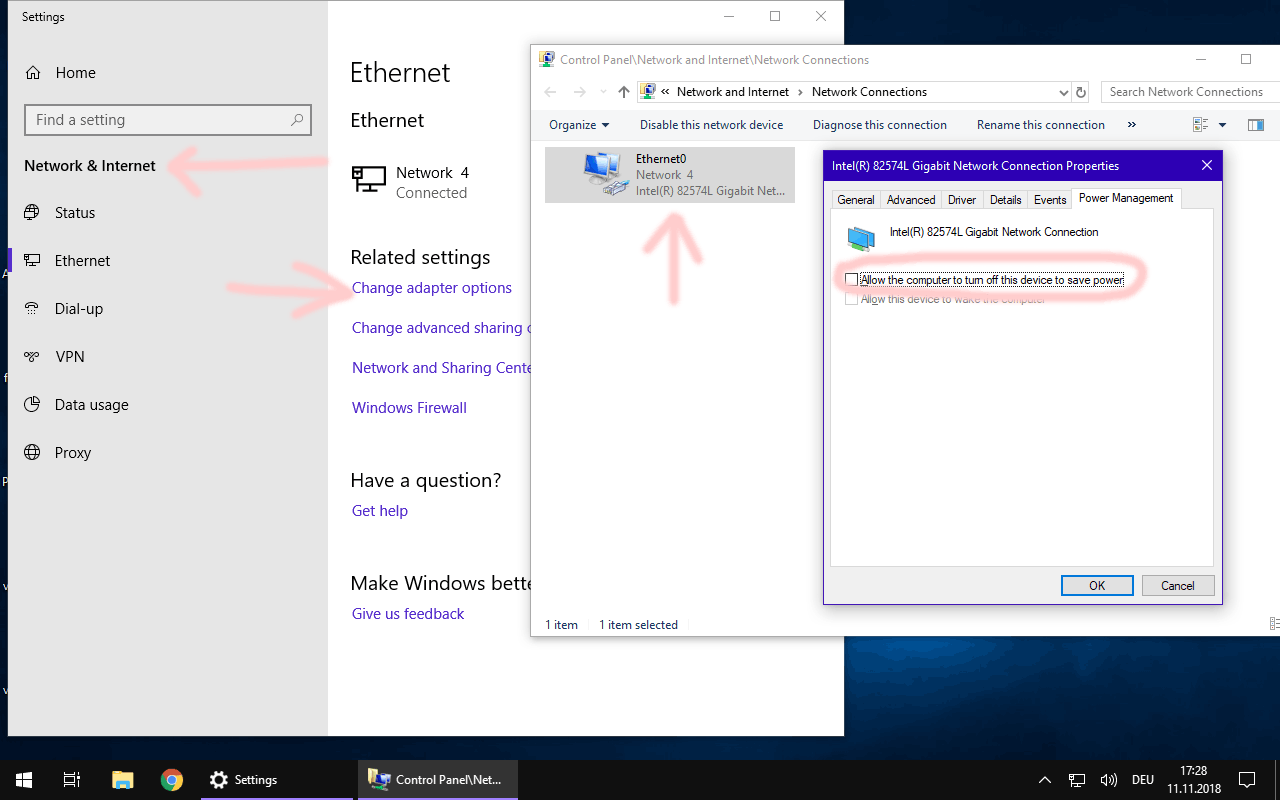
I forgot: in my experience it has been beneficial to stability and responsiveness to disable power saving on the NIC in the server device:

I personaly recommend to do the same on every Windows computer with Plex HTPC installed, if you want to control it from another Plex client. https://support.plex.tv/articles/categories/features/casting-flinging-remote-control/

OK, good point about NIC going to sleep, this I forgot, it was done on the old box…

router wise, reason for the direct link is it’s easier in the router to prioritise an interface/IP than have it do it by protocol, routers CPU is only so fast, and if you ask it to do QOS filtering, it murders the throughput.

I could have just done it by IP though the switch, but going direct also reduces the hop count for this link… and as it;s traffic for the outside world, why give it the extra step and possible conflict in the switch.

I think nothing of that is overly important, if we’re talking GBit connections.

True enough, however, whatever the root cause, it looks like it’s resolved doing this (or maybe it just went away on it’s own?

the box is still doing the odd win7 update, I thought I had got all of them, but apparently not…

As far as I remember, you need at least 2 or 3 reboots until you got them all. Don’t forget to install IE 11 and dot.net as they bring some routines on which Plex is depending.

.Net yes…

IE11? really?

Yep. Really.

OK, I’ll take your word for it… (never had it on the previous box… no IE at all).

Do you know what routines Plex uses and why?

I am no coder. I only know that PMS won’t work correctly without it.

No worries, just interested…

Thanks for your help here…
