Can anyone help?
Apologies, I have been a faithful user of this great program for years… I had to switch harddrives and have been having issues ever since.
I can launch Plex on my main admin user but Plex will no longer stay launched in another user that i have an external drive attached to despite having admin access?
Moving this to its own topic as it appears to be an own issue (not related to the thread you were posting in).
As far as I remember, PMS is running as a specific user. So running it from a different user might not be working. At least it’ll create a separate server configuration for both Mac accounts.
So… if Plex is crashing(?) on one of those accounts… can you manually collect the server logs from that user’s ~/Library/Logs/Plex Media Server/ directory?
if you just use Fast user switching then the server should continue running as the user1 that launched it. If the s user2 wants to access the same server then they should go to app.plex.tv or IP:32400/web, not try to launch the server from the applications folder or dock. else it will create a new server under that user and two servers running at the same time on the same computer is bound to cause problems.
to prevent user2 from being able to try to launch it then when in the user1 account put server app in user1’s Application folder rather than the system Applications folder
I had used PMS under a sub admin with no issue. It was calling to the IP:3400/web. now it is not. im going to try a repair then restore and will let you know how it turns out…
I had been launching it from the applications folder of the sub admin user or the icon in the menu bar. I will also make sure that plex is NOT running in the admin user.
if the subadmin was launching the server then afaik it would have created a separate DB. if you look in each users unique ~/Library/Application Support folder then there should be a Plex Media Sever folder in each with all the associated files including DB. it probably corrupted the subadmins DB that it was trying to create because it was having trouble writing to two DBs at once. (though that is only a guess as I have not experimented with this scenario)
I have attached a screen shot of the folder Databases in question.
What should be present in this folder? There seems to be too many files…
Should all the files that are not com.plexapp.plugins.library.db be deleted?
I’m not clear which MacOS user is supposed to be the one that the server is running under. Or which one is it launching properly.
That is the user library folder for the user account tinglemedia. Is that the account which the server is supposed to be running under and launches fine?
At some point both accounts launched the server when they were logged in so both will have a Plex Media Server in each accounts unique ~/Library/Application Support folder with all that stuff.
Thanks for your reply.
The main admin account runs PMS without issue.
The subadmin user (tinglemedia) is where i would like to run PMS, but is having issues.
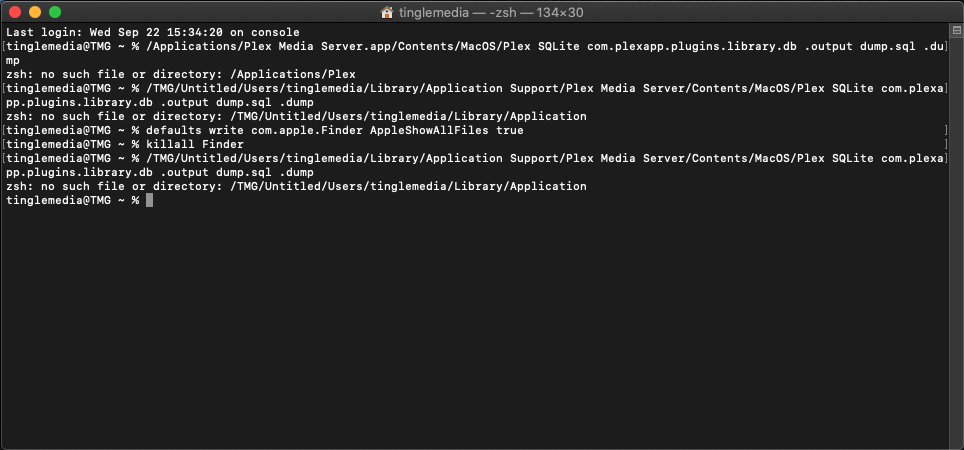
Im am trying to run the Manually Repair Database instructions but am having issues
it is saying file not found when i try to run it in terminal
/TMG/Untitled/Users/tinglemedia/Library/Application Support/Plex Media Server/Contents/MacOS/Plex SQLite com.plexapp.plugins.library.db .output dump.sql .dump