Which postal code and guide are you loading from? I have a channel 12.1 that I can test against, and can look at the actual guide data coming from OnConnect (who is likely your provider for that area).
This happened to me also.
Before it installed the guide it correctly identified 49.1 by its call letters and being MET.V affiliate.
The guide lists it as REVNand of course the programs listed are all wrong.
L1S 0A1 is the postal code, the guide is left to Plex.
I have no idea why we have to match the channels in the DVR setup if it’s not going to use that info.
@DaveBinM Still happening, is there an update on this? Is it being looked at?

@chyjinx just wanted to let you know that i tested out the newest beta and the problems with using a custom xmltv file seems to be fix now. so the layout for the guide and the listing of channel numbers is working.
One note though to get it working it had to delete my tuner, then reboot the server and re-add the tunner and configure the xmltv file for the epg.
I know that the plex team is working on a fix for you, but if you need a workaround in the meantime, this one should be fully useable now.
@chyjinx Sorry it’s taken me a bit to get this one. Can you give me a copy of your current XMLTV file so I can test against it and fix my sim so it creates the same case?
@timwoj I use PLEX to get the channels, is there a way to export the XMLTV file?
So when I’m setting up the DVR it shows and matches to the proper channel (CHEX 12.1 which is CTV in Canada). But when it downloads the guide / show info it shows a different channel and lineup (NBC) . Does the DVR setup and the guide not get their info from the same place?
If there are two channels in your XMLTV guide data that have the same channel number (like in an lcn field) then it will only show the second of them due to how we parse the channel data out. For example I built the following XMLTV:
<tv date="1531772700" source-info-url="https://tv-guide.icetv.com.au" source-info-name="IceTV">
  <channel id="0">
    <display-name lang="en">Channel 12.1 #1</display-name>
    <lcn>12.1</lcn>
    <icon src="http://images.icetv.com.au/channels/sbs-one-v3.png"/>
  </channel>
  <channel id="1">
    <display-name lang="en">Channel 12.1 #2</display-name>
    <lcn>12.1</lcn>
    <icon src="http://images.icetv.com.au/channels/sbs-one-v3.png"/>
  </channel>
  <programme channel="0" start="20180716202500" stop="20180716205500">
    <title lang="en">Fake Show 12.1</title>
    <desc lang="en">Airing 01</desc>
    <sub-title lang="en">Airing 01</sub-title>
    <date>2018</date>
    <country lang="en">United States</country>
    <episode-num system="original-air-date">2018-07-16 20:25:00</episode-num>
    <episode-num system="SxxExx">S01E01</episode-num>
    <episode-num system="xmltv_ns">0.0.</episode-num>
    <premiere/>
    <icon height="680" src="http://images.icetv.com.au/placeholder/22423_poster.png" width="1000"/>
    <video>
      <present>yes</present>
      <colour>yes</colour>
      <aspect>4:3</aspect>
      <quality>SDTV</quality>
    </video>
  </programme>
  <programme channel="1" start="20180716202500" stop="20180716205500">
    <title lang="en">Fake Show 12.1 #2</title>
    <desc lang="en">Airing 01</desc>
    <sub-title lang="en">Airing 01</sub-title>
    <date>2018</date>
    <country lang="en">United States</country>
    <episode-num system="original-air-date">2018-07-16 20:25:00</episode-num>
    <episode-num system="SxxExx">S01E01</episode-num>
    <episode-num system="xmltv_ns">0.0.</episode-num>
    <premiere/>
    <icon height="680" src="http://images.icetv.com.au/placeholder/22423_poster.png" width="1000"/>
    <video>
      <present>yes</present>
      <colour>yes</colour>
      <aspect>4:3</aspect>
      <quality>SDTV</quality>
    </video>
  </programme>
</tv>
Only the second channel shows when I go to DVR setup:

You might look at the XMLTV you get back from your provider and see how it’s built. If you have the URL that your provider gave you to put into Plex when you configured your DVR, you can copy it into a browser and see what it looks like. If not and you want to DM me the URL I can check it out.
Here’s something even crazier, in the picture below I’ve clicked on channel 12.1, but it shows “2.1” (which is my proper NBC channel) As you can see it’s airing Masterchef which is what is currently on CHEX 12.1, not American Ninja like it says on the guide.
That’s because you linked an NBC guide to a CHEX channel. The tuner is picking up CHEX and giving it different guide data doesn’t change what the tuner sees.
Okay, so this is what I do. I setup my DVR with Plex and put in a postal code that is close by so I get all the channels my antenna actually picks up. I don’t use a provider and I get nothing from anyone but what Plex provides me with.
Also I didn’t link a NBC guide to a CHEX channel, I selected the only option for that channel, and that selection said the CHEX as you can see in the topmost picture in thread.
So I understand everything your saying about the XMLTV file having 2 channels but only showing one. But the issue is the channel call letters it finds while scanning channels is CHEXHD, I then select CHEXDT from the pull down (it’s the only one there as you stated because it only shows the second channel) but in the guide it shows NBC. I DO NOT select NBC at all or see NBC anywhere in this setup process.
And now that you mentioned that it only shows the second channel in the selection, I’m assuming Plex is grabbing the guide for the first channel that has 12.1 in the XMLTV file and ignoring my selection for whatever reason.
Where is Plex’s XMLTV file? Can I erase the NBC 12.1 channel from it manually?
Okay after reading the following below, it sounds like you may think I’m a newbie that needs common sense explanations like I’m doing something wrong here.
I’m going through the Plex DVR setup, selecting all the right channels, and in all cases it’s the only selection to match the channels to. Then Plex downloads the wrong guide for channel 12.1.
Please don’t assume I’m doing anything wrong here, because I’m not. I’ve done it over and over many times.
With the New update, so far so good after removing and re-adding the DVR. I will keep this post updated because last time I did this it was fine for a day or so then reverted back.
@timwoj So it worked for a split second, just like always when I re-added the DVR it shows CHEX, after 1 or 2 refreshes of the program guide it goes back to NBC and stays there. Btw this is after the latest update.
@timwoj maybe if you could tell up where plex stores the xmltv file it uses to pull in the guide data, then @chyjinx can take a look at the guide data in the file to give you more details on what is going on.
Keep in mind that he already confirmed that he was able to configure it using zap2xml to work around the issue, but decided to go back to native plex guide data, so it defenitely sounds like the issue is with the plex guide data, but would need to look at that xmltv file to confirm it for sure.
@jrbilodeau I’ve been expecting @timwoj to tell me this, but nothing yet. My channel continues to bounce between the 2 station so it’s really screwing with my recordings but I guess my issue is last on the list.
@timwoj @DaveBinM Has anyone even bothered to look into this? the fact that I’m being ignored isn’t helping. I would like a fix for this. I select the right station while setting up the PVR so why does it constantly switch between station whenever every guide update!? Why is it not listening to my selection based on what channel I’ve selected during the PVR setup?!
I have been experiencing what I believe to be a similar issue over the past few weeks.
My setup:
Two HDHomeRun Quatro tuners
Current version Plex software 1.13.8.5395 Sept. 27, 2018
HDHomeRun Windows app and DVR subscription (used as a backup DVR)
I have been using this setup since April 2018 without any DVR recording issues until recently. I have tried every combination I know to troubleshoot the problem, including deleting and re-installing the tuners.
Problem:
Plex sometimes gets confused between two channels with the same number:
3.2 KURKLD2 (Country Music Channel) San Francisco
3.2 KCRA-TV (MeTV) Sacramento
I live half way between San Francisco and Sacramento and get the strongest channels out of Sacramento due to less mountains and obstructions. Channels out of SF are very weak or mostly undetected, despite being only 30+ miles away.
I cannot view anything off my antenna for KURKLD2 and didn’t know it existed until recently when it started to show up in Plex. MeTV Sacramento comes in very strong.
These images were taken at the same time:

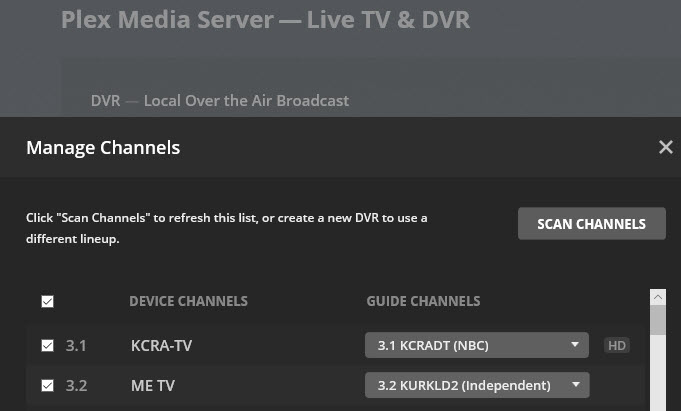

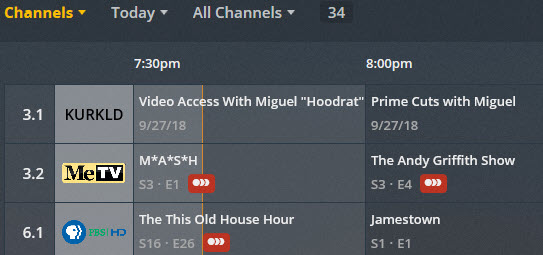
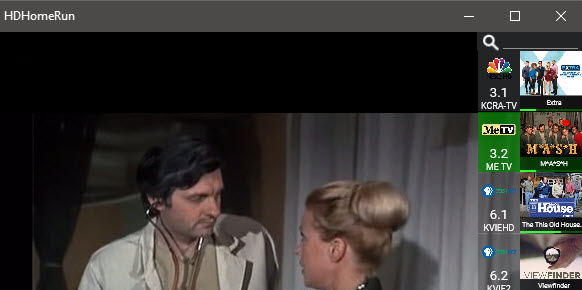
Observations about these images:
- Notice the device channels and descriptions in HDHomeRun and Plex are the same.
- Plex “Manage Channels” shows the guide channel 3.2 as KURKLD2 (CMC) with no choice for
MeTV. Until recently, it always displayed 3.2 KCRA MeTV. - Plex is showing MeTV as the device channel and KURKLD2 as the guide channel but is displaying
MeTV programs in the guide and is recording MeTV scheduled programs. - You can see channel 3.1 is also wrong on the channel guide, it shows the programs for KURKLD2
(CMC). - HDHomeRun app sees MeTV and functions and records properly.
Last night, everything looked the same, except: (I did not make any changes from the previous night)
- The Plex channel guide displayed 3.2 KURKLD2 (CMC) programs and would not record MeTV
programs because it did not see them. - HDHomeRun played and recorded the MeTV programs properly at the same time.
- After several hours (no changes on my part), Plex automatically switched the channel guide back
to MeTV and everything worked the same as the example above. This switching happens
randomly and not every day at different times.

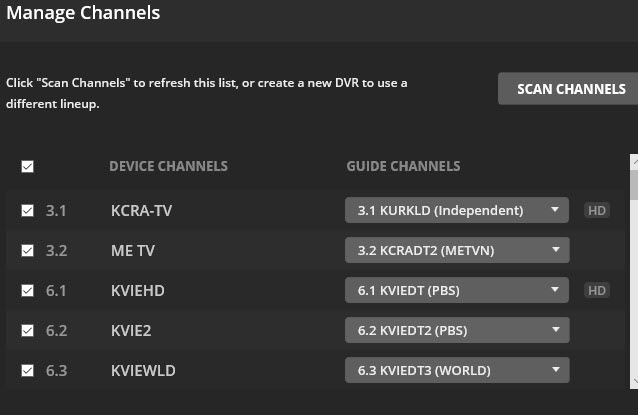
It seems to me something in the Plex software is causing it to pull the wrong data, even though the HDHomeRun channel scan lists the correct channel and description properly.
Anyone experiencing this have any solutions? Why is this happening?
Has there been a resolution to this? I just did a fresh install and I’m having the same issues as jcal65. I’m using a hdhr with an ota antenna. The device channels in plex match the channel name in the hdhr, but I can’t select that channel in the select channel pulldown.
This is occurring for a number of channels in my lineup. I only watch 4 channels and unfortunately one of them will be unusable because the guide data is wrong.
I was hoping to use plex to replace my sage system, but right now that can’t happen.
