Hello. I still have buffering issues with latest version and 4k movies. My TV is hardwired lan to my home network. Same movie with Xplay play just fine. Anyone else having same issues?
1 Like
I do. Speedtest shows a constant 150 Mbps but a 60 Mbps 4k Movie constantly Buffers. Xplay works but would prefer oficcial Plex app
I did some speed tests tonight also. 80Mbps on Ethernet and 150Mbps on Wi-Fi - both buffer constantly.
It actually gets worse the longer you watch a movie - I watched Deadpool UHD remux tonight and it started off fine for the first 30 minutes or so, then started buffering every 5 minutes or so, then towards the end was buffering every 30 seconds.
I just tested the new Plex app for PS4 Pro (V2) and it plays great (albeit, it doesn’t support HDR yet). This is using the exact same network switch as the LG TV that struggles. It would be nice if the experience was the same across both for me.
I feel that there might be a smaller subset of folks who are still having these issues - are these issues being looked into? Or are you applying the 80/20 rule? 
Not all platforms are created equal and have different limitations (including different webOS devices).
Which webOS device are you using?
We’re definitely interested in investigating, but more information is required.
I appreciate the assistance. What information would help?
Here is what Plex tells me about my device and player:
LG OLED65C7P-U
3.70.3
Plex for LG
Hey @markus101, can you please try using a high latency and high bandwidth server? It’s pretty easy to reproduce if the client has high latency (>100ms) to the server.
I’m having this issue and it affects pretty much EVERY recent Plex client (tested android, LG, roku), except the Web Client. Here is a description of the problem:
- Same server, same PMS version, all tests with 180ms ping between client and PMS, bandwidth >50Mbit/s between PMS and client, using low bitrate(<5Mbit/s) 1080p media with just 1 audio stream. Clients tested: Android, LG and Roku, current release versions.
- Direct play works fine for all clients.
- Direct stream works fine for all clients.
- Transcode to 1080p buffers A LOT for all clients. (except Web Client)
- Transcode to 720p buffers less, but still buffers.
- Transcode to 480p doesn’t buffer.
- CPU usage on server is less than 5% even when transcoding to 1080p, transcoder is throttled most of the time.
- Client shows a message saying the server isn’t powerful enough to transcode, or that the network connection to the server isn’t fast enough.
- Same server, same PMS version, all tests with 180ms ping between client and PMS, bandwidth >50Mbit/s between PMS and client, using low bitrate(<5Mbit/s) 1080p media with just 1 audio stream. Clients tested: Android, OLDER VERSION, v5.7.1
- No buffering observed at all. 1080p transcode works just fine.
- CPU usage on server is over 30%. Transcode doesn’t get throttled as often.
Workaround: For Android, use older version, do not update the client. For other platforms I do not know how to downgrade.
Hi all,
I am using LG OLED55B7 and plex app is v3.72.1
I am new to Plex and tried it to see whether it works to play my 4k movies or not.
For 4k it buffers every 10 seconds or so.
Made the green lock go away and tried again. Now it cannot even stop buffering and the movies become unwatchable.
The buffer issue is affecting all 4k movies. I tried 720p and 1080p and they work fine (at least 5min without any buffering).
Even if I try via DLNA, the results are exactly the same as with the app, with secure connections and without.
Tested the network speed of the tv with speedtest and it scores close to 100Mbps.
Is there anything I can do to make it work? Is there an update on the works?
If the 4k movie has HDaudio as first track, then select the second audio track if exists.
I remember that I tried selecting a second audio track, but not sure if that was with the secure connections disabled or not. And it didn’t work. I can try that tomorrow, but I don’t have many hopes.
When you’re playing a file is it direct playing or transcoding? If it’s not working right with dlna either then that would suggest to me it’s a network issue tho. Do you have a big enough usb drive to try playing a file back locally on the TV?
It is direct play. Or at least it is selected to use it. But via dlna it is definitely direct play. What I suspect now is that dlna might overahadow the server’s cpu. I want to try that once I get off from work.
I have the same infuriating issue: live TV and shows in the process of recording buffer like crazy on Plex for my 2018 LG smart TV (WebOS 3), but not on Plex for any other devices, nor on the HDHomeRun app for my phone/tablet. Once the recordings are complete, they play fine with minimal buffering, but this doesn’t help when I’m trying to start watching a football game on delay, as I was last night.
I likewise tried all fixes/Plex settings changes mentioned above. @markus101 is there a permanent fix currently being developed by Plex for this LG app? If yes, when should we expect it?
Disabling dlna didn’t fix anything. On further investigation, it all points to the pms trying to transcode the 4k videos. Checked it through the web app, where I tried to play a video and saw the network usage of my pc, which showed no continuous flow of data, but peaks and zeros almost like a triangular sinus wave. Tried the same file via the smb share on my gaming pc and it was able to play it with a nice continuous flow of data. I checked then what was the cpu usage of the pms on the NAS pc during the web app video playback and it showed that the usage goes through the roof. Which explains the buffering. And that means transcoding. What I don’t understand is the reason of the transcoding.
My tv is LG OLED55B7, running webOS 3.(something don’t remember right now)
Plex v3.72.1
Following is the .nfo of the video
Format                      : Matroska
DXVA Compliant              : No (requires HEVC/H.265 Decode)
Format version              : Version 4 / Version 2
File size                   : 47.2 GiB
Duration                    : 2 h 8 min
Overall bit rate            : 52.7 Mb/s
Encoded date                : UTC 2018-09-09 18:34:42
Writing application         : mkvmerge v26.0.0 ('In The Game' ) 64-bit
Writing library             : libebml v1.3.6 + libmatroska v1.4.9

IMDb Information            : http://www.imdb.com/title/tt4881806/
Genre                       : Action | Adventure | Sci-Fi

[color=red][b]Audio 1 Info[/b][/color]

Codec................: DTS X / MA / Core
Bitrate..............: 4 231 Kbps / 4 231 Kbps / 1 509 Kbps
kHz/bit..............:  / 48.0 KHz / 48.0 KHz /  / 24 bits / 24 bits
Channels.............: Object Based / 8 / 6
Language.............: English
Subtitles............: English (SDH), Spanish, French.

[color=red][b]Audio 2 Info[/b][/color]

Codec................: DTS MA / Core
Bitrate..............: 2 046 Kbps /  1 509 Kbps
kHz/bit..............: 48.0 KHz /  24 bits
Channels.............: 8 / 6
Language.............: Spanish
Subtitles............: English (SDH), Spanish, French.

[color=red][b]Audio 3 Info[/b][/color]

Codec................: DTS MA / Core
Bitrate..............: 2 046 Kbps / 1 509 Kbps
kHz/bit..............: 48.0 KHz / 24 bits
Channels.............: 8 / 6
Language.............: French
Subtitles............: English (SDH), Spanish, French.

[color=red][b]Video Info[/b][/color]

Codec................: HEVC
Type.................: 2160p UHD BluRay Remux
Format Profile Level.: Main 10@L5.1@High
Resolution...........: 3840x2160
Aspect Ratio.........: 16:9
Bitrate..............: 44.2 Mbps
Framerate............: 23.976 (24000/1001) FPS

[color=red][b]Source[/b][/color]

QUICK SUMMARY:

Disc Title: JWFK_UPK75
Disc Size: 86,653,925,376 bytes
Protection: AACS2
BD-Java: Yes
Playlist: 00800.MPLS
Size: 58,722,895,872 bytes
Length: 2:08:17.690
Total Bitrate: 61.03 Mbps
Video: MPEG-H HEVC Video / 44266 kbps / 2160p / 23.976 fps / 16:9 / Main 10 Profile 5.1 High / 4:2:0 / 10 bits / HDR / BT.2020 /
Video: * MPEG-H HEVC Video / 44266 kbps / 1080p / 23.976 fps / 16:9 / Main 10 Profile 5.1 High / 4:2:0 / 10 bits / Dolby Vision / BT.2020 /
Audio: English / DTS:X/DTS-HD Master Audio / 7.1-X / 48 kHz / 4231 kbps / 24-bit (DTS Core: 5.1 / 48 kHz / 1509 kbps / 24-bit)
Audio: Spanish / DTS-HD Audio / 7.1 / 48 kHz / 2046 kbps / 24-bit (DTS Core: 5.1 / 48 kHz / 1509 kbps / 24-bit)
Audio: French / DTS-HD Audio / 7.1 / 48 kHz / 2046 kbps / 24-bit (DTS Core: 5.1 / 48 kHz / 1509 kbps / 24-bit)
Subtitle: English / 34.324 kbps
Subtitle: Spanish / 24.741 kbps
Subtitle: French / 23.287 kbps
Subtitle: Spanish / 0.189 kbps
Subtitle: French / 0.631 kbps
Same results I get when I try to run it through Plex app, Xplay or dlna.
Why is transcoding needed?
Have you got any subtitles selected while playing?
No, I do not.
When you play the video go to your plex server’s webpage and check what it’s doing with the file. You’ll need to click the activity button in the top right (assuming you’re running a recent plex server it’ll be lit up with a number next to it) and select ‘Now playing’. That should open a new page show the file being played. If you mouse over the playing file picture, it’ll say whether it’s direct playing or being converted. If it’s the latter it’ll also say what’s being converted. Can you make a note of that or get a screenshot?
It says that it is direct play, but still buffering.
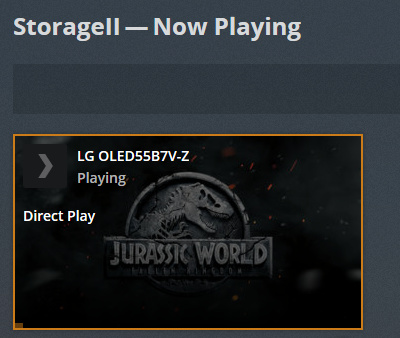
Connection to the network is wired by the way.
Also checked the pms whether it is transcoding… it’s not!

So what is making me buffer that much?
Check the LG app settings and make sure ‘Allow fallback to insecure connections’ and ‘Prefer insecure connections’ are both set to ‘On same network as server’. Also check that ‘Secure connections’ on the Network page of the Plex server settings is not set to Required.
How is your TV connected to your server? Any equipment in between? Is your media stored locally to the server or does it access it over a network?
The secure connections stuff is done already.
The content is on a NAS vm running in a windows pc close to the tv. Both are connected to the same router. Nothing in between.
