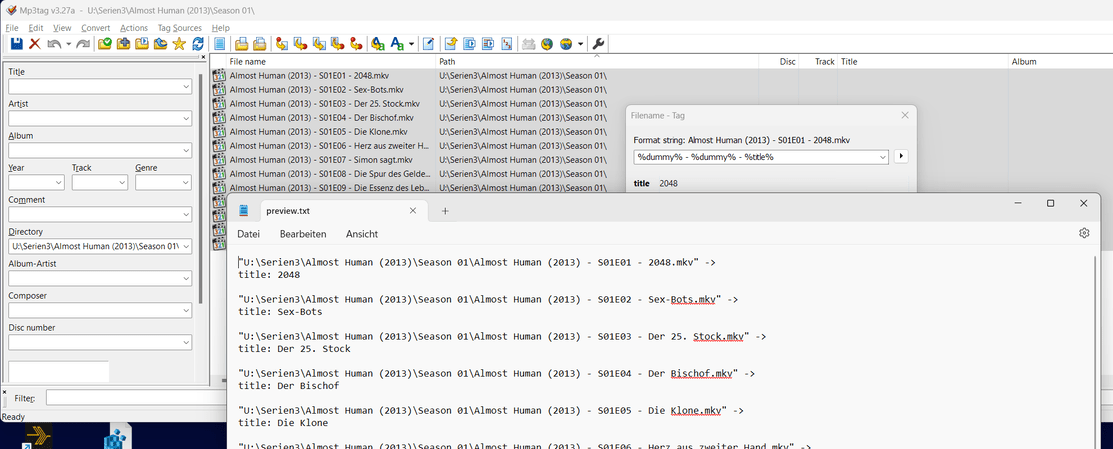
Tip: if your video files are already named after a common pattern (ideally, already after the Plex norm Show Title - SxxEyy - Episode Title), you can use mp3tag’s “Convert: Filename → Tag” feature to write the episode title into all files at once.
The format string %dummy% - %dummy% - %title% might do it for the above pattern.
(Please ignore the mkv file name extension in this screenshot. Tagging these mkv files would unfortunately do nothing in Plex. I only used these files to illustrate the process in mp3tag.)
Thank you. The meta tag PODCASTDESC worked. I had a fairly long description and it all came through to PLEX’s summary for the episode. Hitting Refresh Metadata for the episode doe not load the metadata. I have to do it for the series to make it load.
I still have an issue with MP3TAG. After I make changes to the tags of a file. It takes for ever to write the tag data. Meanwhile, I cannot work on another file or the program will hang. Is this normal?
Yes. If the file hasn’t had any tags before, the software has to make room first for the meta tags. It can do this only by reading and then writing the whole file in full. You can imagine that this can take quite a while – particularly if it’s done over a network connection.
What you can do, is pick a random unused metadata tag, and overnight set that tag to something in bulk. Then moving forward when you are working with tags its much faster.
Whether you remove that “placeholder” tag afterwards is up to you. If you name it with some unrecognized title, it should not have any negative effects even if you leave it in there permanently.
Yes, mp3tag allows you to select several files and assign them tags at once. I’m doing that in my 3rd screenshot above. Same method as in Windows file explorer: mark the first item, go down to the last item, hold down the Shift-key and click. All items in between are now selected as well.
Use the CTRL-key and click to toggle the selection of single items.
@OttoKerner, thanks for the tip. That was not obvious I can do that.
I found various discussions on using NFO files to store the related info for each video and using the XBMCnfoTVImporter.bundle as agent to import it into PMS. Do you recommend that?
I tried and it wasn’t clear to me how to install that bundle . It says to added that bundle’s folder to my PMS plugin folder at %appdata%\Plex Media Server\Plug-ins. I did that and this XBMCnfoTVImporter did not show up as option to be selected as agent. Also, per the example at this example link, it uses the PLEX Series Scanner as Scanner. But on my system, if I select the PLEX Series Scanner as scanner, I get an error when I click Save Changes saying that the changes cannot be saved. So I was not able to get it to work.
Also, it was mentioned previously that I have legacy agents which may stop working anytime. I can see it on my server…
No, as it hasn’t been updated in a long time and still relies on Python. Because of that, it belongs to the legacy agents.
There may be native support for nfo files at some point in the future. So it can’t hurt to put some nfo files beside your videos. But I wouldn’t count on support arriving tomorrow.
Can you guide me on how to fix the legacy agent issue. Under Agents for the my server, I have Plex Movie (Legacy) selected and cannot be unchecked. How do I fix that?
I have the exact same issue. Though I believe mine started after the latest update (currently running Version 1.41.3.9314). I’ve had plex pass since 2012 and have never had such an issue. I’ve tried everything including reinstalling PMS. Analyzed the files, numerous scans, reboots, etc. All new videos added after the latest update simply don’t show up in the library. This applies to TV Shows and Movies and all 5 library sources i have. Movies added prior to the update play just fine.
The only other weird thing is that the “Recommended” tag shows an error. But Library tab loads without issue.
I’m running W11 Pro. Am I the only one with this issue?
You are right. I forgot that I have set the same description in the PODCASTDESC tag of that video previously. So, it came from there, not from the nfo file.
Is there a tag that will set the first aired date?