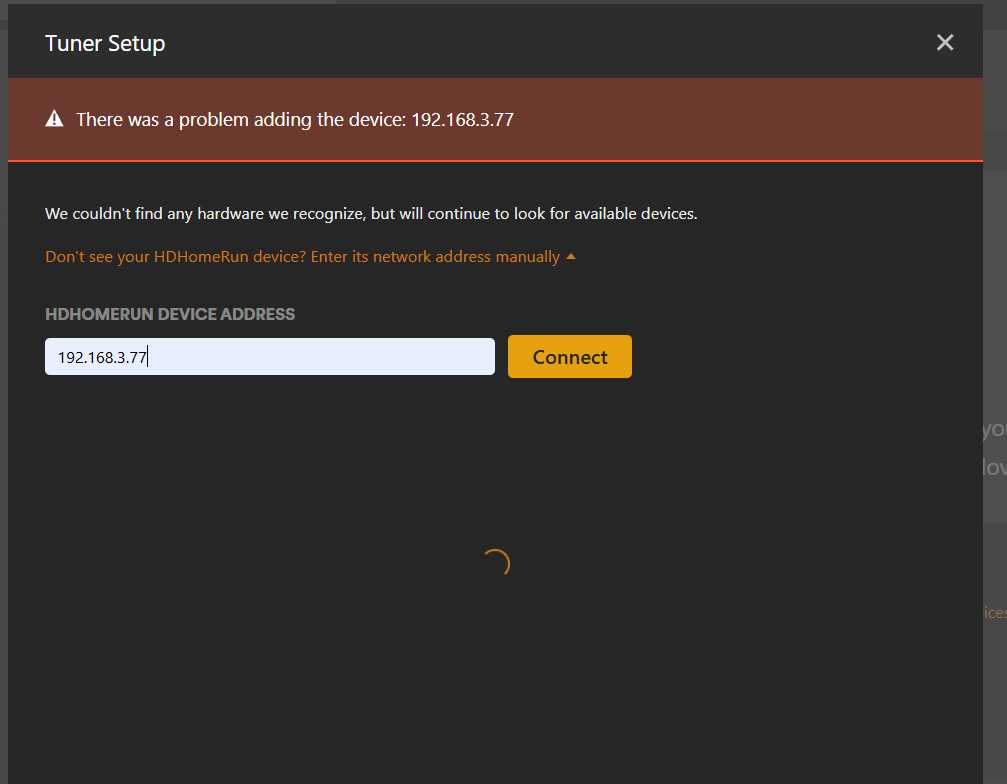
Server Version#: Version 1.41.4.9463
Player Version#: n/a
Tuner Make/Model: HDHomerun HDHR4-2US Firmware 20230713
Guide/Lineup name:
Using XMLTV?:
Channel number/Name:
<If providing server logs please do NOT turn on verbose logging, only debug logging should be enabled>
Long time PLex Media Server user on Plex. With a network upgrade, I created multiple subnets on my network using a OPNSense router. The PMS is hosted on 192.168.1.48:32400 and is working swimmingly. The HDHomerun is installed on 192.168.3.77 and it can be accessed from anywhere no problem.
However, Plex cannot add the HDhomerun to its live DVR. It doesn’t autodetect, nor does it add when I manually specify the ip address (192.168.3.77).
Has anybody managed to get this set up? I searched reddit and here and aside from the obvious “put it on the same subnet as the Plex Media Server” answer (which I cannot do)
I checked my firewall traffic and there is nothing being blocked on the firewall side while viewing the live logs. Is there a specific port address I have to add to the 192.168.3.77:xxxx to make this work (I tried many common ones).
Its probably a stupid setting somewhere, but appreciate the help on this.
That’s to be expected. Plex Media Server uses SSDP to discover HDHR network tuners; SSDP relies on multicast (to 239.255.255.250) which doesn’t cross network boundaries (at least not without some help). So it not being auto-detected by the server is completely normal.
This isn’t expected. In fact, I just tested with a spare HDHR Flex 4K. I placed it on my untrusted network and, as expected, it was not auto-detected. However, as soon as I manually entered its IP address, PMS detected it and allowed me to continue setting up the DVR.
My network (Unifi-based) is configured to allow all traffic from my trusted network to pass indiscriminately to my untrusted network. All traffic from untrusted to trusted is dropped, except for established and related (that is, traffic in response to, or related to, sessions already created by the trusted network).
Why not? I ask because a useful test would be to place it back on your trusted VLAN to ensure that it can still be detected there. Plex might have problems detecting this as a new tuner if it thinks it already exists in your previous configuration. If that’s the case it can be corrected with some minor database manipulation, but that might be challenging in your environment (presumably Docker on Truenas).
But let’s go for the low-hanging fruit first. When you manually configure the tuner, PMS is going to send an HTTP request to ipaddress:80. So ensure you allow at least that. Actually, for the time being, I’d recommend allowing all traffic to that IP address to pass. And ensure you’re allowing established/related traffic in the other direction as well.
Its actually k3s on Truenas Scale (app), not docker. Probably that is the problem.
I guess its hard because I have physical bare metal separation on my subnet networks. Its not actually VLANs. There is no firewall rule blocking network traffic between any subnets right now. I checked the firewall for both blocked, dropped and allowed. Maybe I am not understanding the firewall fillter. There appears to be no way of filtering by http on the firewall log screen. That said, all other devices can communicate with plex just peachy on every other subnet.
Ah, gotcha. I honestly have no clue then. If a computer with a browser on the same subnet as PMS can reach the tuner on port 80, then PMS should be able to. Other ports will be needed for tuning channels/streaming (at least 5004), but for discovery port 80 should be all that’s required as far as I know.
I’d still recommend trying it wide open (all traffic allowed from the PMS subnet to the IP address of the tuner). That would at least rule out the possibility of some esoteric port being used of when I’m not aware (SiliconDust’s software uses their own discover methods on differing ports).
At any rate, if you want to ensure a clean start from the PMS perspective, you can delete the DVR through the web UI. After that, if you’re comfortable on the command-line, find wherever PMS stores the Plex data folder on that platform and look in the sub-directory ‘Plug-in Support/Databases’.
Within there is the PMS database: com.plexapp.plugins.library.db. Find the Plex SQLite application in PMS’ application directory (on ‘normal’ Linux its at /usr/lib/plexmediaserver) and open the database. You can remove all traces of the DVR configuration and any previously discovered tuners with DELETE FROM media_provider_resources;. It’s important that any existing DVRs have been deleted from the web UI first.
Then, try to manually add your tuner again. If there was an old tuner configuration blocking its addition, the above should have cleared it. If it still doesn’t work, there are likely network complications.
Notes:
Obviously, please backup your DB before doing the above.
Plex Media Server must be stopped during these database modifications.
You must use the Plex SQLite application and not the system-provided sqlite3 app, for reasons.
THank you pshanew for all the support. Clearly you have a very high technical knowledge of Plex, and certainly more than I ever have or will. I don’t have any working DVR, so clean slating this is fine by me.
I bet it is something very simple or easy to fix, and I will attempt to do this from a command line interface as you write. I am a total hack at Linux /FreeBSD but Chatgpt has been quite helpful to date, and all things considered, I am very proud of my home network setup to date (Truenas, Opnsense, 10g networking, 99% de-botnetted Adguard home internet experience, children friendly IoT networking). I will persevere and your insight / support has been most helpful.