I also can not log in from new mobile devices, Android nor iOS.
The error is I entered the wrong password too many times and log in is temporarily unavailable.
The same problem with log into plex.tv in browser, on the server:
Same issue I am in Pacific northwest USA. I logged my plex server out to try to see if looging out and back in worked. Plex server will no longer start.
The issues seems to have resolved itself. I see that the Status page was updated to say there was a 20 minute “Major” outage for the Authentication/API server. I apparently just happened to fall into that time frame.
I get that there is an issue but I have to agree with OPs initial problem
it should not be, that the local server does not work, just because plex.tv does not work
that kinda beats the whole “local” part of it
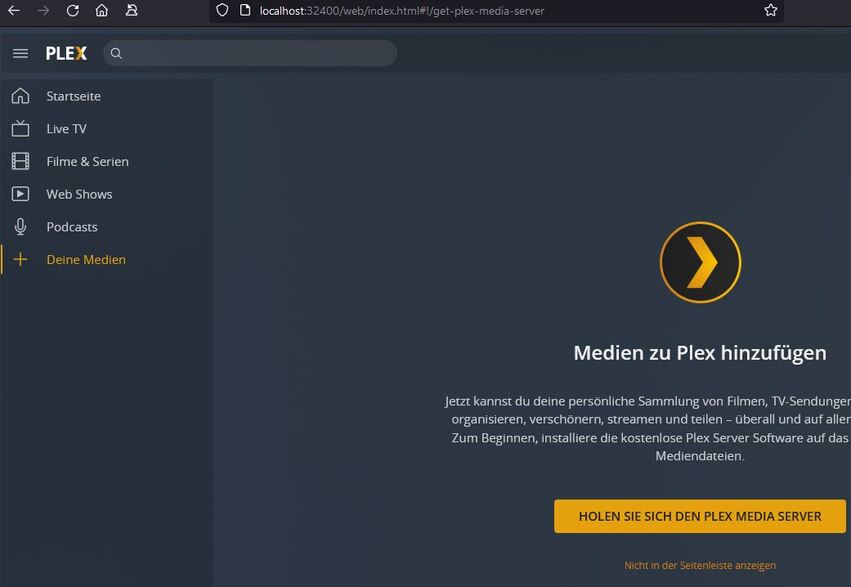
and to take it up a notch, accessing my PMS server localy asks me to download PMS
Under Settings → Network, right down the bottom you should set your local IP range in the ‘List of ip addresses and networks that are allowed without auth’ box. This keeps Plex accessible on your local network if your PMS can’t phone home. ‘10.0.0.1/255.255.255.0’ is mine.
Still dead for me. I’m running plex server on an nvidia shield. The server is logged out and will no longer start. It just says “stopped” ifi click to enable it just spins for a second and still says stopped.
I have to admit I love plex but this has me rethinking things. It killed the web interface and the local interface to the point it’s dead. Local connections should always function JMO.
I, also, am not getting connected to my Plex server, I can see it’s there. It says it on, but it’s not showing as available. I installed version 1.25.2.5319 on my ReadyNAS 214 and was getting no remote access. Tried to turn that on with no success. It didn’t look like it was connecting with the Plex server on the NAS drive so I disconnected the device in the app, signed out and back in and it doesn’t show up to add. I don’t get any of my media through Plex. This is the only kind of support available? After seven years using this? This is severely poor support.
Poor support? I mean it’s the holidays and they are working on it. It just happened so hold your horses. Poo happens sometimes.
My concerns are future looking I switched from kodi because plex was just easier. But the idea they can be taken down entirely and your media is dead is a bit concerning.
Add your LAN subnet, (e.g 192.168.0.0/24) to the list of IPs which are allowed without authentication.
IF you have the ability to specify FQDNs in your firewall + VPNs, you can do something more exotic and make those remote hosts also appear as local on your LAN. Such a configuration is not easy to do unless you have the right infrastructure.