Server Version#: 1.32.0.6973-a787c5a8e-x86_64_DSM7
Player Version#: 5.59.3
Hi there, I’ve been having these two issues consistently with streaming to my Samsung TV from my Synology DiskStation DS720+ for a while, and I’m hoping to find a solution. The first issue is long stuttering of the video, but not the audio. The second is a corruption of the video. To me it seems to be missing key frames, or “VLCing”. I have confirmed that these issues do not happen on other platforms. I’ve tested on my Chromecast, Android, and PC, and none experience this issue. All were transcoding to burn in subtitles as well. The issues seem to be fairly consistent. Usually the stuttering will happen at the same time if I reload the video or seek back, but very rarely seeking back and playing again will not have the stutter in the same place. I have tried the following solutions to no avail:
-Set Burn Subtitles to Always in the Samsung app settings menu. This was the only possible solution so a similar problem that I found on Google.
-Ensured DSM, Plex Media Server, and the Plex for Samsung app are up to date.
-Defragmented the NAS’s file system
I have linked videos of the issue below. The first clip shows the long stuttering and some of the corruption on the bottom of the video. The second clip shows a more obvious example of the video corruption. Thanks in advance for your assistance.
Do these happen to be MKV files?
I have an extremely similar issue with MKVs that have a lot of subtitle tracks (more than 20-30) that seems to be a known samsung issue. For me just stripping the subtitles I don’t want out fixes it
Hi there, thanks for your reply. The video I showed in my example only has one subtitle track. I don’t have any media in my library with 20-30 subtitle tracks.
Hi there, thanks for your reply and for linking that thread.
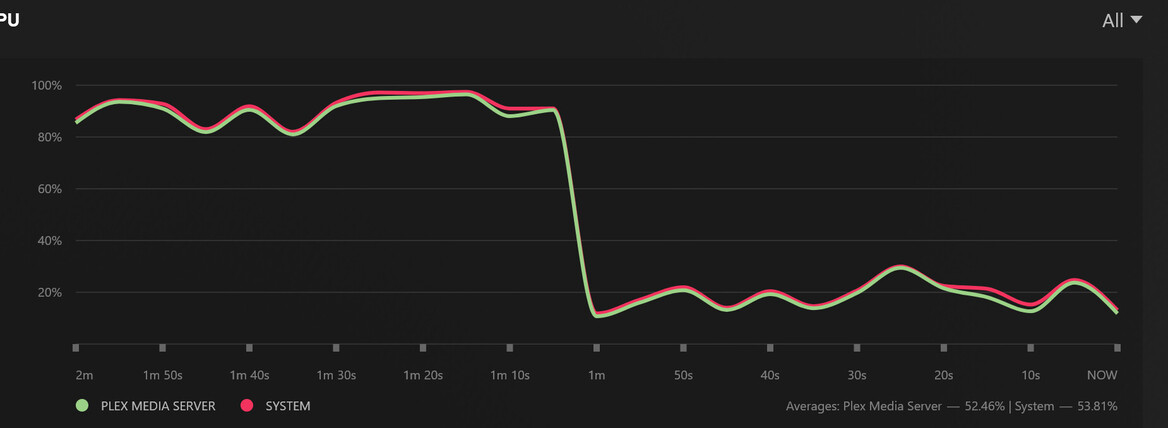
That is my CPU, and I just checked and it does seem my usage is at 80-100% now. Unfortunately, I believe this issue has been happening since before that problematic update came out. I am not having any stuttering issue related to the CPU being at 100% from what I can tell. I am having another issue where the transcoder just “gives up” and the playback begins buffering very slowly, but I believe this to be yet another separate issue.
(Playback started buffering very slowly when the cpu usage dropped. I didn’t pause the video.)