Strange behaviour (since last update?):
Plex server setup for remote access. Worked without any problems.
Now:
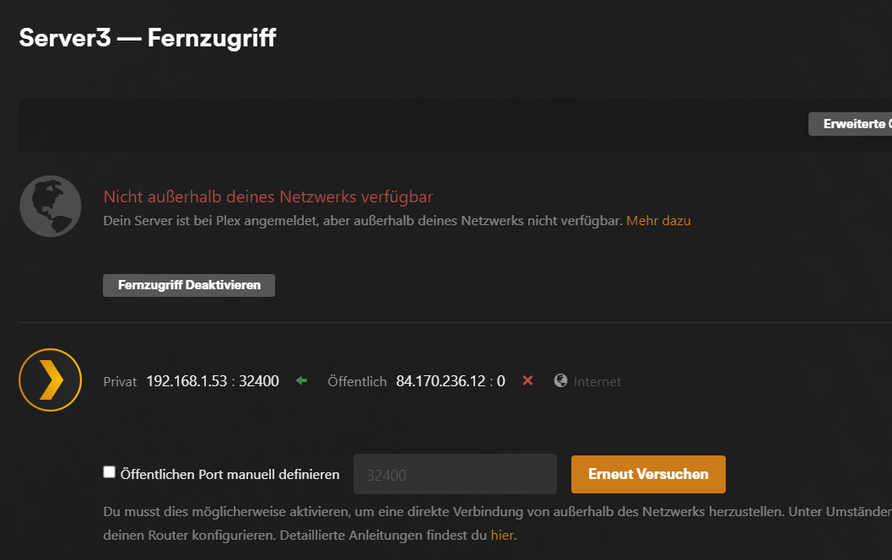
The server is not accessible. On the administration interface for remote access it says “not accessible from outside” (see screenshot)
On that same page, pushing the retry button will immediately show “fully accessable” (see screenshot) - and the server is accessible from outside.
But after a few minutes the server is unavailable again. Pushing the button will make it immediately available again, but after a few minutes…
I haven’t changed anything at the firewall, router or Plex-setup.
I do have a manual port setup in the FritzBox.
Worked like charme and I didn’t change anything at the Fritzbox-Settings.
And what’s strange: When I hit the “test” button it switches to “everything’s fine” - just to not work again after a while…
Strange. Haven’t seen that it was unchecked. Since I configured the standard port for port forwarding, I’m quite sure it worked without that checkbox. But I’ll give it a try… …
With the last update, I lost the connection to my internet. If it reconnects though, it is for less than a second. I have never touched the setting for my router or plex since I set everything up over 6 years ago. This is the first time that I have had this problem.
Remote Access will always turn Green when you click it (Opportunistically)
– If it’s unable to verify the connection (Plex.tv replies) then it turns RED again a few seconds later
There are to parts to making Remote Access always work.
Configuring the Synology
If your Synology Firewall is enabled, Ensure you’ve created a rule which allows DSM port 32400/TCP to accept traffic.
– ALL inbound PMS traffic for Remote Access will come here.
This is where things usually go awry.
Modem/routers can be configured manually or automatically.
Manual port forwarding is where you create a NAT/Gaming/Port Forwarding rule in the modem router to send all traffic received on the port you want to use to port 32400 of the Syno.
Every modem/router should allow you to log into it (directly or have an app for your phone or browser URL for cloud-based devices)
Automatic port forwarding is where PMS sends a request for a port to be allocated (UPnP - Universal Plug-n-Play protocol — Often known as ‘Plug-N-Pray protocol’).
– With UPnP, there is table of the allocations. The most common failure of UPnP is when that table fills and no more can be allocated. This is where you need to go into the modem/router and delete the old entries.
The most stable method is:
Decide on which WAN (Internet facing) port you want opened (5120 → 65535)
Confirm your Synology’s DEFAULT ethernet port is configured as STATIC assigned (so it doesn’t change)
Sign into the modem/router and create the NAT/Gaming/Port Forwarding rule from the port you want to use to Syno_IP_Address:32400/tcp
If anyone needs help finding where the settings are in their modem/router,
Please share the Make and Model here. We’ll lookup the manual pages for it and then point you to what you need to do.
@spiderff Did you try to check the “Manually specify public port” and enter the default port of 32400?
This solved the problem for me.
(seems to be a tiny buy)


 …
…


