Roon manages to handle gapless perfectly and allow DSP functions so it’s possible.
I’m sure some aspects are possible; the main point I was trying to make was that Plexamp uses the Plex receiver app, so it would be up to that software/team to make enhancements.
It’s more than likely Roon renders the gapless/DSP stream on the server side and just sends that over to the Chromecast. That would require changes on the Plex Media Server and the Chromecast receiver side.
tl;dr; not a trivial change we can make inside Plexamp.
1 Like
The best kind of problems are the ones which solve themselves! Glad you’re up and running.
Is it possible to provide casting support for downloaded items from Android?
1 Like
Fair enough. Tbh I don’t know of any apps that mange Gapless on Chromecast except Play Music and Roon. Good to see Chromecast added though. Keep up the good work PlexAmp is becoming a more interesting proposition all the time.
I’d love to see this too! I just updated to 3.2.1, noticed the “Cast” button, and got super excited!, but then saw the dreaded “Cannot cast downloads” message.
Is this because Plexamp can’t cast directly from phone/tablet to the audio devices?
2 Likes
I don’t know… Over the years I have only very occasionally been able to cast from the Plex for Android, but not for a long time. I was hoping plexamp would be different in this regard.
Anyone else having issues Casting to Sonos? I have a Sonos Connect (Sonos S1 Legacy) and it shows up on all my Android devices and on my IOS iPad and even shows up on my computer, when I select the Sonos for casting the music on the Sonos cuts off like it is ready to receive what I am going to cast to it but then I get his message “Could not switch to player”:
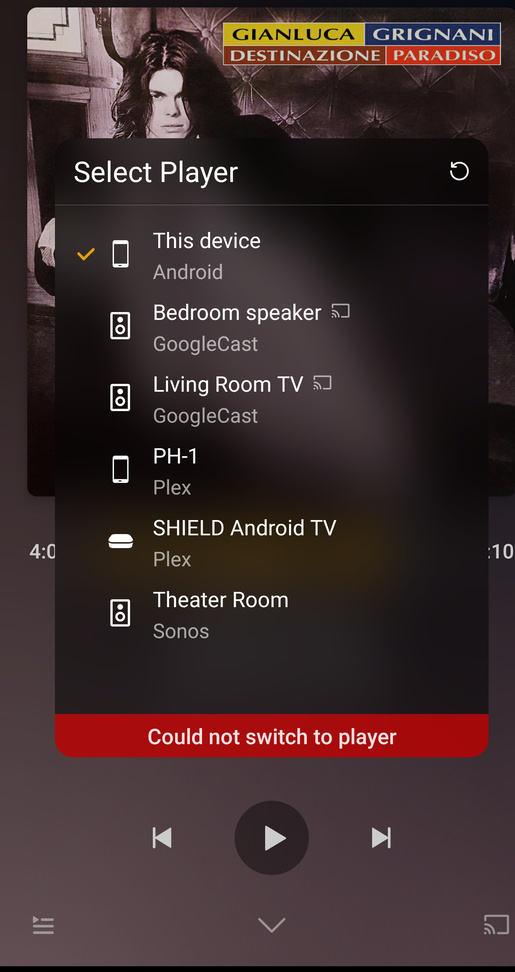
Just came across this restriction too. Going to have to work out how to stream by Bluetooth by the looks of things.
I’m sure only a couple of weeks ago was able to cast to my TV and Audio chromecast devices, from my OnePlus 6 with Plexamp. But today unable to… Any logs to see why one cannot connect? Is it plex, android or the chromecasts? 
(can’t work how to insert very similar image as above) “Could not connect to player”.
Hi guy’s i’m trying to make plexamp work on Chromecast with Google Tv, I have downloaded the APK version and install it on the Chromecast but i’m stuck to the login page. Remote dont work…
Anyones have trying this ?
I love the interface better of plexamp vs plex.
Thanks
Hoping you guys are able to figure out casting on the desktop app eventually. It would be awesome to start listening to music on my PC, cast to a Google Nest Mini in the bathroom while in the shower, then cast to the living room Chromecast while cooking, cleaning, whatever. One of the few things that Spotify can do that Plex can’t I’ve discovered.
I know this can be done with mobile, but it uses the actual Plex application, not Plexamp. Is there any way to have a mobile phone cast to the desktop PlexAMP app instead off the default plex app?
Latest version of Plexamp 3.4.1, seems to have a long delay when casting. I can connect to my devices (Chromecast audio, or Nest mini or Shield TV) but when I hit play or skip track it takes 48 seconds to play. 
Note: this is only my Android phone (PH-1 running Android 11), on my iPad it seems to work correct and also on my tablet running Android 7.1 it seems to work fine.
After months of me hoping for and getting chromecast support. I’ve now changed my home set up and I hope for Alexacast. What the chance? Or some way to cast to Echo devices.
Yours hopefully 
Still seeing casting issues with the latest version 3.4.1? it is taking a long time to start playing from all my cast-able devices, iPad, Essential Phone, and Android tablet. Once it starts playing it seems to work fine but if I try and skip a track it will hang again for another minute… I can see it trying to play the track as it jumps from 0-1 sec and back to 0 the entire time until it starts playing. Am I the only one seeing this issue? Perhaps it is a server side issue with my PMS on the Shield TV? I can play all content just fine on Plexamp without the delay as long as I play it local on my devices. Also Plex app on all my devices play the music files just fine.
Latest version (3.4.2) seems to fix the Cast delay issues. Thank you!
1 Like
Received a message letting me know downloaded tracks cannot be chromcasted. I normally use my BT headphones for downloaded playlists on my phone but had some house work to do and wanted to cast to the home Chromecast speakers in different rooms. I’ve opted to use bluetooth on only one speaker instead and got Sweet Fades which was the added bonus but then was not able to cast to 2 other speakers that are part of a Chromecast Speaker Group (Sweet Fades gets turned off).
This limitation of not being able to Chromecast a DOWNLOADED playlist/tracks on Android PlexAmp… is this a technical issue or by design?
Chromecast works by treating your phone as a remote and directing the server to send the music to the device. You can’t send from your phone to the device via Chromecast.
You’re better off just using wifi connection to your server at home. Downloads are intended for offline listening or for situations where data use is critical.
lol love it. Another “you’re doing it all wrong” situation.
When the shoe fits…
