I for one, LOVE that they added this tech information (I would even add the “bit-depth” info, in case if I mix some 16 and 24 bit albums). It gives a more professional appeal to it, plus if you forgot in which quality you have X album on, you can easily check.
4 Likes
I took the plex pass only for the Plexamp feature, AWESOME app, PC and android !!! but …no cast !!! 
casting my song with the plex server to my chromecast audio is the only way i use to listen music in my living room.
pleeeease add Chromecast support !!!
2 Likes
This is on the list of thing to add in the future. I really want it to with the same setup - Chromecast Audio!
2 Likes
I get what you mean. I wouldn’t mind a fixed position display of info like file type, bit rate, sample rate, etc. reminiscent of Winamp UI-- which is itself an homage to LCD display on Sound system from 80s and 90s.
HOWEVER, what really bugs me is the rate/star button in the middle. I never rate my own music-- it feels super awkward. Also having the rate/star button as the only interactive UI element sandwiched between file type and sample rate is… unintuitive, to say the least.
So I’d really hope for an option to disable rating/starring altogether. I don’t know anyone that uses the rating system as a vector to choose what they want to play at any ocassion.
2 Likes
If you’re using Plexamp on a computer, you can resize the window… but you also lose the play controls and album name. But there is that option, if that helps.
ChromeCast Support essential for me as well, otherwise great player!
1 Like
The star rating is really a button that takes you to options like to add the song to a playlist. Not sure why they made the button a Star rating button but it does a lot more than just let you rate your own music.
1 Like
No… it’s a star that you can click on. It fills up. You can give a song a star, or a “thumps down,” or leave it blank. Those are the 3 options.
Strange, on mine when I click on it it brings up a list of 5 choices and at the bottom of the list I can rate the song by 1-5 stars. Perhaps it functions differently from OS to OS?
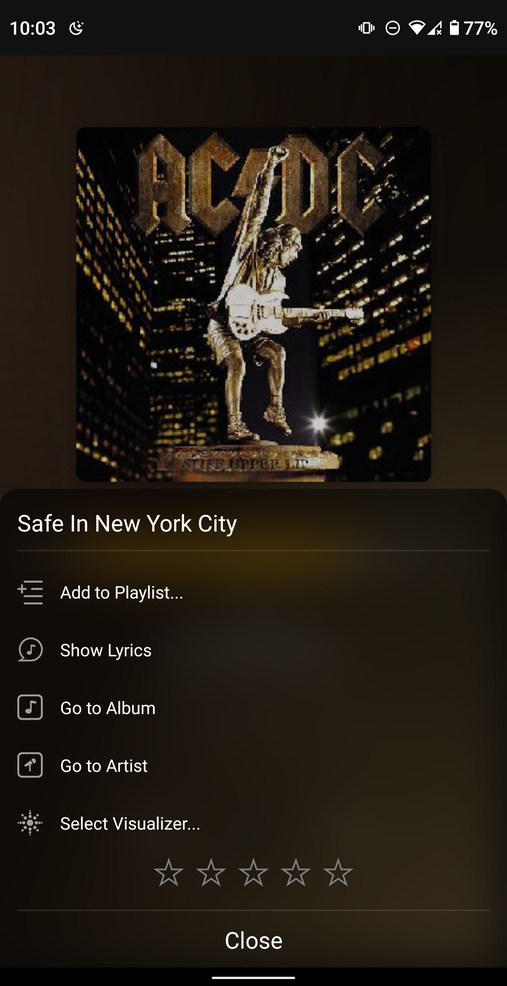
This depends on whether you’ve got Prefer full ratings enabled or not in Settings > Appearance
1 Like
Yes that is the case.
But regardless, respectfully-- my point stands-- the star is a user interactable UI that’s sandwiched between 2 non-interactive elements-- namely the file type and sample rate. Which doesn’t make a lot of sense and just feels awkward.
1 Like
I can’t say I’ve personally found it awkward, but I’ll pass your feedback on nonetheless 
Would love casting too…
hope they will do it right as well supporting full flac and high bitstream audio on chromecast.
TIDAL for example messed up and is still not able to support that claiming its googles fault. But here are other apps that support it.
Hopes up 
Yes! It will even do 24-bit lossless! If you manage to track down a (now sadly discontinued) Chromecast audio it even has optical audio out. The audio groups also work really well for me (two Chromecast audios, a Google home, home mini, home hub, and a normal (gen 2) Chromecast). I can cast to all of them simultaneously and I’ve never had any problems with them desynchronizing or anything.
I’m super looking forward to Chromecast support in plexamp. Tbh, I could probably uninstall the normal Plex app from my phone at that point, because I basically only use it for music.
1 Like
Very cool! That would be fantastic if it could be integrated not only on the PC app, but also via the mobile Plexamp as well. I would like to have the option of controlling music to my Hi-Fi while using only my mobile.
another + 1 for chromecast and to also include gapless playback (unlike regular plex app)
Thank you Plex Peoples!
2 Likes
+1 chromecast.
1 Like
another + 1 for chromecast
1 Like
+1 for chromecast support
2 Likes
+1 Chromecast support.
Unfortunately no use for me before able to cast.
The app looks great though
2 Likes
