Server Version#: 1.32.5.7210
Player Version#: AppleTV 8.20 (6066)
Attache are logs. It seems to just quit every once and a while. Starting it back up works though until it crashes again…
Server Version#: 1.32.5.7210
Player Version#: AppleTV 8.20 (6066)
Attache are logs. It seems to just quit every once and a while. Starting it back up works though until it crashes again…
Reporting Issues with Plex Media Server
You need to attach server logs from Plex Media Server.
Ensure Plex Media Server is configured for debug logging.
Do not enable verbose logging.
See support document linked above for details.
Restart Plex Media Server.
After the next crash, restart PMS, wait 2 - 3 minutes for it to fully start.
Pull PMS logs and attach to the thread.
If you cannot reach Settings → Troubleshooting:
I just reverted to an older PMS version and seems to be stable now…
I also experienced the same on M1 with Plex Version 1.32.5.7210 across multiple players. I also downgraded because Plex became unusable (kept crashing).
Attaching my logs hoping they can help finding the cause.
Plex Media Server Logs_2023-07-02_13-38-43.zip (403.3 KB)
Also having this issue on Mac Mini M2 (sure M1 would be the same). Downgraded the PMS version and doesn’t make any difference. It’s been solid on M1/M2 until now - Plex can you investigate please?!
Plex Crash Uploader.1.log (1.4 KB)
Logging Level
Debug level logging has been disabled, so the log files do not contain much information.
Please re-enable debug, but not verbose, logging in Settings → Server_Name → General + Show Advanced. Then re-start Plex Media Server. When Plex crashes, restart it, wait 2 - 3 minutes for it to fully start, then pull and post the log files.
Database Issues
It is not clear if this is causing your problems, but Plex Media Server.log does have a couple of database error entries.
If you are comfortable using Terminal (command line) on the Mac, download and run the PlexDBRepair Utility.
Use option 2, Auto. It will check the db for problems and attempt to repair any that it finds. It will make a backup of the current db, so you can revert if necessary.
@_LUKEFLIX A full set of log files is needed. The Crash Uploader just shows if PMS uploaded any info to Plex.
Make sure logs are debug, not verbose. See post above for configuration details.
Thanks! I’ve ran the repairer tool for now, I’ve also done what this guy suggested - Plex Server MAC Randomly Crashing - #18 by michaelstachowiak
Nope, the crashing is now occurring less, but still occurs. Plex can you fix it? It’s proper annoying.
Made no difference sorry - it doesn’t crash as often but still does. Attached are the requested logs. Plex please get this sorted, it’s a proper issue now.
Plex Media Server Logs_2023-07-12_13-22-15.zip (4.5 MB)
The log files do not show a crash.
Plex Media Server runs continuously from Jul 12, 2023 09:21:55.147 to Jul 12, 2023 13:22:14.803.
After the next crash, restart Plex Media Server, wait 3 minutes for it to fully boot and the logs to capture the startup sequence, then pull the log files.
Thanks, done what you said. Odd it shows no crash, as it crashes constantly.
Attached are the logs after a recent crash - server was restarted while the app was left closed (after the crash) and waited 3 mins.
Any help is appreciated.
Plex Media Server Logs_2023-07-13_21-17-43.zip (4.4 MB)
Thanks for the log files.
I noticed two items. A possible problem with a media file and a network configuration issue.
Try playing the TV episode and see if the problem reoccurs. Also, disconnect one of the network connections.
Additional details:
If I’m reading the logs correctly, an AppleTV was streaming and transcoding Love Island s10e37.
There are some error entries at the same time Plex Media Server stopped. They may indicate a problem with the media file.
Have you noticed any problems when playing this TV episode?
Try playing it again and see if it plays OK or if there are problems.
From Plex Media Server.1.log:
Jul 13, 2023 21:12:18.218 [0x17004b000] ERROR - [Req#122b48/Transcode/64020979-1F20-4E79-929B-03E694357D5D/f189d053-17c5-4fd9-bc3d-5b04ccb2e733] [h264 @ 0x131e11400] Failed setup for format videotoolbox_vld: hwaccel initialisation returned error.

Jul 13, 2023 21:12:18.219 [0x1711cb000] ERROR - [Req#122b4e/Transcode/64020979-1F20-4E79-929B-03E694357D5D/f189d053-17c5-4fd9-bc3d-5b04ccb2e733] [h264 @ 0x131e1a930] mmco: unref short failure
Having two active interfaces on the same subnet is not advisable. It can cause problems with Plex. It is possible for the stream to leave on one interface and return traffic (acknowledgements, etc) arrive on the other. This will confuse Plex Media Server and can cause instability.
Jul 13, 2023 21:14:58.180 [0x16f797000] DEBUG -  * 6 en0 (172.16.0.164) (5C-1B-F4-77-46-AB) (loopback: 0)
Jul 13, 2023 21:14:58.180 [0x16f797000] DEBUG -  * 12 en1 (172.16.0.165) (5C-1B-F4-7E-12-8F) (loopback: 0)
Thanks for looking. This episode has been watched by others before and since. This looks like this was just the episode that tipped it over the edge. The server died at 3am the other day, and no one was streaming anything.
In regards to the interface, this was the Wi-Fi interface which I’ve now turned off and disabled.
Still confused as this has been happening for nearly 3 weeks and even rolling the version back doesn’t seem to have helped it. The only other thing I can think of is the latest or one before the latest MacOS updates - as I’ve read online this can cause issues with Network Shares - most of my content is run over network shares and run on NAS’.
I’m going to see what type of share the server has mounted them as, and look to change them to another protocol.
I also running the latest plex app on iPhone and Apple TV, and there is a flashing issue. I can only switch to the old version of the player. I suggest optimizing the player!
Think I’ve found the issue - it was relating to the how macOS looks at SMB shares. In a recent update to macOS Ventura 13.2 File Sharing broken - Apple Community . There are reports of shares breaking for a lot of people but not necessarily accessing shares located on a NAS from macOS.
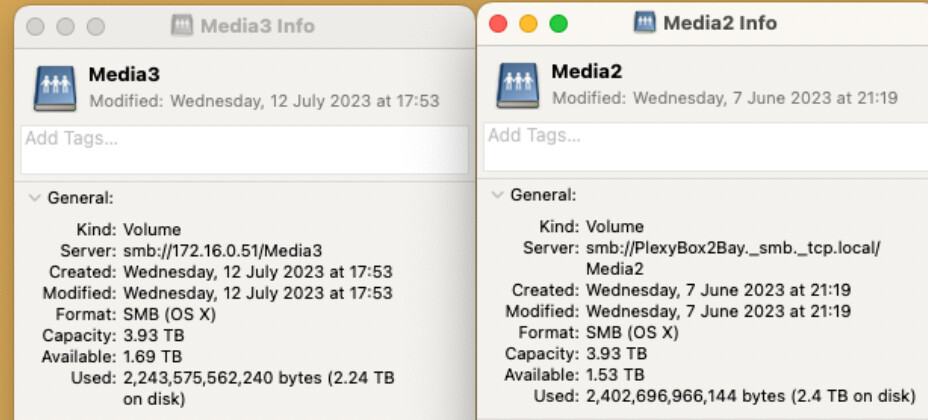
So after looking at my setup, I noticed the below: Media 3 is the share I’ve corrected and Media 2 is the share macOS mounted automatically.
Media 2 is mounted using the DNS name of the NAS not the IP, also NFS was turned off along with SMB v3 being forced.
I tested this out on Media 3, by turning NFS sharing on, and allowing SMB v2 & v3. Finally added the share back via its IP and not via the DNS name (going to Finder, network and adding the share that way) and used the Connect to Server option and using the IP.
Been going strong for nearly two days with no hiccups nor crashing. Also content loads quicker as its not having to look us the DNS name every time content is started .
Started to crash again today…so went 7 days and starting to crash again!
PLEX WTF? Why is there no fix for this?! Utter joke.
What version did you revert to? and where can you get hold of older versions?
I’ve reverted the Plex app to run in Rosetta 2 mode instead, I have a feeling this is a M1/2 bug.
I reverted the the version listed above and haven’t had the issue since. The version # is on a different thread floating around here, I’ll take a look and post it here if I find it.