I am 10G as well. I just added the 5G QNAP USB to my desktop. It’s sweet
1 Like
Yeah, I love it! Moving data between my 10Gbit ESXi-host (nvme) and the NAS i see speeds up to 1GB/sec. Not quite as fast when backing up to my TS863, but still alot better than 1Gbit 
My older desktop has a SATA-2/SATA-3 speed bus. I get 383 MB/sec up the 5 Gbps line. Not bad at all.
1 Like
New crash tonight while I was sleeping, at around 01.45. This time I could stop the Plex app and start it again to get Plex running, didn’thave to reboot the whole NAS. Would be great if you could look at the fresh logs attached 
Plex Media Server Logs_2019-06-06_09-21-55.zip (4.2 MB)
Updated the firmware on the NAS to 4.3.6.0959 after the crash btw.
Installing 1.15.8.1198 now, hopefully that will help.
Crashed again. Had to kill the app and start it again (didn’t have to reboot the NAS). Attached fresh logs.Plex Media Server Logs_2019-06-07_21-40-04.zip (4.9 MB)
And again.
Plex Media Server Logs_2019-06-11_17-44-36.zip (3.8 MB)
I’ll try moving the cable from NIC6 (Intel 10Gbe) to NIC5 (QM2-2P10G1T) to see if that helps anything.
From this:

to this:

Running out of ideas here so fingers crossed.
I’m having the same problem. Plex keeps eating RAM and eventually my QNAP kills it every now and then. My setup is much simpler, let me know if/what you need me to provide to find the issue…
Thanks!
What QNAP do you use?
@ChuckPa What’s your disk config on your 1282, are you using cache and qtier?
My configuration:
- CACHEDEV1_DATA = 2x 1TB M.2 Samsung SSD (RAID)
- CACHEDEV2_DATA = 8x HGST/WD Red Pro 8TB
- Read-only SSD cache - attached to CACHEDEV2_DATA
- CACHEDEV3_DATA = 500 GB Samsung 860 EVO (Plex Library)
- CACHEDEV4_DATA = 1TB spinner (other uses)
I do not use Q-Tier. There is no need in this environment, imho. It will use RAM and SSD however it wishes.
Thanks.
My config is:
2x Intel M.2 512GB (RAID1) in a QM2 expansion card as cache
2x Samsung 850 EVO 512GB (RAID1) (System, this is where Plex and all containers live)
4x Samsung 850 EVO 2TB (RAID5) qtiered with
8x Seagate Ironwolf 10TB (RAID5) (Media files mostly)
Really puzzled as to why Plex is so unstable, every container, the VPN app (now moved off the NAS) and so on runs like a charm never crashing.
What are your CACHEDEV assignments?
Based on how you wrote what you now have, I think I understand what’s happening but first would like configuration confirmation from you.
Sweet
CACHEDEV1_DATA = Storage pool2 volume “system”, cached. (2x 850EVO M.2) (System, Plex, containers) Transcode dir here too.
CECACHEDEV2_DATA = Storage pool1 volume “data” 4x850 EVO 2TB +8x 10TB Seagate qtiered). cached. Media files
CACHEDEV3_DATA = Storage pool1 volume “backup”. Not cached. Backup of containers.
CACHEDEV4_DATA= Storage pool1 volume “Video”. Not cached. video files from my cameras.
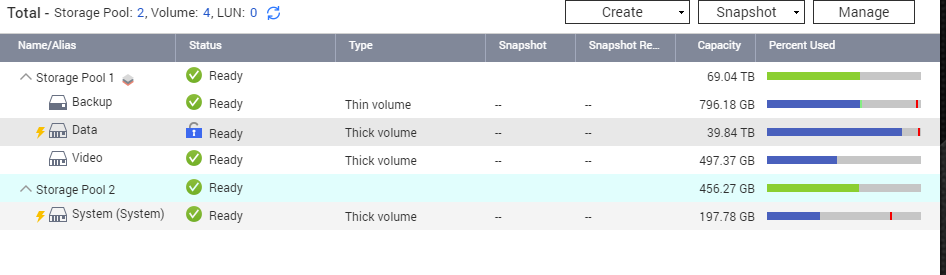

Interesting.
My storage map looks different. It looks like you left the HD’s in when you installed QTS the second time?

Yeah, I did a full restore of QTS a while back (at least a year ago I think) and had the drives out when I did (I think)
My M.2’s are about a year old now. I made it a point to install QTS fully and start basic setup with no drives in it. (QTS recommended).
That explains that. Also, I sized the inodes for 128TB (max I’ll ever have on 8 HDDs)
SSDs are best static. Storage pools slow them down
Yeah don’t really have too much use for tiering really, but I enabled it for the fun of it  So probably not caching or tiering causing the issues then?
One thing it does use is RAM. There are a lot of memory buffers in active use as things go back and forth.
I worth-while experiment would be to turn it off.
Plex leaks (DLNA not withstanding) won’t hit you as harshly
Not sure you can just turn it off though? Caching I can turn off but if I understand the GUI correctly I would need to tear the whole pool down to disable tiering (I might be wrong here but it looks like that)
