Server Version#: 1.20.5.3600
Player Version#: 4.46.2
I was having trouble with my old QNAP server and I thought it might be due to the memory I was using.
I upgraded to a QNAP TS-453D with 8Gb factory installed.
I still keep getting excessive memory use from Plex and the QNAP kills the process.
Warning 2020-11-18 17:45:02 — 127.0.0.1 — --- [System Message] PlexMediaServer has been automatically disabled by QTS to free up system memory.
For a few hours the NAS works properly. After 6-8 hours the NAS is completely inactive.
The connection by SSH takes 30 minutes.
Running htop takes 20 minutes.
The system has no free memory or resources.
I cannot access qnap by web, or by any method.
After getting access to htop I see that ./plex_media_server.sh is consuming + 40% memory with multiple processes.
I am trying to kill the plex processes but it takes a long time. When I succeed I try to restart the system and I will try to obtain the plex logs of the last hours to see if you, as great experts, find any anomaly.
You do need to stop using the Multimedia shared folder.
Multimedia is a software defined shares and does not work properly with PMS.
Every time QTS updates, it causes PMS to lose where your media is.
The best solution is to properly sort your media into shared folders which you create.
Nov 19, 2020 22:51:04.706 [0x7f110d11f700] ERROR - Couldn't find the file to stream: /share/CACHEDEV1_DATA/Multimedia/Videos/Series/El hombre en el castillo (2015)/Season 2/El hombre en el castillo - S02E01 - El cubil del tigre.mkv
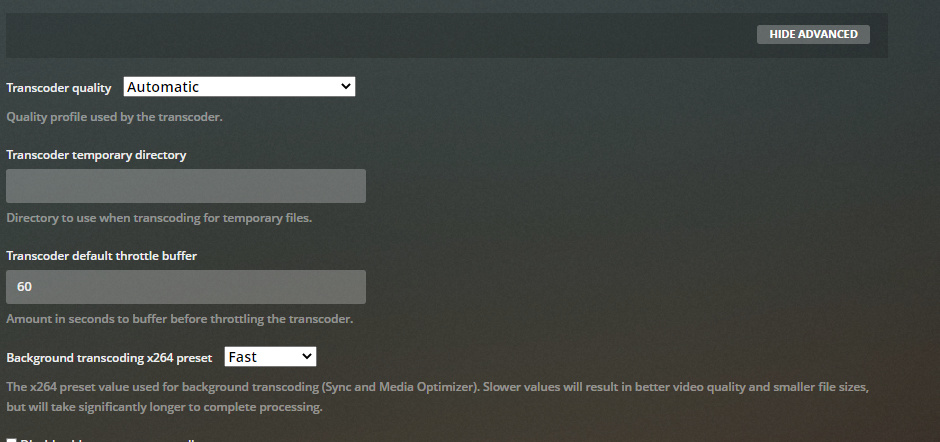
Default transcode duration of 120 minutes???
Nov 19, 2020 22:51:05.467 [0x7f1104987700] DEBUG - Using default transcode duration of 120 minutes
Nov 19, 2020 22:51:05.467 [0x7f1104987700] DEBUG - Using default transcode duration of 120 minutes
A proper duration should be 120 seconds (2 minutes).
This is a possible source of your memory problems. The transcoder temp, if using /dev/shm (memory) would fill up.
I have a Qnap HS-251+ with 2GB of RAM.
It’s not much, but I’ve never had memory problems until this week when I installed the Plex Media Server update.
I was looking for the box to set the 120 minutes. I cannot find it as indicated in this guide https://support.plex.tv/articles/200250347-transcoder/ (Advanced Settings section)
Where can I change the 120 minute option?
But my image is the same as yours. And according to my logs it seems that I have something that activates 120 minutes…
If I don’t know where to modify that value, I will not be able to change it.
QNAP programs are running.
The most powerful can be programs like HBS3 and Container Station.
But … 8 days ago I had the same programs.
Right now Plex is running normally alongside those programs.
Right now Plex is consuming 4.9% memory.
The feeling I have is that it may be related to operations that Plex does at night (Scheduled Tasks).
Look at my logs uploaded yesterday from this line. Strange connection errors start from this line. I don’t know if they are caused by Plex or the NAS. Regardless, Plex at this point is when memory usage increases. Nov 21, 2020 05: 11: 22.533 [0x7f4ae4855700] DEBUG - Activity: updated activity 8d54f15e-3712-459a-9e93-327a8ac054af - completed 93.7% - Detecting intros
I’ve had intro detection since it was created. It started not working. Then it worked very well and right now could it be what causes the problem?
OK.
I try to turn it off and see what happens on Sunday night to Monday…