I do request , if possible, let it sit otherwise idle during this time to preserve maximum retention?
If you wish to playback anything, Please perform an interim snapshot dump of the logs,. I will start looking
I do request , if possible, let it sit otherwise idle during this time to preserve maximum retention?
If you wish to playback anything, Please perform an interim snapshot dump of the logs,. I will start looking
It’s idle, as I’m watching other stuff on Netflix.
How will I know when it’s 100% completed? Activity & the “wheel” stop for a while, and then continue after a few seconds.
How many items are in the section? I’ll be able to estimate
There are about 850 movies in the /Movies folder
Not too long. I have a DS1815 with 780-ish in it.
If it’s been quiet for a bit and not flipping (down at the last one), you can pull the logs now.
So to my point, how will I be able to tell that it’s finished, as there is always something going on in Console?
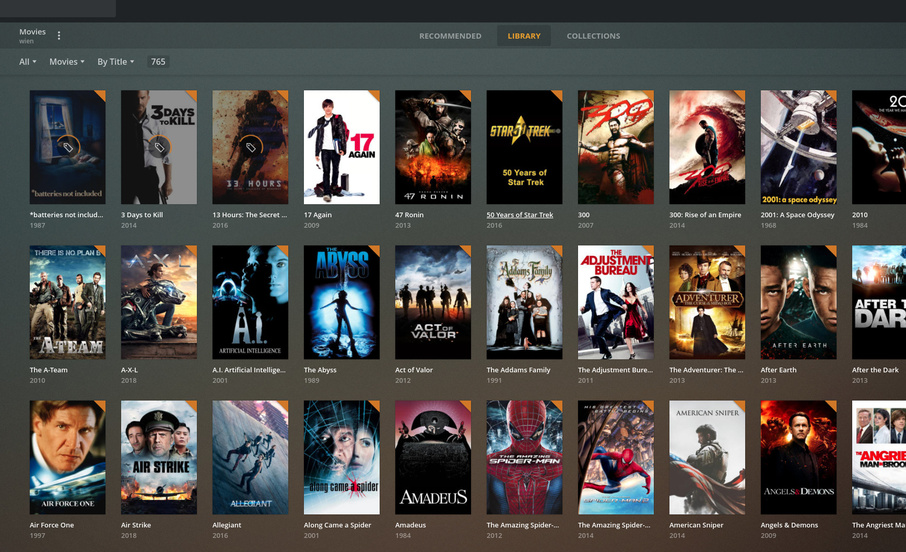
If you go into the section -> “Library” view (top center of Plex/web)
Now scroll down the posters (grid view).
Do any of them have spinning circles?
If none, it’s done
If all are well matched, I can spin the the entire 780 in about 10 minutes
Sorry, not sure exactly where you mean. Picture/screenshot?
Got it.
I don’t see any spinning circles, but Console is still going nuts. Should I assume that it’s completed the Scan?
Console? you mean activity log? Yes… ignore that.
Grab the ZIP please.
I’ll get started.
Refreshing All Metadata now.
Should I export the logs now, or wait until that Refresh completes?
Download them now and attach here. I’ll take wherever it’s at and get started.
Logs:
Thanks. Reviewing now. It’ll take a bit.
As I walk through this, I am seeing repeated scanning activity on one file.
Jan 11, 2020 21:55:14.074 [0x7f5d05ad5700] DEBUG - Completed: [192.168.2.100:51731] 200 GET /library/sections (9 live) TLS GZIP 6ms 1248 bytes (pipelined: 7)
Jan 11, 2020 21:55:14.414 [0x7f5cee840700] INFO - Library section 6 (Movies) will be updated because of a change in '"/volume1/Media/Movies/York - Historic Capital of the North"/9. Kings Manor - Charles 1st - Cilver War.m4v'
Jan 11, 2020 21:55:20.364 [0x7f5ced0d0700] DEBUG - Library Updater: Requested that section 6 be updated, force=0, deep=0, subdir= iTunes=0
Jan 11, 2020 21:55:20.364 [0x7f5ced0d0700] DEBUG - Library Updater: Queueing section 6
Jan 11, 2020 21:55:20.421 [0x7f5ceeb2e700] DEBUG - Activity: registered new activity fb3dd003-ba08-477b-89f4-04665f915feb - Scanning
Jan 11, 2020 21:55:20.421 [0x7f5ceeb2e700] DEBUG - Scanning section 6
Do you have a downloading task / program which writes directly to your Movies library as it downloads?
The only activity is the Refresh, to my knowledge. There may have been some background activity running. Let me download the logs again.
I will look at those logs in a moment.
I see that the actual scanning of the Movies library takes about 20 seconds.
Something updates that file which causes the inotify to fire.
Since PMS is watching that directory, library section scanning is interrupted and starts again.
When I get to the end of the log, I will see if it is indeed an infinite loop but all indications at this time are that it’s holding up everything else.
As for your observations about how long it takes, I understand you. The D2700 CPU is only dual core and, while solid as a NAS, not that quick as an appliance.
Another changing item I have found:
Jan 11, 2020 22:06:12.466 [0x7f5ced99a700] DEBUG - Content-Length is -1 (of total: -1).
Jan 11, 2020 22:06:14.150 [0x7f5cee840700] INFO - Library section 6 (Movies) will be updated because of a change in '"/volume1/Media/Movies"/Icon
'
Jan 11, 2020 22:06:22.994 [0x7f5cedc88700] DEBUG - Library Updater: Requested that section 6 be updated, force=0, deep=0, subdir= iTunes=0
Jan 11, 2020 22:06:22.994 [0x7f5cedc88700] DEBUG - Library Updater: Queueing section 6
Jan 11, 2020 22:06:22.995 [0x7f5ced99a700] DEBUG - Activity: registered new activity 5aa04bcb-6b73-4c7e-824b-66826e153047 - Scanning
Jan 11, 2020 22:06:22.995 [0x7f5ced99a700] DEBUG - Scanning section 6
Jan 11, 2020 22:06:22.995 [0x7f5ced99a700] DEBUG - Activity: updated activit
Scanning for changes requires 6 seconds.
This file directory is being updated every 15 seconds.
Might this be the DVR ?
I am also seeing a slow query but not too concerned as there is no secondary failures of it. It tells me either the DB is fragmenting or the system is getting CPU overloaded due to demand .
Jan 11, 2020 22:09:22.871 [0x7f5d05ad5700] DEBUG - Completed: [192.168.2.100:53887] 200 GET /hubs/home/recentlyAdded?type=8&includeExternalMedia=1 (9 live) TLS GZIP Page 0-50 338ms 6369 bytes (pipelined: 4)
Jan 11, 2020 22:09:22.887 [0x7f5c9140d700] WARN - SLOW QUERY: It took 510.000000 ms to retrieve 50 items.
Jan 11, 2020 22:09:22.888 [0x7f5c925a1700] WARN - SLOW QUERY: It took 440.000000 ms to retrieve 10 items.
Jan 11, 2020 22:09:22.892 [0x7f5c9140d700] DEBUG - Setting container serialization range to [0, 49] (total=850)
This many selected rows should take single-digit milliseconds.
Do the movies/files
2 The Romans Occupation3 Anglo Scaon York and Viking York4 Norman York Cliffords Towershow in your library with metadata?
By what i see here, there is no match.
It seems that entire block (the leading numbered ones) are all failing to match and return metadata