This is very wierd and I can’t even understand how this is possible..
This problem just appear on the TV plex app not on the web (!)
When I view the movies in the standard movie folder with all the movies,
the covers looks like they should do.
Adding a picture just so you can see the difference
(Took Pretty Woman as example)

But I like to sort my movies in my own way so I know where to find them easier.
So when I view the movies in my own sorted folder on the TV the covers are like to big or something.
Like this:
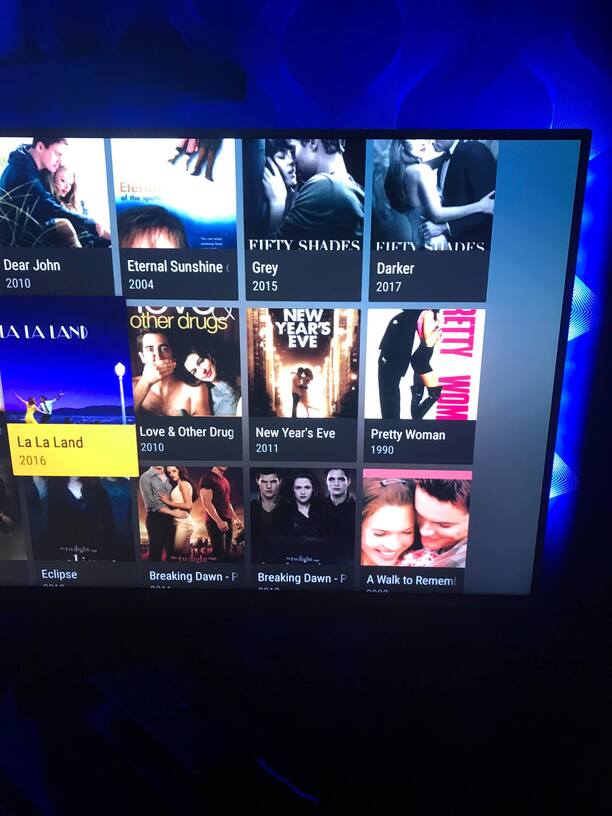
I am using an Android 4K smart tv if you need to know and I just updated the app on both the TV and my media server on the computer.
I just sorted and added all my movies to folders so I have never seen this problem before.
Edit: I just watched plex on my moms and dads Samsung smart TV and this problem dosen’t appear and there is an alternative to change the view of list to…
Can’t find anything like that on my Philips 4K smart tv…
Again how can this even be possible…
Edit 2: I bought the XPLAY app on my tv and the app is so much easier and so much more options to choose between.
Like you could choose your list view and how many lines it should show as BUT…
You can’t sort as folder and that really sucks so this app wont work for me anyway.
So why haven’t plex added things like this when they have been running this app since December 2009 (!!!)
Im not trying to be rude but how can so simple things be so hard to fix? I don’t get it..
There is so many threads out there with problems that have been out for YEARS but still no solutions in so many cases?
I feel like you guys just don’t give a ■■■■ and just milking money, it’s sad since this is a wonderful awesome app in so many ways, but so many problems and it takes ages for solutions…
Is there anyone else with this problem?
Kind Regards, Mattias
